
1000 Ways to Explode:tnt
This modpack is full of explosive chaos with TNT cannons, orbital strikes, and many powerful destruction tools. Build massive weapons and turn your Minecraft world into total destruction and mayhem.
Screenshots

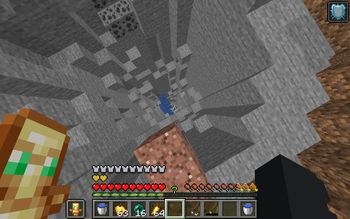
Über dieses Modpack
TNT Orbital Strike Cannon is a chaotic Minecraft modpack focused on powerful explosives and massive destruction tools. It includes TNT cannons, orbital strike abilities, and other overpowered weapons designed to blow up terrain and enemies with ease.
This modpack is made for players who enjoy fast-paced chaos, huge explosions, and turning the entire world into total devastation.
!WARING u game might crash of tnt
1.Orbital Strike Cannon | DataPack | Mod | Plugin
🎣 How to Use
Take the fishing rod
Right-click to call the orbital strike
Or look at a target and use stab-charge to blast instantly in that direction
Enjoy the carnage.
STAB CHARGE
Commands
/function orbital:give/stab_1
/function orbital:give/stab_2
/function orbital:give/stab_3
STAB CHARGE AIM
Commands
STAB CHARGE AIM + INF
Commands
NUKE CHARGE
Commands
NUKE CHARGE AIM
Commands
CINEMATIC NUKE
Commands
TOGGLE AUTHOR MESSAGE
Commands
TOGGLE CRAFT
Commands
Trailer
2.
more tnt mods utilles damged higher dmg to blocks for more info go to setting mods and look at description if u cant understand it go to my discord sever and i will help or my staff
Verfügbare Versionen
1000 Ways to Explode:tnt Server einrichten
Server bestellen
Wähle mindestens 6 GB RAM (8 GB empfohlen für 1000 Ways to Explode:tnt). Je nach Spieleranzahl: +1 GB pro 5 Spieler.
Modpack im Dashboard installieren
Öffne den Modpack-Browser im Dashboard, suche nach "1000 Ways to Explode:tnt" und klicke "Installieren". Der fabric-Loader und Minecraft 1.21.11 werden automatisch konfiguriert.
Server starten & spielen
Starte den Server – alle Mods werden automatisch geladen. Teile die Server-IP mit Freunden und spielt zusammen!
Häufige Fragen
1000 Ways to Explode:tnt Server crasht oder startet nicht – was tun?
Häufigste Ursachen: zu wenig RAM oder falscher fabric-Loader. Prüfe latest.log auf "OutOfMemoryError" → erhöhe RAM auf mindestens 8 GB. Bei "Mixin" oder "ClassNotFoundException": Modpack-Version und Loader stimmen nicht überein. Bei Mado Hosting werden Loader und Minecraft-Version beim Modpack-Install automatisch konfiguriert – das verhindert die meisten Startprobleme.
Wie viel RAM braucht ein 1000 Ways to Explode:tnt Server wirklich?
Minimum 6 GB, empfohlen 8 GB für stabile Performance. +1 GB pro 5 Spieler. Wichtig: Minecraft-Modpacks brauchen mehr RAM als Vanilla – plane pro zusätzlichem Spieler extra ein. Bei Mado Hosting kannst du den RAM jederzeit live hochskalieren, ohne Datenverlust (ab €7.800000000000001/Monat).
Kann ich eigene Mods zu 1000 Ways to Explode:tnt hinzufügen, ohne Konflikte?
Ja, aber achte auf die Kompatibilität: Nutze nur Mods für den gleichen Loader (fabric) und die gleiche Minecraft-Version (1.21.11). Häufige Probleme: ID-Konflikte bei Rezept-Mods und inkompatible Coremod-Versionen. Im Mado Dashboard zeigt der Mod-Browser nur kompatible Mods an und warnt bei bekannten Konflikten.
1000 Ways to Explode:tnt Server laggt – Performance-Tipps
1) RAM auf 8 GB+ erhöhen. 2) Server-View-Distance auf 8 reduzieren (server.properties). 3) Pre-Generiere Chunks mit dem "Chunky" Plugin. 4) Prüfe mit /spark profiler welche Mods die meiste Tick-Time verbrauchen. Bei Mado Hosting laufen alle Server auf NVMe-SSDs mit dedizierten CPU-Kernen – das eliminiert Hardware als Engpass.
Ähnliche Modpacks
![Cobblemon Official Modpack [Fabric]](https://cdn.modrinth.com/data/5FFgwNNP/e7f9ee2e9d361623847853fe2ddce42f519ee64f.png)
![COBBLEVERSE - Pokemon Adventure [Cobblemon]](https://cdn.modrinth.com/data/Jkb29YJU/581ecf54530972afb18a04660afd820f2f24f6c7.png)
![Better MC [FABRIC] - BMC2](https://cdn.modrinth.com/data/shFhR8Vx/a19c2bcb51d38f32f138d3607e91cb2b7b8e387f_96.webp)


![Better MC [FORGE] - BMC4](https://cdn.modrinth.com/data/4BV47HRn/7f5ef7cc61b2593609aabef3ed07a866a4f11b73_96.webp)
1000 Ways to Explode:tnt Server mieten
Starte deinen eigenen Server mit automatischer Modpack-Installation.
Details
- Lizenz
- LicenseRef-All-Rights-Reserved
- Server-seitig
- Erforderlich
- Client-seitig
- Erforderlich
Unterstützte Versionen
Starte deinen 1000 Ways to Explode:tnt Server jetzt
Ab €7.80/Monat; für die beste Performance werden 8 GB RAM empfohlen.
Server konfigurieren →