
AeroSociety
Modpack focused around the Create Aeronautics mod and revamping the base vanilla experience
Screenshots
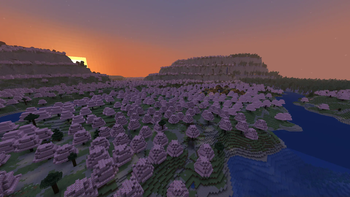

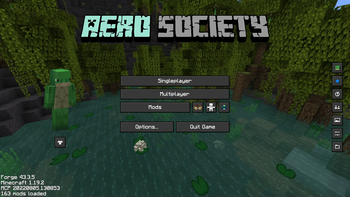
Über dieses Modpack
Everything here can and will change this is very much in the beta stage.
This modpack does not include Create: Aeronautics because as of now it isn't released yet. This is meant to be kind of a test run so we have a complete modpack when it does come out.
Theres a lot of mods but the main ones are Create (+addons) and the Let's do series and for the generation its Terralith + [Let's Do] Meadow + [Let's Do] BloomingNature for the overworld, Jaden's Nether Expansion for The Nether and Nullscape for The End.
Modpack is meant to be played on the official server but it can be played in singleplayer as well.
To join the offical server (still very much beta and will probably reset at some point) just dm me on discord and tell me something about yourself: .kynzo (don't forget to join the discord server linked here to be able to dm me without being friends)
I'd recommend this modpack to experienced vanilla players that tried everything in vanilla minecraft so they dont find it fun anymore. Reason for that is i changed or disabled a lot of vanilla features so i'd force the player to try new stuff either vanilla or modded (mostly create)
Some of the things changed from vanilla (or some mods):
- There's the create mod and some of it's addons. This is a great thing to explore if you loved making farms and redstone contraptions in vanilla but reached the limitations of vanilla minecraft.
- The Let's Do series adds a lot of new cooking and brewing recipes. these mods I'd recommend for the cozy players who like to build there farms and rp while baking, cooking, brewing all the new food items.
- The Elytra has been removed (not really just the ability to fly with it was :D), BUT instead of it there has been many planes and airships added (they are supposed to replace Create: Aeronautics until it comes out)
- There's tons of tiny changes into the game which would take hours to list so I'll just list few: Fireflies!, Bundle scroll, Pushing Lily pads instead of breaking them, revamped fishing mechanics and much more.
If i had to describe the modpack in one word i'd say vanila+++ :D
In case you have any questions what so ever don't hesitate to dm me on discord: .kynzo
all the mods/texture packs:
Check out the projects I'm using in my modpack!
- Chainmail Bucket
- Create: Vibrant Vaults
- FastQuit
- Prometheus (Permissions & Utilities)
- Eravern's more animal products
- AppleSkin
- Chat Heads
- Model Gap Fix
- Legendary Tooltips
- [Let's Do Addon] Structures
- Enhanced Boss Bars
- Shield Banner Fix
- Create: Interiors
- Effective
- Tide
- Saplanting
- Create: Copycats+
- Enchantery
- MixinTrace
- KubeJS
- Fabrishot
- LambDynamicLights
- [Let's Do Addon] Apple Wood
- Here be no Dragons!
- [Let's Do] Vinery
- [Let's Do] Bakery - Farm&Charm Compat
- Antique Atlas 4
- Fabric API
- Majrusz Library
- Trinkets
- Particle Rain
- ImmediatelyFast
- Reese's Sodium Options
- LootJS: KubeJS Addon
- Mixin Conflict Helper
- Glowing
- Create Man of Many Planes
- Disable Elytra
- TerraBlender
- Architectury API
- Fadeless
- [Let's Do] Meadow
- Memory Leak Fix
- [Let's Do] NetherVinery
- Through the lily pads, gently
- Eating Animation
- Dungeons and Taverns
- Amplified Nether
- Presence Footsteps
- Vanity: Core
- More Armor Trims
- Heracles (Questing)
- Not Enough Animations
- Better Third Person
- Archaeology Banners
- Handcrafted
- [Let's Do] API
- YUNG's API
- Ambient Fireflies
- Effect Timer Plus
- Spyglass Improvements
- Eclectic Trove (Legendary Tooltips)
- EMIffect
- Nullscape
- Create Crafts & Additions
- Sounds Be Gone!
- Amendments
- Ribbits
- More Culling
- Create Fabric
- [Let's Do Addon] EMI Compat
- Sodium
- Entity Culling
- Dungeons and Taverns Swamp Hut Overhaul
- Create: Steam 'n' Rails
- Dungeons and Taverns Ancient City Overhaul
- Resourceful Lib
- EMI Addon: Extra Mod Integrations
- 3D Skin Layers
- Nvidium
- Infinite Banner Patterns
- Fabric Language Kotlin
- Surveyor Map Framework
- Patchouli
- Explosive Enhancement
- Astrocraft
- Create Cobblestone
- [Let's Do] BloomingNature
- Create Big Cannons
- More Chat History
- Create: Power Loader (Fabric)
- Luki's Grand Capitals
- Jade 🔍
- EMI Ores
- Cloth Config API
- [Let's Do] WilderNature
- e4mc
- [Let's Do] Farm & Charm
- Sophisticated Core (Unofficial Fabric port)
- Dungeons and Taverns Stronghold Overhaul
- Controlling
- Immersive Aircraft
- Mythic Charms
- More Banner Features
- Geckolib
- Dynamic FPS
- FerriteCore
- Sushi Bar
- [Let's Do] Candlelight - Farm&Charm compat
- Create Railways Navigator
- Spelunkery
- Searchables
- MoreJS: KubeJS Addon
- Chai's Inventory Sorter
- Better Trim Tooltips
- Cut Through
- Smooth Scrolling
- Remove Reloading Screen
- Your Options Shall Be Respected (YOSBR)
- Too Many Binds
- oωo (owo-lib)
- [Let's Do Addon] Corn Expansion
- Dynamic Trim
- EMI Trades
- Mouse Tweaks
- Forge Config API Port
- Man of Many Planes
- Enhanced Block Entities
- [Let's Do] Furniture
- ScreenFX
- Make Bubbles Pop
- Sodium Extra
- Continuity
- Vanity: Aesthetic Armory
- [Let's Do Addon]: Photographers
- Exposure
- Sophisticated Backpacks (Unoffical Fabric port)
- [Let's Do] Beachparty
- Moonlight Lib
- OctoLib
- BetterF3
- [Let's Do] HerbalBrews
- WITS (What Is This Structure?)
- Athena
- [Let's Do] Brewery - Farm&Charm Compat
- Prism
- Indium
- LazyDFU
- Just Enough Breeding (JEBr)
- Enchantment Descriptions
- Lithium
- Create: Cards
- Create: Pattern Schematics
- [Moonsu] Better GUI for Sophisticated Backpacks
- YetAnotherConfigLib
- Rhino
- Mod Menu
- CERBON's Better Beacons
- Visuality
- Distant Horizons
- Chipped
- EMI Loot
- Better Clouds
- Argonauts (Parties & Guilds)
- Bookshelf
- Majrusz's Enchantments
- Fzzy Config
- Oreganized
- EMI
- Puzzles Lib
- CERBON's API
- Dungeons and Taverns Pillager Outpost Overhaul
- No Chat Reports
- ModernFix
- Bundle Tweaks
- Jaden's Nether Expansion
- Debugify
- Immersive Weathering
- Chai's Build Tools
- EMI Enchanting
- Iceberg
Verfügbare Versionen
AeroSociety Server einrichten
Server bestellen
Wähle mindestens 6 GB RAM (8 GB empfohlen für AeroSociety). Je nach Spieleranzahl: +1 GB pro 5 Spieler.
Modpack im Dashboard installieren
Öffne den Modpack-Browser im Dashboard, suche nach "AeroSociety" und klicke "Installieren". Der forge-Loader und Minecraft 1.20.1 werden automatisch konfiguriert.
Server starten & spielen
Starte den Server – alle Mods werden automatisch geladen. Teile die Server-IP mit Freunden und spielt zusammen!
Häufige Fragen
AeroSociety Server crasht oder startet nicht – was tun?
Häufigste Ursachen: zu wenig RAM oder falscher forge-Loader. Prüfe latest.log auf "OutOfMemoryError" → erhöhe RAM auf mindestens 8 GB. Bei "Mixin" oder "ClassNotFoundException": Modpack-Version und Loader stimmen nicht überein. Bei Mado Hosting werden Loader und Minecraft-Version beim Modpack-Install automatisch konfiguriert – das verhindert die meisten Startprobleme.
Wie viel RAM braucht ein AeroSociety Server wirklich?
Minimum 6 GB, empfohlen 8 GB für stabile Performance. +1 GB pro 5 Spieler. Wichtig: Minecraft-Modpacks brauchen mehr RAM als Vanilla – plane pro zusätzlichem Spieler extra ein. Bei Mado Hosting kannst du den RAM jederzeit live hochskalieren, ohne Datenverlust (ab €7.800000000000001/Monat).
Kann ich eigene Mods zu AeroSociety hinzufügen, ohne Konflikte?
Ja, aber achte auf die Kompatibilität: Nutze nur Mods für den gleichen Loader (forge) und die gleiche Minecraft-Version (1.20.1). Häufige Probleme: ID-Konflikte bei Rezept-Mods und inkompatible Coremod-Versionen. Im Mado Dashboard zeigt der Mod-Browser nur kompatible Mods an und warnt bei bekannten Konflikten.
AeroSociety Server laggt – Performance-Tipps
1) RAM auf 8 GB+ erhöhen. 2) Server-View-Distance auf 8 reduzieren (server.properties). 3) Pre-Generiere Chunks mit dem "Chunky" Plugin. 4) Prüfe mit /spark profiler welche Mods die meiste Tick-Time verbrauchen. Bei Mado Hosting laufen alle Server auf NVMe-SSDs mit dedizierten CPU-Kernen – das eliminiert Hardware als Engpass.
Ähnliche Modpacks
![Cobblemon Official Modpack [Fabric]](https://cdn.modrinth.com/data/5FFgwNNP/e7f9ee2e9d361623847853fe2ddce42f519ee64f.png)
![COBBLEVERSE - Pokemon Adventure [Cobblemon]](https://cdn.modrinth.com/data/Jkb29YJU/581ecf54530972afb18a04660afd820f2f24f6c7.png)
![Better MC [FABRIC] - BMC2](https://cdn.modrinth.com/data/shFhR8Vx/a19c2bcb51d38f32f138d3607e91cb2b7b8e387f_96.webp)


![Better MC [FORGE] - BMC4](https://cdn.modrinth.com/data/4BV47HRn/7f5ef7cc61b2593609aabef3ed07a866a4f11b73_96.webp)
AeroSociety Server mieten
Starte deinen eigenen Server mit automatischer Modpack-Installation.
Unterstützte Versionen
Starte deinen AeroSociety Server jetzt
Ab €7.80/Monat; für die beste Performance werden 8 GB RAM empfohlen.
Server konfigurieren →