
Aeroworks
A Create: Aeronautics centered modpack with complementary mods added. Server included.
Screenshots
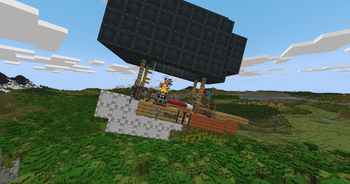
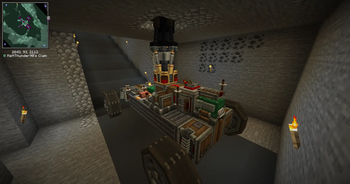
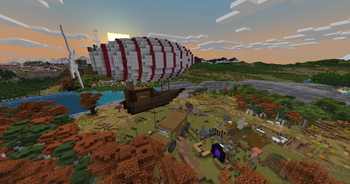
Über dieses Modpack
Make sure you allocate at least 6GB of RAM
Aeroworks is a NeoForge 1.21.1 server pack built for multiplayer worlds looking for maximum Aeronautics interaction. Server Included
The pack is centered on Create: Aeronautics, with the rest of the mod list chosen to support player built infrastructure, trade routes, airships, rail systems, factories, and large scale engineering projects. The best parts of the pack are meant to develop over time. Building an airship, setting up logistics, defending routes, moving goods, or connecting settlements should feel like part of the server’s history.
Aeronautics is backed up by a growing ecosystem of complementary mods, including Create: Big Cannons, Create: Propulsion, Create: Radars, CC: Sable, and Vista. Together, they push the pack toward mobile industry, ship mounted systems, air travel, navigation, automation, and larger multiplayer projects.
There is also enough tech depth to keep factories interesting. Mekanism and Oritech add more advanced machinery, power systems, and production chains, with plenty of room for strange interactions once players start putting factories on ships.
The world keeps a familiar Minecraft feel while giving exploration more weight. Tectonic & WWOO expand terrain generation, while the YUNG’s Better suite overhauls vanilla structures like dungeons, mineshafts, strongholds, ocean monuments, nether fortresses, temples, and more. Exploration should feel recognizable, but much more worth doing. End Remastered also gives the server a shared long-term goal and slows down the usual rush to the End.
The multiplayer side is built around player-driven systems. Trading, claims, transport networks, towns, alliances, rivalries, and infrastructure all come from what players choose to build. Voice chat, mapping tools, claims, and social mods are included to make cooperation easier without requiring strict roleplay or heavy server rules.
Aeroworks is for players who want an Aeronautics server that develops its own economy, landmarks, routes, factions, projects, and stories over time.
Verfügbare Versionen
Aeroworks Server einrichten
Server bestellen
Wähle mindestens 6 GB RAM (8 GB empfohlen für Aeroworks). Je nach Spieleranzahl: +1 GB pro 5 Spieler.
Modpack im Dashboard installieren
Öffne den Modpack-Browser im Dashboard, suche nach "Aeroworks" und klicke "Installieren". Der neoforge-Loader und Minecraft 1.21.1 werden automatisch konfiguriert.
Server starten & spielen
Starte den Server – alle Mods werden automatisch geladen. Teile die Server-IP mit Freunden und spielt zusammen!
Häufige Fragen
Aeroworks Server crasht oder startet nicht – was tun?
Häufigste Ursachen: zu wenig RAM oder falscher neoforge-Loader. Prüfe latest.log auf "OutOfMemoryError" → erhöhe RAM auf mindestens 8 GB. Bei "Mixin" oder "ClassNotFoundException": Modpack-Version und Loader stimmen nicht überein. Bei Mado Hosting werden Loader und Minecraft-Version beim Modpack-Install automatisch konfiguriert – das verhindert die meisten Startprobleme.
Wie viel RAM braucht ein Aeroworks Server wirklich?
Minimum 6 GB, empfohlen 8 GB für stabile Performance. +1 GB pro 5 Spieler. Wichtig: Minecraft-Modpacks brauchen mehr RAM als Vanilla – plane pro zusätzlichem Spieler extra ein. Bei Mado Hosting kannst du den RAM jederzeit live hochskalieren, ohne Datenverlust (ab €7.800000000000001/Monat).
Kann ich eigene Mods zu Aeroworks hinzufügen, ohne Konflikte?
Ja, aber achte auf die Kompatibilität: Nutze nur Mods für den gleichen Loader (neoforge) und die gleiche Minecraft-Version (1.21.1). Häufige Probleme: ID-Konflikte bei Rezept-Mods und inkompatible Coremod-Versionen. Im Mado Dashboard zeigt der Mod-Browser nur kompatible Mods an und warnt bei bekannten Konflikten.
Aeroworks Server laggt – Performance-Tipps
1) RAM auf 8 GB+ erhöhen. 2) Server-View-Distance auf 8 reduzieren (server.properties). 3) Pre-Generiere Chunks mit dem "Chunky" Plugin. 4) Prüfe mit /spark profiler welche Mods die meiste Tick-Time verbrauchen. Bei Mado Hosting laufen alle Server auf NVMe-SSDs mit dedizierten CPU-Kernen – das eliminiert Hardware als Engpass.
Ähnliche Modpacks
![Cobblemon Official Modpack [Fabric]](https://cdn.modrinth.com/data/5FFgwNNP/e7f9ee2e9d361623847853fe2ddce42f519ee64f.png)
![COBBLEVERSE - Pokemon Adventure [Cobblemon]](https://cdn.modrinth.com/data/Jkb29YJU/581ecf54530972afb18a04660afd820f2f24f6c7.png)
![Better MC [FABRIC] - BMC2](https://cdn.modrinth.com/data/shFhR8Vx/a19c2bcb51d38f32f138d3607e91cb2b7b8e387f_96.webp)


![Better MC [FORGE] - BMC4](https://cdn.modrinth.com/data/4BV47HRn/7f5ef7cc61b2593609aabef3ed07a866a4f11b73_96.webp)
Aeroworks Server mieten
Starte deinen eigenen Server mit automatischer Modpack-Installation.
Unterstützte Versionen
Starte deinen Aeroworks Server jetzt
Ab €7.80/Monat; für die beste Performance werden 8 GB RAM empfohlen.
Server konfigurieren →