
AttilaCraft 3
Create machines, make them more efficient, upgrade, and take over the world! This is a modpack focused on technology and efficiency.
Screenshots

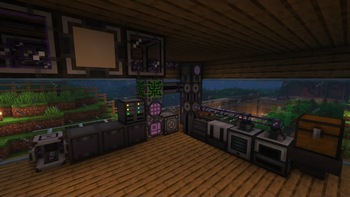

Über dieses Modpack

Create machines, make them more efficient, upgrade, and take over the world!
⚙️ Features:
- 🔧 Play with your favorite tech mods such as : AE2, Create, The Thermal Series and Immersive Engineering
- 🏰 Explore the tons of new structures added by Yung's mods, Repurposed Structures
- 🧟♂️ Fight the powerful monsters from Mutant Monsters and Mutant More
- 🌕 Experience the cool new lunar events with Enhanced Celestials
- 🚀 Explore new planets with Ad Astra!
- 🍃 Generate mana with natural technologies in Botania
- 🔗 Compatibility mods for a more seamless experience (Applied Botanics, Applied Mekanistics, etc... )
- 📦 Enjoy the small useful features added by Quark, Supplementaries and Fuzs's mods
- 🤨 And 500% more Attila
❓FAQ
3️⃣ Why 3?
Because there was a v1 and v2 on curseforge. I want the project to be successor and not a continuation of the modpack.
 |
|

|
🔄 Verisoning :
The modpack uses this version system: Major.Minor.Patch
- Major : A new version of minecraft or a big modpack change, these updates are not backwards compatible.
- Minor : New mods might have been added or removed, these updates might be backwards compatible.
- Patch : Updated mods, safe to update worlds.
💻 Server files :
Server files are usually available as additional files at the download page.
(Server files might be uploaded later then the full modpack)
🔥 Mods from Curseforge :
|
Shutup Experimental Settings! | GPLv3 |

|
Catalogue | GPLv3 |

|
Framework | GPLv3 |

|
Configured | GPLv3 |
|
MrCrayfish's Gun Mod | GPLv3 |
|
kiwi boi | LGPLv3 |
|
Citadel | LGPLv3 |
|
Alex's Mobs | LGPLv3 |
|
Ender Storage 1.8.+ | MIT |
|
CodeChicken Lib 1.8.+ | LGPLv3 |

|
AE2 Things | MIT |
|
Titanium | LGPLv3 |
|
Industrial Foregoing | MIT |
|
Create Big Cannons | MIT |
Only in older versions:
|
Domestication Innovation | LGPLv3 |
Verfügbare Versionen
AttilaCraft 3 Server einrichten
Server bestellen
Wähle mindestens 6 GB RAM (8 GB empfohlen für AttilaCraft 3). Je nach Spieleranzahl: +1 GB pro 5 Spieler.
Modpack im Dashboard installieren
Öffne den Modpack-Browser im Dashboard, suche nach "AttilaCraft 3" und klicke "Installieren". Der forge-Loader und Minecraft 1.19.2 werden automatisch konfiguriert.
Server starten & spielen
Starte den Server – alle Mods werden automatisch geladen. Teile die Server-IP mit Freunden und spielt zusammen!
Häufige Fragen
AttilaCraft 3 Server crasht oder startet nicht – was tun?
Häufigste Ursachen: zu wenig RAM oder falscher forge-Loader. Prüfe latest.log auf "OutOfMemoryError" → erhöhe RAM auf mindestens 8 GB. Bei "Mixin" oder "ClassNotFoundException": Modpack-Version und Loader stimmen nicht überein. Bei Mado Hosting werden Loader und Minecraft-Version beim Modpack-Install automatisch konfiguriert – das verhindert die meisten Startprobleme.
Wie viel RAM braucht ein AttilaCraft 3 Server wirklich?
Minimum 6 GB, empfohlen 8 GB für stabile Performance. +1 GB pro 5 Spieler. Wichtig: Minecraft-Modpacks brauchen mehr RAM als Vanilla – plane pro zusätzlichem Spieler extra ein. Bei Mado Hosting kannst du den RAM jederzeit live hochskalieren, ohne Datenverlust (ab €7.800000000000001/Monat).
Kann ich eigene Mods zu AttilaCraft 3 hinzufügen, ohne Konflikte?
Ja, aber achte auf die Kompatibilität: Nutze nur Mods für den gleichen Loader (forge) und die gleiche Minecraft-Version (1.19.2). Häufige Probleme: ID-Konflikte bei Rezept-Mods und inkompatible Coremod-Versionen. Im Mado Dashboard zeigt der Mod-Browser nur kompatible Mods an und warnt bei bekannten Konflikten.
AttilaCraft 3 Server laggt – Performance-Tipps
1) RAM auf 8 GB+ erhöhen. 2) Server-View-Distance auf 8 reduzieren (server.properties). 3) Pre-Generiere Chunks mit dem "Chunky" Plugin. 4) Prüfe mit /spark profiler welche Mods die meiste Tick-Time verbrauchen. Bei Mado Hosting laufen alle Server auf NVMe-SSDs mit dedizierten CPU-Kernen – das eliminiert Hardware als Engpass.
Ähnliche Modpacks

![COBBLEVERSE - Pokemon Adventure [Cobblemon]](https://cdn.modrinth.com/data/Jkb29YJU/581ecf54530972afb18a04660afd820f2f24f6c7.png)




AttilaCraft 3 Server mieten
Starte deinen eigenen Server mit automatischer Modpack-Installation.
Details
- Lizenz
- LicenseRef-All-Rights-Reserved
- Server-seitig
- Erforderlich
- Client-seitig
- Erforderlich
Unterstützte Versionen
Starte deinen AttilaCraft 3 Server jetzt
Ab €7.80/Monat; für die beste Performance werden 8 GB RAM empfohlen.
Server konfigurieren →