
Better Survival Modpack
A pack aiming to make the Minecraft survival experience as fun as possible.
Screenshots
Über dieses Modpack
Description
Overview
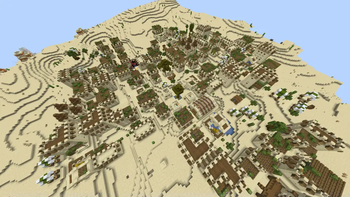
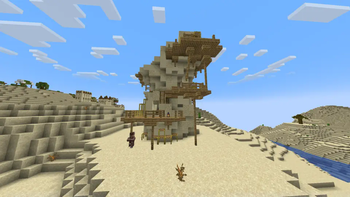
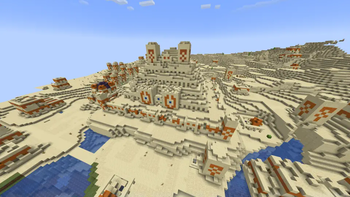
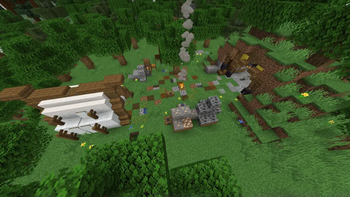
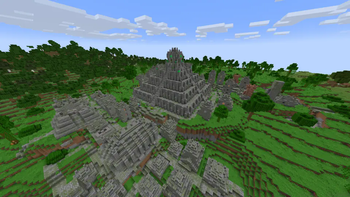
Better Survival is a modpack focusing on adventure, adding tons of structures all while keeping Minecraft still feeling like Minecraft. As you explore your world you won't have to search long before you find a fun structure to loot, and with bundles being added in 1.21.4, now is the perfect time to start a world or server all about the adventure and discovery aspect of the game.
The main twist of this pack comes when you play on a multiplayer server. With Simple Voice Chat, players can now talk in game from a close proximity. However, groups are disabled, and so is chat and msg. This means that the only way to communicate is to stay together, or head to a server landmark and hope that someone will find you. Try searching for structures with a friend. Don't get lost though, as it is much more difficult now to meet up again.
Some optimizations such as Sodium have also been added to keep your game running nicely.
Content
There are many additions, but here are some examples:
Pale Garden
Spoiler
Thanks to The Pale Garden Remastered, you can now enter the gardens in a differnt way then before. There is now dense fog, and creepy ambience, plus structures added by other packs, making this biome far more worth your time.
Ancient City
Spoiler
You simply must try invading an ancient city with a friend. With Voice Chat Interaction and Dungeons and Taverns Ancient City Overhaul, the sculk sensors will hear your voices if you are not quiet, so remember to whisper as you explore the upgraded ancient city.
Nether
Spoiler
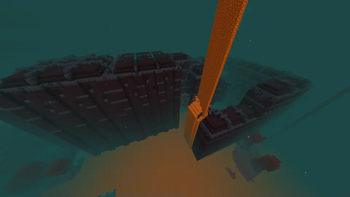
Due to Amplified Nether, the nether is now double the height, so more room for structures! The nether's world gen has been improved, adding some more variation, and the nether fortress has been revamped as well.
End
Spoiler
Dungeons and Taverns Stronghold Overhaul completely upgrades the stronghold, adding hundreds of rooms, and once you enter the portal, you'll find that the ender dragon also has gotten an update. True Ending: Ender Dragon Overhaul turns the end fight into the most epic boss battle ever, a great way to end your journey. That is, if you want to stop there! Try the outer islands too, which are far more interesting now, with insane loot just waiting to be obtained.
Configuring
Before you Start
Before starting a server, I would recommend running /gamerule showDeathMessages false. This will turn off death messages showing up in chat, which will add the fun of not knowing if someone died while looting a structure.
Many mods can be edited through Mod Menu, so you can chnage things as you like before starting a world or server. A fullbrightness toggle has also been added, for those who can't stand playing without fullbright. To toggle it, press 'G' by default. You should also enable resource packs before you start, or at least the ones you want.
Mod List/Credits
Mods
Spoiler
- [EMF] Entity Model Features https://modrinth.com/mod/entity-model-features
- [ETF] Entity Texture Features https://modrinth.com/mod/entitytexturefeatures
- 3D Skin Layers https://modrinth.com/mod/3dskinlayers
- Additional Structures https://modrinth.com/mod/additional-structures
- Amplified Nether https://modrinth.com/datapack/amplified-nether
- AppleSkin https://modrinth.com/mod/appleskin
- Architectury API https://modrinth.com/mod/architectury-api
- Axiom https://modrinth.com/mod/axiom
- Better Advancements https://modrinth.com/mod/better-advancements
- Better Mount HUD https://modrinth.com/mod/better-mount-hud
- Better Ping Display [Fabric] https://modrinth.com/mod/better-ping-display-fabric
- Better Statistics Screen https://modrinth.com/mod/better-stats
- BetterF3 https://modrinth.com/mod/betterf3
- Capes https://modrinth.com/mod/capes
- Chat Heads https://modrinth.com/mod/chat-heads
- Cherry Grove Villages https://modrinth.com/datapack/cherry-villages
- ChoiceTheorem’s Overhauled Village https://modrinth.com/mod/ct-overhaul-village
- Cloth Config API https://modrinth.com/mod/cloth-config
- Clumps https://modrinth.com/mod/clumps
- Collective https://modrinth.com/mod/collective
- Continents https://modrinth.com/datapack/continents
- Continuity https://modrinth.com/mod/continuity
- CreativeCore https://modrinth.com/mod/creativecore
- Cristel Lib https://modrinth.com/mod/cristel-lib
- Debugify https://modrinth.com/mod/debugify
- Double Doors https://modrinth.com/mod/double-doors
- Dungeons and Taverns https://modrinth.com/datapack/dungeons-and-taverns
- Dungeons and Taverns Ancient City Overhaul https://modrinth.com/datapack/dungeons-and-taverns-ancient-city-overhaul
- Dungeons and Taverns Desert Temple Replacement https://modrinth.com/datapack/dungeons-and-taverns-desert-temple-replacement
- Dungeons and Taverns End Castle Standalone https://modrinth.com/datapack/dungeons-and-taverns-end-castle-standalone
- Dungeons and Taverns Jungle Temple Replacement https://modrinth.com/datapack/dungeons-and-taverns-jungle-temple-replacement
- Dungeons and Taverns Nether Fortress Overhaul https://modrinth.com/datapack/dungeons-and-taverns-nether-fortress-overhaul
- Dungeons and Taverns Ocean Monument Replacement https://modrinth.com/datapack/dungeons-and-taverns-ocean-monument-replacement
- Dungeons and Taverns Pillager Outpost Overhaul https://modrinth.com/datapack/dungeons-and-taverns-pillager-outpost-overhaul
- Dungeons and Taverns Stronghold Overhaul https://modrinth.com/datapack/dungeons-and-taverns-stronghold-overhaul
- Dungeons and Taverns Swamp Hut Overhaul https://modrinth.com/datapack/dungeons-and-taverns-swamp-hut-overhaul
- Dungeons and Taverns Woodland Mansion Replacement https://modrinth.com/datapack/dungeons-and-taverns-woodland-mansion-replacement
- Durability Tooltip https://modrinth.com/mod/durability-tooltip
- Dynamic FPS https://modrinth.com/mod/dynamic-fps
- Entity Culling https://modrinth.com/mod/entityculling
- Essential Mod https://modrinth.com/mod/essential
- Explorify https://modrinth.com/datapack/explorify
- Fabric API https://modrinth.com/mod/fabric-api
- Fabric Language Kotlin https://modrinth.com/mod/fabric-language-kotlin
- Falling Leaves https://modrinth.com/mod/fallingleaves
- Farlands Reborn https://modrinth.com/mod/farlands-reborn
- FerriteCore https://modrinth.com/mod/ferrite-core
- Freecam https://modrinth.com/mod/freecam
- Full Brightness Toggle https://modrinth.com/mod/full-brightness-toggle
- Geckolib https://modrinth.com/mod/geckolib
- Hearths https://modrinth.com/datapack/hearths
- ImmediatelyFast https://modrinth.com/mod/immediatelyfast
- Iris Shaders https://modrinth.com/mod/iris
- Jade https://modrinth.com/mod/jade
- Krypton https://modrinth.com/mod/krypton
- LambDynamicLights https://modrinth.com/mod/lambdynamiclights
- Litematica https://modrinth.com/mod/litematica
- Litematica Printer https://modrinth.com/mod/litematica-printer
- Lithium https://modrinth.com/mod/lithium
- Lithostitched https://modrinth.com/mod/lithostitched
- Make Bubbles Pop https://modrinth.com/mod/make_bubbles_pop
- MaLiLib https://modrinth.com/mod/malilib
- MES - Moog’s End Structures https://modrinth.com/mod/mes-moogs-end-structures
- MidnightLib https://modrinth.com/mod/midnightlib
- Mine Spawners https://modrinth.com/mod/mine-spawners
- Mod Menu https://modrinth.com/mod/modmenu
- Model Gap Fix https://modrinth.com/mod/modelfix
- ModernFix https://modrinth.com/mod/modernfix
- More Chat History https://modrinth.com/mod/morechathistory
- More Mobs https://modrinth.com/datapack/more-mobs
- More Music Discs https://modrinth.com/mod/more-music-discs
- MVS - Moog’s Voyager Structures https://modrinth.com/mod/moogs-voyager-structures
- No Chat Reports https://modrinth.com/mod/no-chat-reports
- No Enderman Grief https://modrinth.com/datapack/no-enderman-grief
- Not Enough Animations https://modrinth.com/mod/not-enough-animations
- Nullscape https://modrinth.com/datapack/nullscape
- Polytone https://modrinth.com/mod/polytone
- Reese’s Sodium Options https://modrinth.com/mod/reeses-sodium-options
- Remove Chat https://modrinth.com/mod/remove-chat
- Replay Voice Chat https://modrinth.com/mod/replay-voice-chat
- Replay Mod https://modrinth.com/mod/replaymod
- Repurposed Structures - Quilt/Fabric https://modrinth.com/mod/repurposed-structures-fabric
- Revamped Shipwrecks https://modrinth.com/datapack/revamped-shipwrecks
- Roughly Enough Items (REI) https://modrinth.com/mod/rei
- Shulker Box Tooltip https://modrinth.com/mod/shulkerboxtooltip
- Silk Touch Budding Amethyst [PurpurPack] https://modrinth.com/datapack/purpurpacks-silk-touch-budding-amethyst
- Simple Voice Chat https://modrinth.com/plugin/simple-voice-chat
- Sleep https://modrinth.com/datapack/sleep
- Sodium https://modrinth.com/mod/sodium
- Sodium Extra https://modrinth.com/mod/sodium-extra
- Sodium Shadowy Path Blocks https://modrinth.com/mod/sodium-shadowy-path-blocks
- Structory https://modrinth.com/datapack/structory
- Structory: Towers https://modrinth.com/datapack/structory-towers
- SuperMarijn642’s Config Lib https://modrinth.com/mod/supermartijn642s-config-lib
- TCDCommons API https://modrinth.com/mod/tcdcommons
- Tectonic https://modrinth.com/datapack/tectonic
- Text Placeholder API https://modrinth.com/mod/placeholder-api
- The Pale Garden Remastered https://modrinth.com/datapack/pale-garden-remastered
- Tidal Towns https://modrinth.com/datapack/tidal-towns
- Towns and Towers https://modrinth.com/mod/towns-and-towers
- True Ending: Ender Dragon Overhaul https://modrinth.com/datapack/true-ending
- Very Many Players (Fabric) https://modrinth.com/mod/vmp-fabric
- Villager Transportation https://modrinth.com/datapack/villager-transportation
- Visuality https://modrinth.com/mod/visuality
- Voice Chat Interaction https://modrinth.com/mod/voice-chat-interaction
- Wavey Capes https://modrinth.com/mod/wavey-capes
- WorldEdit https://modrinth.com/plugin/worldedit
- Xaero’s Minimap https://modrinth.com/mod/xaeros-minimap
- Xaero’s World Map https://modrinth.com/mod/xaeros-world-map
- YetAnotherConfigLib (YACL) https://modrinth.com/mod/yacl
- Zoomify https://modrinth.com/mod/zoomify
Resource Packs
Spoiler
- 3D Ladders https://modrinth.com/resourcepack/3d-ladders
- 3D Mace! https://modrinth.com/resourcepack/3d-mace!
- Better Survival Resource Pack https://modrinth.com/resourcepack/better-minecraft-resource-pack
- Fresh Animations https://modrinth.com/resourcepack/fresh-animations
- Link’s 3D Rails https://modrinth.com/resourcepack/links-3d-rails
- Low On Fire https://modrinth.com/resourcepack/low-on-fire
- Simple 3D Chain https://modrinth.com/resourcepack/simple-3d-chain
- Undopia 3D Doors https://modrinth.com/resourcepack/undopia-3d-doors
Shaders
Spoiler
No shaders have been added yet.
Verfügbare Versionen
Better Survival Modpack Server einrichten
Server bestellen
Wähle mindestens 6 GB RAM (8 GB empfohlen für Better Survival Modpack). Je nach Spieleranzahl: +1 GB pro 5 Spieler.
Modpack im Dashboard installieren
Öffne den Modpack-Browser im Dashboard, suche nach "Better Survival Modpack" und klicke "Installieren". Der fabric-Loader und Minecraft 1.21.4 werden automatisch konfiguriert.
Server starten & spielen
Starte den Server – alle Mods werden automatisch geladen. Teile die Server-IP mit Freunden und spielt zusammen!
Häufige Fragen
Better Survival Modpack Server crasht oder startet nicht – was tun?
Häufigste Ursachen: zu wenig RAM oder falscher fabric-Loader. Prüfe latest.log auf "OutOfMemoryError" → erhöhe RAM auf mindestens 8 GB. Bei "Mixin" oder "ClassNotFoundException": Modpack-Version und Loader stimmen nicht überein. Bei Mado Hosting werden Loader und Minecraft-Version beim Modpack-Install automatisch konfiguriert – das verhindert die meisten Startprobleme.
Wie viel RAM braucht ein Better Survival Modpack Server wirklich?
Minimum 6 GB, empfohlen 8 GB für stabile Performance. +1 GB pro 5 Spieler. Wichtig: Minecraft-Modpacks brauchen mehr RAM als Vanilla – plane pro zusätzlichem Spieler extra ein. Bei Mado Hosting kannst du den RAM jederzeit live hochskalieren, ohne Datenverlust (ab €7.800000000000001/Monat).
Kann ich eigene Mods zu Better Survival Modpack hinzufügen, ohne Konflikte?
Ja, aber achte auf die Kompatibilität: Nutze nur Mods für den gleichen Loader (fabric) und die gleiche Minecraft-Version (1.21.4). Häufige Probleme: ID-Konflikte bei Rezept-Mods und inkompatible Coremod-Versionen. Im Mado Dashboard zeigt der Mod-Browser nur kompatible Mods an und warnt bei bekannten Konflikten.
Better Survival Modpack Server laggt – Performance-Tipps
1) RAM auf 8 GB+ erhöhen. 2) Server-View-Distance auf 8 reduzieren (server.properties). 3) Pre-Generiere Chunks mit dem "Chunky" Plugin. 4) Prüfe mit /spark profiler welche Mods die meiste Tick-Time verbrauchen. Bei Mado Hosting laufen alle Server auf NVMe-SSDs mit dedizierten CPU-Kernen – das eliminiert Hardware als Engpass.
Ähnliche Modpacks
![Cobblemon Official Modpack [Fabric]](https://cdn.modrinth.com/data/5FFgwNNP/e7f9ee2e9d361623847853fe2ddce42f519ee64f.png)
![COBBLEVERSE - Pokemon Adventure [Cobblemon]](https://cdn.modrinth.com/data/Jkb29YJU/581ecf54530972afb18a04660afd820f2f24f6c7.png)
![Better MC [FABRIC] - BMC2](https://cdn.modrinth.com/data/shFhR8Vx/a19c2bcb51d38f32f138d3607e91cb2b7b8e387f_96.webp)


![Better MC [FORGE] - BMC4](https://cdn.modrinth.com/data/4BV47HRn/7f5ef7cc61b2593609aabef3ed07a866a4f11b73_96.webp)
Better Survival Modpack Server mieten
Starte deinen eigenen Server mit automatischer Modpack-Installation.
Unterstützte Versionen
Starte deinen Better Survival Modpack Server jetzt
Ab €7.80/Monat; für die beste Performance werden 8 GB RAM empfohlen.
Server konfigurieren →