
CobbleAdventures Official Modpack
CobbleAdventures Modpack for the CobbleAdventures minecraft server!
Screenshots
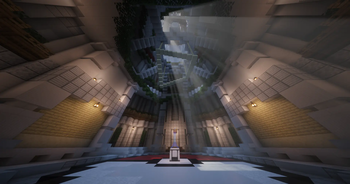
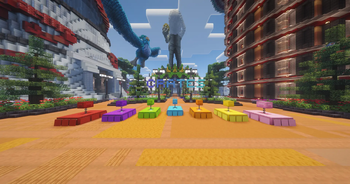
Über dieses Modpack
CobbleAdventures The Official Server Modpack
CobbleAdventures is the official modpack for the CobbleAdventures server. Everything in this pack has been specifically built, configured, and optimized to give you the best possible experience on our server. Install it, join up, and you're ready to go no tweaking required.
🔹 What's Included
Cobblemon 1.7+ The heart of the pack. Catch, train, evolve, and battle with over 1000 Pokémon faithfully recreated in Minecraft's art style. Encounter them naturally in the wild across every biome on the server.
Quality-of-Life Mods A detailed minimap to navigate the world, an improved UI for inventory and party management, and dozens of small tweaks that make your time on the server feel polished from day one.
Performance Optimized Runs smoothly on low-to-mid range PCs so every player on the server gets a lag-free experience, no matter their setup.
Custom Cosmetics Exclusive Pokémon skins and visual enhancements unique to CobbleAdventures. Look different from players on any other server.
Adventure Tools Enhanced exploration, better loot progression, and custom structures spread across the server world that reward trainers who go looking for them.
Pre-Configured for Our Server Every mod is already set up to work perfectly with CobbleAdventures. Just install and connect.
✅ What Awaits You on the Server
- 1000+ Pokémon to catch across the server's handcrafted world
- Mega Evolution, Dynamax & Z-Moves — competitive battling at its finest
- Full Trading & Breeding Systems — team up with other players to build the perfect roster
- Gym Battles & Tournaments — take on server gyms or compete in player tournaments
- Beautiful Biomes & Custom Structures — a world built for exploration and discovery
- Balanced Difficulty & Rewards — every achievement on the server feels earned
🌍 Who Is This For?
- New players joining CobbleAdventures for the first time
- Returning players making sure they're up to date with the latest server version
- Competitive trainers who want every battle tool at their fingertips
- Builders & explorers who want to make their mark on the server world
⚙️ How to Join
- Download this modpack from Modrinth
- Open your launcher (Modrinth App, CurseForge, or Prism)
- One-click install — no manual configuration needed
- Launch the game and connect to the CobbleAdventures server
Minecraft Version: 1.21.1
Modloader: Fabric
💬 Join the Community
Connect with the rest of the CobbleAdventures community on our Discord at discord.gg/cobbleadventures — find teammates, arrange trades, join tournaments, and stay up to date with server news and modpack updates. See you on the server, trainer. 🎮
Verfügbare Versionen
CobbleAdventures Official Modpack Server einrichten
Server bestellen
Wähle mindestens 6 GB RAM (8 GB empfohlen für CobbleAdventures Official Modpack). Je nach Spieleranzahl: +1 GB pro 5 Spieler.
Modpack im Dashboard installieren
Öffne den Modpack-Browser im Dashboard, suche nach "CobbleAdventures Official Modpack" und klicke "Installieren". Der fabric-Loader und Minecraft 1.21.1 werden automatisch konfiguriert.
Server starten & spielen
Starte den Server – alle Mods werden automatisch geladen. Teile die Server-IP mit Freunden und spielt zusammen!
Häufige Fragen
CobbleAdventures Official Modpack Server crasht oder startet nicht – was tun?
Häufigste Ursachen: zu wenig RAM oder falscher fabric-Loader. Prüfe latest.log auf "OutOfMemoryError" → erhöhe RAM auf mindestens 8 GB. Bei "Mixin" oder "ClassNotFoundException": Modpack-Version und Loader stimmen nicht überein. Bei Mado Hosting werden Loader und Minecraft-Version beim Modpack-Install automatisch konfiguriert – das verhindert die meisten Startprobleme.
Wie viel RAM braucht ein CobbleAdventures Official Modpack Server wirklich?
Minimum 6 GB, empfohlen 8 GB für stabile Performance. +1 GB pro 5 Spieler. Wichtig: Minecraft-Modpacks brauchen mehr RAM als Vanilla – plane pro zusätzlichem Spieler extra ein. Bei Mado Hosting kannst du den RAM jederzeit live hochskalieren, ohne Datenverlust (ab €7.800000000000001/Monat).
Kann ich eigene Mods zu CobbleAdventures Official Modpack hinzufügen, ohne Konflikte?
Ja, aber achte auf die Kompatibilität: Nutze nur Mods für den gleichen Loader (fabric) und die gleiche Minecraft-Version (1.21.1). Häufige Probleme: ID-Konflikte bei Rezept-Mods und inkompatible Coremod-Versionen. Im Mado Dashboard zeigt der Mod-Browser nur kompatible Mods an und warnt bei bekannten Konflikten.
CobbleAdventures Official Modpack Server laggt – Performance-Tipps
1) RAM auf 8 GB+ erhöhen. 2) Server-View-Distance auf 8 reduzieren (server.properties). 3) Pre-Generiere Chunks mit dem "Chunky" Plugin. 4) Prüfe mit /spark profiler welche Mods die meiste Tick-Time verbrauchen. Bei Mado Hosting laufen alle Server auf NVMe-SSDs mit dedizierten CPU-Kernen – das eliminiert Hardware als Engpass.
Ähnliche Modpacks
![Cobblemon Official Modpack [Fabric]](https://cdn.modrinth.com/data/5FFgwNNP/e7f9ee2e9d361623847853fe2ddce42f519ee64f.png)
![COBBLEVERSE - Pokemon Adventure [Cobblemon]](https://cdn.modrinth.com/data/Jkb29YJU/581ecf54530972afb18a04660afd820f2f24f6c7.png)
![Better MC [FABRIC] - BMC2](https://cdn.modrinth.com/data/shFhR8Vx/a19c2bcb51d38f32f138d3607e91cb2b7b8e387f_96.webp)


![Better MC [FORGE] - BMC4](https://cdn.modrinth.com/data/4BV47HRn/7f5ef7cc61b2593609aabef3ed07a866a4f11b73_96.webp)
CobbleAdventures Official Modpack Server mieten
Starte deinen eigenen Server mit automatischer Modpack-Installation.
Details
- Lizenz
- LicenseRef-All-Rights-Reserved
- Server-seitig
- Erforderlich
- Client-seitig
- Erforderlich
Unterstützte Versionen
Starte deinen CobbleAdventures Official Modpack Server jetzt
Ab €7.80/Monat; für die beste Performance werden 8 GB RAM empfohlen.
Server konfigurieren →