
Craftified
A cozy modpack for beginners and advanced players to play together
Screenshots
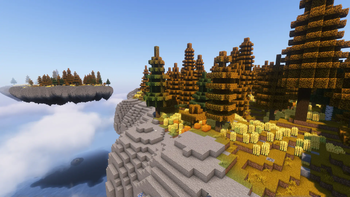
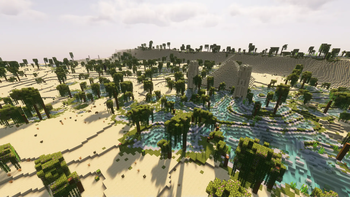
Über dieses Modpack
Craftified aims for a cozy gaming experience for both beginners and advanced players. With mods that delay the end and mods that provide content for tech-savvy players. All in a vanilla based style.
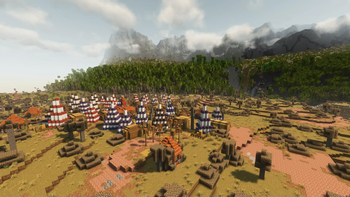
Explore the wonderful world of Craftified and enjoy a vibrant world with new animals, structures, and plants. Get to know a world that changes with the seasons and will influence your behaviour. But as idyllic as the world may seem, it also has a few tricks to challenge advanced players. Bosses to defeat and dimensions that are as beautiful and terrifying like never before. So go on your own journey and learn new skills, craft new armor, tools, and weapons, or find some of it in mysterious dungeons.
Features
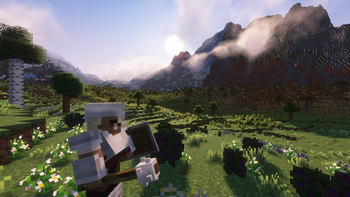
🎨 Resource Pack - to make the world a little more beautiful we use Whimscape as resource pack
🌷 Decoration - design your home with a large collection of decorative items
🔝 Skills - become stronger by skilling your character with Simply Skills
⚔️ Fight - choose your fighting style with one of the numerous weapons
🍂 Seasons - over time, the world will change depending on the season. So take care of your resources
🎤 Voice Chat - with Simple Voice Chat you can comunicate with your friends and strangers direcly in game
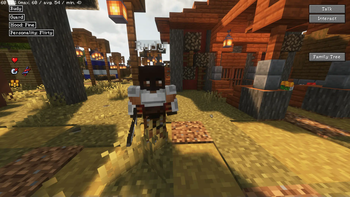
🏠 Interactive Towns - build and manage your own town with MCA Reborn
📁 Storage System - keep an overview of your storage with Tom's Simple Storage Mod
A nice look provides the GUI packs from Moongosu
Optimized
Craftified has many mods that increase your game performance. So that you get the best gaming experience.
- Embeddium
- Lithium
- FerriteCore
- ModernFix
- ImmediatelyFast
- spark
- Starlight
- Exordium
...and few more
Verfügbare Versionen
Craftified Server einrichten
Server bestellen
Wähle mindestens 6 GB RAM (8 GB empfohlen für Craftified). Je nach Spieleranzahl: +1 GB pro 5 Spieler.
Modpack im Dashboard installieren
Öffne den Modpack-Browser im Dashboard, suche nach "Craftified" und klicke "Installieren". Der fabric-Loader und Minecraft 1.20.1 werden automatisch konfiguriert.
Server starten & spielen
Starte den Server – alle Mods werden automatisch geladen. Teile die Server-IP mit Freunden und spielt zusammen!
Häufige Fragen
Craftified Server crasht oder startet nicht – was tun?
Häufigste Ursachen: zu wenig RAM oder falscher fabric-Loader. Prüfe latest.log auf "OutOfMemoryError" → erhöhe RAM auf mindestens 8 GB. Bei "Mixin" oder "ClassNotFoundException": Modpack-Version und Loader stimmen nicht überein. Bei Mado Hosting werden Loader und Minecraft-Version beim Modpack-Install automatisch konfiguriert – das verhindert die meisten Startprobleme.
Wie viel RAM braucht ein Craftified Server wirklich?
Minimum 6 GB, empfohlen 8 GB für stabile Performance. +1 GB pro 5 Spieler. Wichtig: Minecraft-Modpacks brauchen mehr RAM als Vanilla – plane pro zusätzlichem Spieler extra ein. Bei Mado Hosting kannst du den RAM jederzeit live hochskalieren, ohne Datenverlust (ab €7.800000000000001/Monat).
Kann ich eigene Mods zu Craftified hinzufügen, ohne Konflikte?
Ja, aber achte auf die Kompatibilität: Nutze nur Mods für den gleichen Loader (fabric) und die gleiche Minecraft-Version (1.20.1). Häufige Probleme: ID-Konflikte bei Rezept-Mods und inkompatible Coremod-Versionen. Im Mado Dashboard zeigt der Mod-Browser nur kompatible Mods an und warnt bei bekannten Konflikten.
Craftified Server laggt – Performance-Tipps
1) RAM auf 8 GB+ erhöhen. 2) Server-View-Distance auf 8 reduzieren (server.properties). 3) Pre-Generiere Chunks mit dem "Chunky" Plugin. 4) Prüfe mit /spark profiler welche Mods die meiste Tick-Time verbrauchen. Bei Mado Hosting laufen alle Server auf NVMe-SSDs mit dedizierten CPU-Kernen – das eliminiert Hardware als Engpass.
Ähnliche Modpacks
![Cobblemon Official Modpack [Fabric]](https://cdn.modrinth.com/data/5FFgwNNP/e7f9ee2e9d361623847853fe2ddce42f519ee64f.png)
![COBBLEVERSE - Pokemon Adventure [Cobblemon]](https://cdn.modrinth.com/data/Jkb29YJU/581ecf54530972afb18a04660afd820f2f24f6c7.png)
![Better MC [FABRIC] - BMC2](https://cdn.modrinth.com/data/shFhR8Vx/a19c2bcb51d38f32f138d3607e91cb2b7b8e387f_96.webp)


![Better MC [FORGE] - BMC4](https://cdn.modrinth.com/data/4BV47HRn/7f5ef7cc61b2593609aabef3ed07a866a4f11b73_96.webp)
Craftified Server mieten
Starte deinen eigenen Server mit automatischer Modpack-Installation.
Unterstützte Versionen
Starte deinen Craftified Server jetzt
Ab €7.80/Monat; für die beste Performance werden 8 GB RAM empfohlen.
Server konfigurieren →