
Create Alpine - Aeronautics
Create modpack based on travelling across different terrain, settling colony, making airships to travel across mountain peaks.
Screenshots


Über dieses Modpack
About Create Alpine
Create Alpine is an engineering and exploration-focused modpack built for NeoForge 1.21.1. The pack centers on massive automation, mechanical logistics, and world-scale infrastructure. Instead of magic blocks that do all the work instantly, this pack forces you to think about spatial design, power distribution, and physical transportation.
Your journey starts on the ground with basic mechanical components and eventually scales up to massive automated supply lines that cross continents.
⚙️ Rotational Power & Automation
Using the Create mod, your factories rely on actual physics and mechanical movement. You will design, optimize, and maintain complex assembly lines powered by water wheels, windmills, and steam engines. Every belt, gear, piston, and fluid pipe matters as you automate everything from basic resource processing to high-tier item assembly.
⚓ Airships & Sky Logistics
The horizon isn't just for looking at—you can build custom, fully functional airships to fly through it. Construct massive cargo vessels to move your factory components across the map, build mobile scouting platforms to map out new lands, or station a floating base right above your main mining quarry.
🏔️ Enhanced World Generation
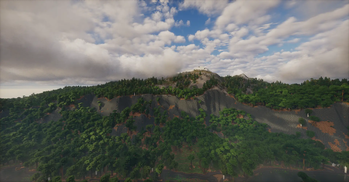
The terrain has been completely overhauled to create massive mountain ranges, deep river valleys, and diverse biomes. The world feels grand and rugged, giving you the perfect terrain to cut massive train tracks through canyons, build suspension bridges, or carve automated factories directly into the sides of mountains.
🏰 Colony Building & Infrastructure
You are not alone in this world. Establish and manage thriving colonies, watching your citizens build houses, farm crops, and run local industries. As your settlements grow, you will need to link your far-flung colonies together using advanced Create rail networks and your fleet of cargo airships to keep resources flowing between them.
Technical & Performance Notes
Client-Side Optimization: This pack includes modern rendering optimization mods to ensure your game stays smooth, even when massive factories are spinning and custom airships are flying through high-render-distance terrain.
Server Compatibility: Built to run efficiently on both single-player worlds and dedicated multiplayer servers. All heavy processing is optimized to keep server tick rates stable during automation setups.
Installation: Download the pack directly through your launcher, ensure you are allocating at least 4-6 GB of RAM for optimal performance, and you are ready to start building.
Verfügbare Versionen
Create Alpine - Aeronautics Server einrichten
Server bestellen
Wähle mindestens 6 GB RAM (8 GB empfohlen für Create Alpine - Aeronautics). Je nach Spieleranzahl: +1 GB pro 5 Spieler.
Modpack im Dashboard installieren
Öffne den Modpack-Browser im Dashboard, suche nach "Create Alpine - Aeronautics" und klicke "Installieren". Der neoforge-Loader und Minecraft 1.21.1 werden automatisch konfiguriert.
Server starten & spielen
Starte den Server – alle Mods werden automatisch geladen. Teile die Server-IP mit Freunden und spielt zusammen!
Häufige Fragen
Create Alpine - Aeronautics Server crasht oder startet nicht – was tun?
Häufigste Ursachen: zu wenig RAM oder falscher neoforge-Loader. Prüfe latest.log auf "OutOfMemoryError" → erhöhe RAM auf mindestens 8 GB. Bei "Mixin" oder "ClassNotFoundException": Modpack-Version und Loader stimmen nicht überein. Bei Mado Hosting werden Loader und Minecraft-Version beim Modpack-Install automatisch konfiguriert – das verhindert die meisten Startprobleme.
Wie viel RAM braucht ein Create Alpine - Aeronautics Server wirklich?
Minimum 6 GB, empfohlen 8 GB für stabile Performance. +1 GB pro 5 Spieler. Wichtig: Minecraft-Modpacks brauchen mehr RAM als Vanilla – plane pro zusätzlichem Spieler extra ein. Bei Mado Hosting kannst du den RAM jederzeit live hochskalieren, ohne Datenverlust (ab €12/Monat).
Kann ich eigene Mods zu Create Alpine - Aeronautics hinzufügen, ohne Konflikte?
Ja, aber achte auf die Kompatibilität: Nutze nur Mods für den gleichen Loader (neoforge) und die gleiche Minecraft-Version (1.21.1). Häufige Probleme: ID-Konflikte bei Rezept-Mods und inkompatible Coremod-Versionen. Im Mado Dashboard zeigt der Mod-Browser nur kompatible Mods an und warnt bei bekannten Konflikten.
Create Alpine - Aeronautics Server laggt – Performance-Tipps
1) RAM auf 8 GB+ erhöhen. 2) Server-View-Distance auf 8 reduzieren (server.properties). 3) Pre-Generiere Chunks mit dem "Chunky" Plugin. 4) Prüfe mit /spark profiler welche Mods die meiste Tick-Time verbrauchen. Bei Mado Hosting laufen alle Server auf NVMe-SSDs mit dedizierten CPU-Kernen – das eliminiert Hardware als Engpass.
Ähnliche Modpacks
![Cobblemon Official Modpack [Fabric]](https://cdn.modrinth.com/data/5FFgwNNP/e7f9ee2e9d361623847853fe2ddce42f519ee64f.png)
![COBBLEVERSE - Pokemon Adventure [Cobblemon]](https://cdn.modrinth.com/data/Jkb29YJU/581ecf54530972afb18a04660afd820f2f24f6c7.png)
![Better MC [FABRIC] - BMC2](https://cdn.modrinth.com/data/shFhR8Vx/a19c2bcb51d38f32f138d3607e91cb2b7b8e387f_96.webp)


![Better MC [FORGE] - BMC4](https://cdn.modrinth.com/data/4BV47HRn/7f5ef7cc61b2593609aabef3ed07a866a4f11b73_96.webp)
Create Alpine - Aeronautics Server mieten
Starte deinen eigenen Server mit automatischer Modpack-Installation.
Unterstützte Versionen
Starte deinen Create Alpine - Aeronautics Server jetzt
Ab €12.00/Monat mit 8 GB RAM für die beste Performance.
Server konfigurieren →