
Create: Forced Expansion
A modpack that forces you to not live in one place!
Screenshots

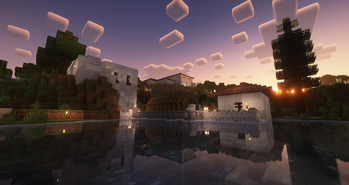
Über dieses Modpack


Video Placeholder
Expand your Empire
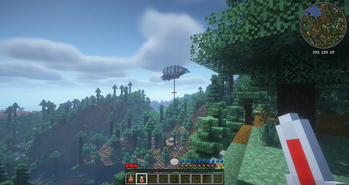
- Explore a Minecraft world with striking visuals and challenging structures using block-built airships and boats.
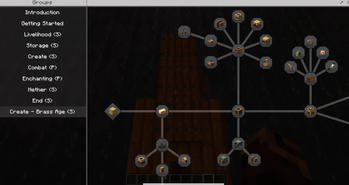
- Progress through the completely fresh Quest system, making use of Create to overcome the various challenges.
- Manage your temperature and meals with homeostatic and spice of fabric.
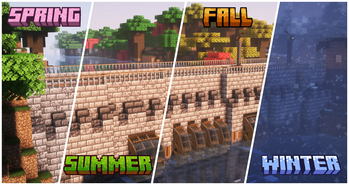
- Learn where to build your farms as well as how to support your saplings and seedlings from the seasons and climate.
- Establish outposts strategically to harvest a diverse array of resources essential for your survival as you follow new rules around your factories.
- Build yourself a home and numerous factories with an extended block pallet from rechiseled and chipped.
- Make the world your own using Create and its multiple add-ons.
- Store your gear in Sophisticated Backpacks and Tom's simple storage.
- Gear up to survive this harsh world and unravel the mysteries of runic stones scattered throughout the world.
- Conquer the Better Nether and Better End.
FAQ
Multiplayer
Q: Does Distant Creations support Multiplayer?
A: Yes, but you have to host your own Server!
Performance/Shaders
Q: The game is not running well, what can I do?
A: First and foremost, depending on your computer, change the Distant Horizon Settings.
By default, they are set to a pretty high view distance, so that should be the first change. Afterwards, the LOD quality setting can have a big impact as well.
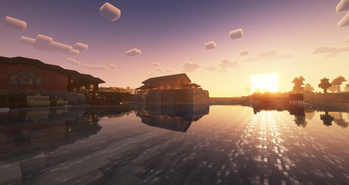
Finally, consider changing the Shaders. By default the modpack comes with BSL and Complimentary Reimagined installed. If you wish to install other shaders, check their compability with Distant Horizons here.
Help/Bug Reports
Q: Where can I ask for help or report bugs?
A: Head over to the blunthorn Discord
Verfügbare Versionen
Create: Forced Expansion Server einrichten
Server bestellen
Wähle mindestens 6 GB RAM (8 GB empfohlen für Create: Forced Expansion). Je nach Spieleranzahl: +1 GB pro 5 Spieler.
Modpack im Dashboard installieren
Öffne den Modpack-Browser im Dashboard, suche nach "Create: Forced Expansion" und klicke "Installieren". Der fabric-Loader und Minecraft 1.20.1 werden automatisch konfiguriert.
Server starten & spielen
Starte den Server – alle Mods werden automatisch geladen. Teile die Server-IP mit Freunden und spielt zusammen!
Häufige Fragen
Create: Forced Expansion Server crasht oder startet nicht – was tun?
Häufigste Ursachen: zu wenig RAM oder falscher fabric-Loader. Prüfe latest.log auf "OutOfMemoryError" → erhöhe RAM auf mindestens 8 GB. Bei "Mixin" oder "ClassNotFoundException": Modpack-Version und Loader stimmen nicht überein. Bei Mado Hosting werden Loader und Minecraft-Version beim Modpack-Install automatisch konfiguriert – das verhindert die meisten Startprobleme.
Wie viel RAM braucht ein Create: Forced Expansion Server wirklich?
Minimum 6 GB, empfohlen 8 GB für stabile Performance. +1 GB pro 5 Spieler. Wichtig: Minecraft-Modpacks brauchen mehr RAM als Vanilla – plane pro zusätzlichem Spieler extra ein. Bei Mado Hosting kannst du den RAM jederzeit live hochskalieren, ohne Datenverlust (ab €7.800000000000001/Monat).
Kann ich eigene Mods zu Create: Forced Expansion hinzufügen, ohne Konflikte?
Ja, aber achte auf die Kompatibilität: Nutze nur Mods für den gleichen Loader (fabric) und die gleiche Minecraft-Version (1.20.1). Häufige Probleme: ID-Konflikte bei Rezept-Mods und inkompatible Coremod-Versionen. Im Mado Dashboard zeigt der Mod-Browser nur kompatible Mods an und warnt bei bekannten Konflikten.
Create: Forced Expansion Server laggt – Performance-Tipps
1) RAM auf 8 GB+ erhöhen. 2) Server-View-Distance auf 8 reduzieren (server.properties). 3) Pre-Generiere Chunks mit dem "Chunky" Plugin. 4) Prüfe mit /spark profiler welche Mods die meiste Tick-Time verbrauchen. Bei Mado Hosting laufen alle Server auf NVMe-SSDs mit dedizierten CPU-Kernen – das eliminiert Hardware als Engpass.
Ähnliche Modpacks
![Cobblemon Official Modpack [Fabric]](https://cdn.modrinth.com/data/5FFgwNNP/e7f9ee2e9d361623847853fe2ddce42f519ee64f.png)
![COBBLEVERSE - Pokemon Adventure [Cobblemon]](https://cdn.modrinth.com/data/Jkb29YJU/581ecf54530972afb18a04660afd820f2f24f6c7.png)
![Better MC [FABRIC] - BMC2](https://cdn.modrinth.com/data/shFhR8Vx/a19c2bcb51d38f32f138d3607e91cb2b7b8e387f_96.webp)


![Better MC [FORGE] - BMC4](https://cdn.modrinth.com/data/4BV47HRn/7f5ef7cc61b2593609aabef3ed07a866a4f11b73_96.webp)
Create: Forced Expansion Server mieten
Starte deinen eigenen Server mit automatischer Modpack-Installation.
Unterstützte Versionen
Starte deinen Create: Forced Expansion Server jetzt
Ab €7.80/Monat; für die beste Performance werden 8 GB RAM empfohlen.
Server konfigurieren →