
Create OneBlock | by Saurier.xyz
A create oneblock modpack made for those who enjoy a rather time consuming but fun modpack ;D
Screenshots


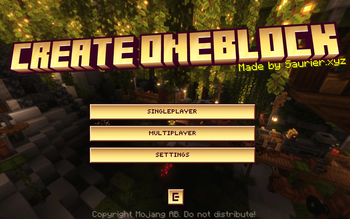
Über dieses Modpack

OneBlock progression for Create. You get one block that regenerates into something new every time you break it, and everything you build comes from it.
Features
- Fully void world. The overworld and the Nether are both empty, no structures anywhere. Everything you need comes from the block.
- Seven tiers of drops. The block starts on stone and cobble and works up through ores, deepslate, Create's stones, Nether materials, and endgame stuff like ancient debris and echo shards. It levels up as you break it.
- Built around Create 6.0.10. The block feeds you raw materials and you build the sifters, washers, and machines that turn them into every metal and part in the pack.
- Everything is obtainable. Items that normally come from villages, fortresses, or strongholds have crafting or farming paths added, so nothing gets locked out by the empty world.
- Beatable end to end. Craft your own End portal without a stronghold, grow a Nether forest, and get all the way to netherite, beacons, and elytra.
- Loot chests and a wandering trader. The block drops chests, and a trader shows up to cover animals, seeds, and a few materials the block can't provide.
- Kickstart rewards and a quest tree. Each tier gives you a starter reward, and a vanilla advancement tree tracks your progress from first iron to the dragon.
- Shared block for multiplayer. One block for the whole server, so you and your friends progress the same world together.
- Void fall protection. Fall off and you get placed back on the block instead of dying.
Support
- ** Please report issues eather in our discord or the issue tracker on github.
- ** Everything you need is linked in the modrinth page, and ingame is also a button for discord and github links. :D
Details
- Minecraft 1.21.1, NeoForge
- Works in singleplayer and on servers!
By saurier.xyz.

Verfügbare Versionen
Create OneBlock | by Saurier.xyz Server einrichten
Server bestellen
Wähle mindestens 6 GB RAM (8 GB empfohlen für Create OneBlock | by Saurier.xyz). Je nach Spieleranzahl: +1 GB pro 5 Spieler.
Modpack im Dashboard installieren
Öffne den Modpack-Browser im Dashboard, suche nach "Create OneBlock | by Saurier.xyz" und klicke "Installieren". Der neoforge-Loader und Minecraft 1.21.1 werden automatisch konfiguriert.
Server starten & spielen
Starte den Server – alle Mods werden automatisch geladen. Teile die Server-IP mit Freunden und spielt zusammen!
Häufige Fragen
Create OneBlock | by Saurier.xyz Server crasht oder startet nicht – was tun?
Häufigste Ursachen: zu wenig RAM oder falscher neoforge-Loader. Prüfe latest.log auf "OutOfMemoryError" → erhöhe RAM auf mindestens 8 GB. Bei "Mixin" oder "ClassNotFoundException": Modpack-Version und Loader stimmen nicht überein. Bei Mado Hosting werden Loader und Minecraft-Version beim Modpack-Install automatisch konfiguriert – das verhindert die meisten Startprobleme.
Wie viel RAM braucht ein Create OneBlock | by Saurier.xyz Server wirklich?
Minimum 6 GB, empfohlen 8 GB für stabile Performance. +1 GB pro 5 Spieler. Wichtig: Minecraft-Modpacks brauchen mehr RAM als Vanilla – plane pro zusätzlichem Spieler extra ein. Bei Mado Hosting kannst du den RAM jederzeit live hochskalieren, ohne Datenverlust (ab €7.800000000000001/Monat).
Kann ich eigene Mods zu Create OneBlock | by Saurier.xyz hinzufügen, ohne Konflikte?
Ja, aber achte auf die Kompatibilität: Nutze nur Mods für den gleichen Loader (neoforge) und die gleiche Minecraft-Version (1.21.1). Häufige Probleme: ID-Konflikte bei Rezept-Mods und inkompatible Coremod-Versionen. Im Mado Dashboard zeigt der Mod-Browser nur kompatible Mods an und warnt bei bekannten Konflikten.
Create OneBlock | by Saurier.xyz Server laggt – Performance-Tipps
1) RAM auf 8 GB+ erhöhen. 2) Server-View-Distance auf 8 reduzieren (server.properties). 3) Pre-Generiere Chunks mit dem "Chunky" Plugin. 4) Prüfe mit /spark profiler welche Mods die meiste Tick-Time verbrauchen. Bei Mado Hosting laufen alle Server auf NVMe-SSDs mit dedizierten CPU-Kernen – das eliminiert Hardware als Engpass.
Ähnliche Modpacks

![COBBLEVERSE - Pokemon Adventure [Cobblemon]](https://cdn.modrinth.com/data/Jkb29YJU/581ecf54530972afb18a04660afd820f2f24f6c7.png)




Create OneBlock | by Saurier.xyz Server mieten
Starte deinen eigenen Server mit automatischer Modpack-Installation.
Details
- Lizenz
- Creative Commons Attribution Non Commercial No Derivatives 4.0 International
- Server-seitig
- Erforderlich
- Client-seitig
- Erforderlich
Unterstützte Versionen
Starte deinen Create OneBlock | by Saurier.xyz Server jetzt
Ab €7.80/Monat; für die beste Performance werden 8 GB RAM empfohlen.
Server konfigurieren →