Create: SoulFire
Create: SoulFire is a Souls-like RPG modpack that aims to completely change Minecraft. The pack enhances nearly every aspect of game. Making a world that feels alive and everchanging along with you as you play.
Über dieses Modpack
What is Create: SoulFire?
Create: SoulFire is a Semi-Hardcore Souls-like RPG modpack with heavy Create mod influence that aims to completely change Minecraft. The pack enhances nearly every aspect of the game. New Visuals, New Terrain Generation that makes your world feel alive and everchanging along with you as you play. New dimensions to unlock. New ways to advance your technology with Create. New ways to fight, battle, move and new enemies and foes to face with those moves. New ways to eat and survive. New ways to build. New ways to travel and explore with your friends. All with a story rich quest line that encourages learning about everything in the game. you'll have to survive difficult terrain and battle strong enemies to unlock the secrets of your world. The secret of SoulFire! But to get there you'll have to climb your way through a challenging progression system. Play with your friends, or travel on your own adventure.
Build a cozy village by the river, or build a massive factory, there are no limits.
You can expect this pack to feel challenging for crafting and general survival, but fair and rewarding. It encourages exploration and advancing your technology in an unfamiliar world that never limits your creativity.
Modpack Status: BETA
This modpack is currently in very early development and is unstable, expect crashes and bugs. You can help track issues in the discord. It's recommended that if you find mod specific issues, that you report them to their respective mod author. You can find links to their mod pages below.
Development
If you would like to help with playtesting the pack or to stay up to date with development, join the Discord below.
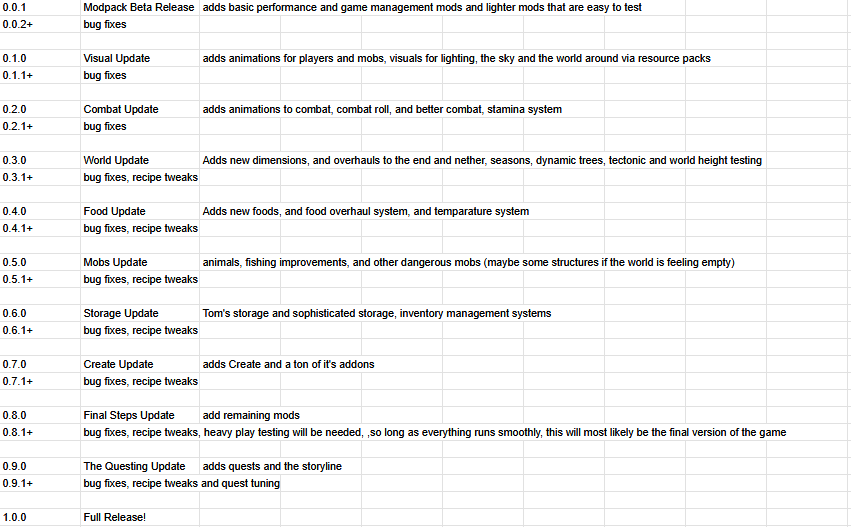
Roadmap
Discord
Modlist
List up to date as of pack version 0.0.1
Support the mod authors below!
Spoiler
- Appleskin
- Architectury
- Bad Optimizations
- Better Advancements
- Better Statistics Screen
- Bookshelf Lib
- Concurrent Chunk Management
- Cloth Config
- Clumps
- Configured
- Controlling
- Cubes Without Borders
- Dynamic Crosshair
- Dynamic FPS
- Enchantment Descriptions
- Entity Culling
- Fast Paintings
- FerriteCore
- FeyTweaks
- Forgified Fabric API
- Freecam
- Immediately Fast
- JEI
- JEI Integration Reborn
- JEFA
- JER
- Kotlin For Forge
- Language Reload
- LibJF
- Lithium
- Mod Menu (NeoForge Edition)
- Modern Fix
- Moonlight Lib
- More Culling
- Mouse Tweaks
- Not Enough Crashes
- Prickle
- Reacharound
- Rebind Narrator
- Reese's Sodium Options
- Remove Reloading Screen
- Respackopts
- Sable
- Searchables
- Sinytra Connector
- Smooth Scrolling Refurbished
- Sodium
- Sodium Extra
- Sodium Options API
- Sodium Options Mod Compat
- Sodium Dynamic Lights
- TCD Commons API
- TXnilib
- YOSBR
Verfügbare Versionen
Create: SoulFire Server einrichten
Server bestellen
Wähle mindestens 6 GB RAM (8 GB empfohlen für Create: SoulFire). Je nach Spieleranzahl: +1 GB pro 5 Spieler.
Modpack im Dashboard installieren
Öffne den Modpack-Browser im Dashboard, suche nach "Create: SoulFire" und klicke "Installieren". Der neoforge-Loader und Minecraft 1.21.1 werden automatisch konfiguriert.
Server starten & spielen
Starte den Server – alle Mods werden automatisch geladen. Teile die Server-IP mit Freunden und spielt zusammen!
Häufige Fragen
Create: SoulFire Server crasht oder startet nicht – was tun?
Häufigste Ursachen: zu wenig RAM oder falscher neoforge-Loader. Prüfe latest.log auf "OutOfMemoryError" → erhöhe RAM auf mindestens 8 GB. Bei "Mixin" oder "ClassNotFoundException": Modpack-Version und Loader stimmen nicht überein. Bei Mado Hosting werden Loader und Minecraft-Version beim Modpack-Install automatisch konfiguriert – das verhindert die meisten Startprobleme.
Wie viel RAM braucht ein Create: SoulFire Server wirklich?
Minimum 6 GB, empfohlen 8 GB für stabile Performance. +1 GB pro 5 Spieler. Wichtig: Minecraft-Modpacks brauchen mehr RAM als Vanilla – plane pro zusätzlichem Spieler extra ein. Bei Mado Hosting kannst du den RAM jederzeit live hochskalieren, ohne Datenverlust (ab €12/Monat).
Kann ich eigene Mods zu Create: SoulFire hinzufügen, ohne Konflikte?
Ja, aber achte auf die Kompatibilität: Nutze nur Mods für den gleichen Loader (neoforge) und die gleiche Minecraft-Version (1.21.1). Häufige Probleme: ID-Konflikte bei Rezept-Mods und inkompatible Coremod-Versionen. Im Mado Dashboard zeigt der Mod-Browser nur kompatible Mods an und warnt bei bekannten Konflikten.
Create: SoulFire Server laggt – Performance-Tipps
1) RAM auf 8 GB+ erhöhen. 2) Server-View-Distance auf 8 reduzieren (server.properties). 3) Pre-Generiere Chunks mit dem "Chunky" Plugin. 4) Prüfe mit /spark profiler welche Mods die meiste Tick-Time verbrauchen. Bei Mado Hosting laufen alle Server auf NVMe-SSDs mit dedizierten CPU-Kernen – das eliminiert Hardware als Engpass.
Ähnliche Modpacks
![Cobblemon Official Modpack [Fabric]](https://cdn.modrinth.com/data/5FFgwNNP/e7f9ee2e9d361623847853fe2ddce42f519ee64f.png)
![COBBLEVERSE - Pokemon Adventure [Cobblemon]](https://cdn.modrinth.com/data/Jkb29YJU/581ecf54530972afb18a04660afd820f2f24f6c7.png)
![Better MC [FABRIC] - BMC2](https://cdn.modrinth.com/data/shFhR8Vx/a19c2bcb51d38f32f138d3607e91cb2b7b8e387f_96.webp)


![Better MC [FORGE] - BMC4](https://cdn.modrinth.com/data/4BV47HRn/7f5ef7cc61b2593609aabef3ed07a866a4f11b73_96.webp)
Create: SoulFire Server mieten
Starte deinen eigenen Server mit automatischer Modpack-Installation.
Details
- Lizenz
- LicenseRef-All-Rights-Reserved
- Server-seitig
- Optional
- Client-seitig
- Optional
Unterstützte Versionen
Starte deinen Create: SoulFire Server jetzt
Ab €12.00/Monat mit 8 GB RAM für die beste Performance.
Server konfigurieren →