
Creative Co-Operation
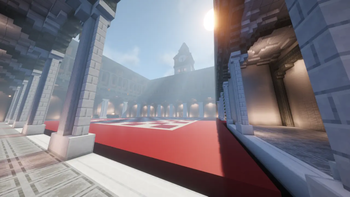
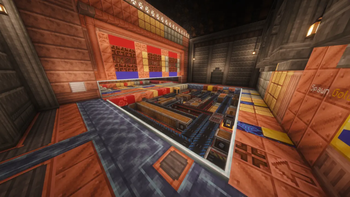
Delve into an ancient sanctum lost to time and overcome more than eight co-operative puzzle chambers in this two-player Minecraft adventure map featuring the Create mod.
Screenshots
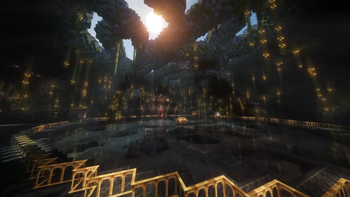
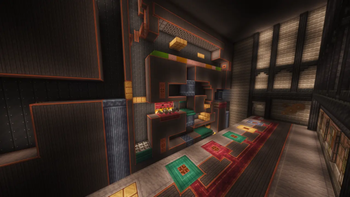
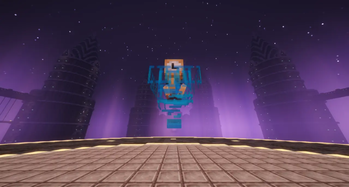
Über dieses Modpack
Important: Modrinth does not allow uploading the server pack needed to play this adventure map. I highly recommend visiting the CurseForge listing instead and downloading there.
Creative Co-Operation is a two-player puzzle map with a focus on mixing the Create Mod with Vanilla Minecraft to make a set of unique puzzle experiences. Players will have to work together to overcome 8 puzzle chambers containing several puzzles each, and uncover the mystery of an ancient dungeon ruled by an entity beyond time.
Features:
👥 Strictly a 2 player adventure map.
🕕 Approximately 6-8 hours of playtime.
🧩 8 bespoke puzzle chambers containing a variety of puzzles testing different skills.
⚙️ Integration with the Create mod, adding some mechanically interesting puzzles.
🧠 A mindbending co-op experience offering the ultimate test of trust and teamwork.
❔ Overcome the trials of the mysterious entity known as the Timekeeper, and unravel their motive.
Credits & Acknowledgements:
Creative Co-Operation was developed as my first fully fledged adventure map over the course of several months and 700+hrs as a passion project for community members to play for free. All of the puzzles, commands, scripting, and overall map design was lead by myself (Clarkster). Special thanks to EllaLellaBella who greatly helped with the Environment and Design aspect of the map, and ZenithRaiden, who helped with sound design and contributed with some custom tracks.
No money is made directly from this project, but if you wish to donate and support my endeavours and more projects like this one, you can do so on my Ko-Fi page.
Many thanks to the following testers who helped me polish the map in the finals days up to launch: ZenithRaiden, Falling_Apples, EllaLellaBella, djwallaby, Marjobon, Woozelem, TheBigBeardedBoy, killilea2000.
Installation:
Download the Creative Co-Operation Modpack.
Download the Creative Co-Operation Server Pack.
Run the modpack through your launcher of choice, and connect to your server to begin playing.
Verfügbare Versionen
Creative Co-Operation Server einrichten
Server bestellen
Wähle mindestens 6 GB RAM (8 GB empfohlen für Creative Co-Operation). Je nach Spieleranzahl: +1 GB pro 5 Spieler.
Modpack im Dashboard installieren
Öffne den Modpack-Browser im Dashboard, suche nach "Creative Co-Operation" und klicke "Installieren". Der neoforge-Loader und Minecraft 1.21.1 werden automatisch konfiguriert.
Server starten & spielen
Starte den Server – alle Mods werden automatisch geladen. Teile die Server-IP mit Freunden und spielt zusammen!
Häufige Fragen
Creative Co-Operation Server crasht oder startet nicht – was tun?
Häufigste Ursachen: zu wenig RAM oder falscher neoforge-Loader. Prüfe latest.log auf "OutOfMemoryError" → erhöhe RAM auf mindestens 8 GB. Bei "Mixin" oder "ClassNotFoundException": Modpack-Version und Loader stimmen nicht überein. Bei Mado Hosting werden Loader und Minecraft-Version beim Modpack-Install automatisch konfiguriert – das verhindert die meisten Startprobleme.
Wie viel RAM braucht ein Creative Co-Operation Server wirklich?
Minimum 6 GB, empfohlen 8 GB für stabile Performance. +1 GB pro 5 Spieler. Wichtig: Minecraft-Modpacks brauchen mehr RAM als Vanilla – plane pro zusätzlichem Spieler extra ein. Bei Mado Hosting kannst du den RAM jederzeit live hochskalieren, ohne Datenverlust (ab €7.800000000000001/Monat).
Kann ich eigene Mods zu Creative Co-Operation hinzufügen, ohne Konflikte?
Ja, aber achte auf die Kompatibilität: Nutze nur Mods für den gleichen Loader (neoforge) und die gleiche Minecraft-Version (1.21.1). Häufige Probleme: ID-Konflikte bei Rezept-Mods und inkompatible Coremod-Versionen. Im Mado Dashboard zeigt der Mod-Browser nur kompatible Mods an und warnt bei bekannten Konflikten.
Creative Co-Operation Server laggt – Performance-Tipps
1) RAM auf 8 GB+ erhöhen. 2) Server-View-Distance auf 8 reduzieren (server.properties). 3) Pre-Generiere Chunks mit dem "Chunky" Plugin. 4) Prüfe mit /spark profiler welche Mods die meiste Tick-Time verbrauchen. Bei Mado Hosting laufen alle Server auf NVMe-SSDs mit dedizierten CPU-Kernen – das eliminiert Hardware als Engpass.
Ähnliche Modpacks
![Cobblemon Official Modpack [Fabric]](https://cdn.modrinth.com/data/5FFgwNNP/e7f9ee2e9d361623847853fe2ddce42f519ee64f.png)
![COBBLEVERSE - Pokemon Adventure [Cobblemon]](https://cdn.modrinth.com/data/Jkb29YJU/581ecf54530972afb18a04660afd820f2f24f6c7.png)
![Better MC [FABRIC] - BMC2](https://cdn.modrinth.com/data/shFhR8Vx/a19c2bcb51d38f32f138d3607e91cb2b7b8e387f_96.webp)


![Better MC [FORGE] - BMC4](https://cdn.modrinth.com/data/4BV47HRn/7f5ef7cc61b2593609aabef3ed07a866a4f11b73_96.webp)
Creative Co-Operation Server mieten
Starte deinen eigenen Server mit automatischer Modpack-Installation.
Details
- Lizenz
- LicenseRef-All-Rights-Reserved
- Server-seitig
- Erforderlich
- Client-seitig
- Erforderlich
Unterstützte Versionen
Starte deinen Creative Co-Operation Server jetzt
Ab €7.80/Monat; für die beste Performance werden 8 GB RAM empfohlen.
Server konfigurieren →