
Engineering Refreshed
Create mod based modpack designed for survival alone or with friends!
Screenshots


Über dieses Modpack
🛠️ Engineering Refreshed
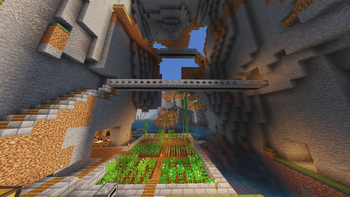
Welcome to Engineering Refreshed, a carefully curated Vanilla+ modpack that completely reimagines Minecraft automation, engineering, and aviation without sacrificing the core charm of the base game.
Whether you want to build massive fully-automated factories, take to the skies in custom-built airships, or explore a beautifully enhanced world, Engineering Refreshed delivers a smooth, highly optimized experience from the ground up.
⚙️ Core Mechanics
- Aviation & Airships: Thanks to Create Aeronautics and Create: Aeroworks, the sky is no longer the limit. Build actual flying contraptions, physics-based airships, and custom aircraft.
- Massive Addon Ecosystem: Dive deep into specific branches of engineering with Create Diesel Generators, Create Big Cannons, Create Nuclear, and The Factory Must Grow.
- Logistics & Trains: Optimize your rail networks with Create: Threaded Trains, Railways Navigator, and Contraption Terminals.
- Quality of Life Automation: Features like Create Slice & Dice, Enchantment Industry, and Mechanical Extruder keep your factories running smoothly.
🚀 Hyper-Optimized
- Graphics & Rendering: Powered by Sodium, Iris, ImmediatelyFast, and EntityCulling.
- Memory & Logic: Features Lithium, Ferrite Core, ModernFix, Saturn, and BadOptimizations to drastically reduce RAM usage and stuttering.
- Create-Specific Fixes: Includes Iris Flywheel Compat and CreateBetterFps so your massive rotating contraptions won't tank your frame rate.
🌍 Vanilla+
- Biomes & Structures: Explore stunning landscapes with Biomes O' Plenty and Structory, and uncover secrets in the Stoneholm Underground Villages.
- Life & Fauna: Encounter realistic and fantastical creatures with Alex's Mobs and Critters and Companions.
- Culinary Arts: Become a master chef with Farmer's Delight and Ocean's Delight.
- Building & Decoration: Build the ultimate workshop using the complete suite of Macaw's building mods, Design n' Decor, Create Deco, and Supplementaries.
🧰 QoL & Storage
- Storage Solved: Keep your inventory organized with Sophisticated Backpacks (fully integrated with Create) and Tom's Simple Storage Mod for physical, accessible item networks.
- Navigation: Never get lost again with Xaero's Minimap and Xaero's World Map.
- Information at a Glance: Full recipe and UI clarity with EMI (and Extra Mod Integrations), Jade, and AppleSkin.
- Multiplayer Ready: Includes Essential Mod and e4mc so you can host worlds and play with your friends flawlessly without needing a dedicated server.
📦 Key Mods
- Technology: Create, Create Aeronautics, CBC Advanced Technology, Create: New Age, Create Power Grid.
- Optimization: Sodium, Lithium, Ferrite Core, ModernFix, CCME, Alternate Current.
- World & Magic: Biomes O' Plenty, Waystones, Gravestone Mod, Carry On.
- UI & Utilities: EMI, Jade, Clumps, Controlling, Mouse Tweaks, ShulkerBoxTooltip.
Verfügbare Versionen
Engineering Refreshed Server einrichten
Server bestellen
Wähle mindestens 6 GB RAM (8 GB empfohlen für Engineering Refreshed). Je nach Spieleranzahl: +1 GB pro 5 Spieler.
Modpack im Dashboard installieren
Öffne den Modpack-Browser im Dashboard, suche nach "Engineering Refreshed" und klicke "Installieren". Der neoforge-Loader und Minecraft 1.21.1 werden automatisch konfiguriert.
Server starten & spielen
Starte den Server – alle Mods werden automatisch geladen. Teile die Server-IP mit Freunden und spielt zusammen!
Häufige Fragen
Engineering Refreshed Server crasht oder startet nicht – was tun?
Häufigste Ursachen: zu wenig RAM oder falscher neoforge-Loader. Prüfe latest.log auf "OutOfMemoryError" → erhöhe RAM auf mindestens 8 GB. Bei "Mixin" oder "ClassNotFoundException": Modpack-Version und Loader stimmen nicht überein. Bei Mado Hosting werden Loader und Minecraft-Version beim Modpack-Install automatisch konfiguriert – das verhindert die meisten Startprobleme.
Wie viel RAM braucht ein Engineering Refreshed Server wirklich?
Minimum 6 GB, empfohlen 8 GB für stabile Performance. +1 GB pro 5 Spieler. Wichtig: Minecraft-Modpacks brauchen mehr RAM als Vanilla – plane pro zusätzlichem Spieler extra ein. Bei Mado Hosting kannst du den RAM jederzeit live hochskalieren, ohne Datenverlust (ab €12/Monat).
Kann ich eigene Mods zu Engineering Refreshed hinzufügen, ohne Konflikte?
Ja, aber achte auf die Kompatibilität: Nutze nur Mods für den gleichen Loader (neoforge) und die gleiche Minecraft-Version (1.21.1). Häufige Probleme: ID-Konflikte bei Rezept-Mods und inkompatible Coremod-Versionen. Im Mado Dashboard zeigt der Mod-Browser nur kompatible Mods an und warnt bei bekannten Konflikten.
Engineering Refreshed Server laggt – Performance-Tipps
1) RAM auf 8 GB+ erhöhen. 2) Server-View-Distance auf 8 reduzieren (server.properties). 3) Pre-Generiere Chunks mit dem "Chunky" Plugin. 4) Prüfe mit /spark profiler welche Mods die meiste Tick-Time verbrauchen. Bei Mado Hosting laufen alle Server auf NVMe-SSDs mit dedizierten CPU-Kernen – das eliminiert Hardware als Engpass.
Ähnliche Modpacks
![Cobblemon Official Modpack [Fabric]](https://cdn.modrinth.com/data/5FFgwNNP/e7f9ee2e9d361623847853fe2ddce42f519ee64f.png)
![COBBLEVERSE - Pokemon Adventure [Cobblemon]](https://cdn.modrinth.com/data/Jkb29YJU/581ecf54530972afb18a04660afd820f2f24f6c7.png)
![Better MC [FABRIC] - BMC2](https://cdn.modrinth.com/data/shFhR8Vx/a19c2bcb51d38f32f138d3607e91cb2b7b8e387f_96.webp)


![Better MC [FORGE] - BMC4](https://cdn.modrinth.com/data/4BV47HRn/7f5ef7cc61b2593609aabef3ed07a866a4f11b73_96.webp)
Engineering Refreshed Server mieten
Starte deinen eigenen Server mit automatischer Modpack-Installation.
Details
- Lizenz
- LicenseRef-All-Rights-Reserved
- Server-seitig
- Erforderlich
- Client-seitig
- Erforderlich
Unterstützte Versionen
Starte deinen Engineering Refreshed Server jetzt
Ab €12.00/Monat mit 8 GB RAM für die beste Performance.
Server konfigurieren →