
EverFall
EverFall is a modpack for Minecraft that adds new structures, bosses, and much more!
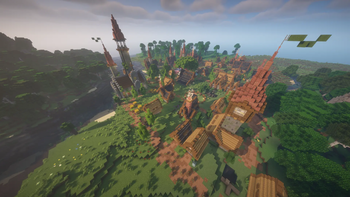
Screenshots


Über dieses Modpack
ENGLISH
🍂 EverFall: Choose Your Own Adventure
Welcome to EverFall, the ultimate survival modpack designed for all tastes! In this world, you decide how you want to play. Whether you're a relentless warrior seeking deadly challenges or a peaceful builder who just wants to get lost in nature, you'll find your perfect place here.
⚔️ Key Features
🏰 Explore and Master Danger
Legendary Dungeons: Delve into labyrinthine structures filled with traps and valuable loot.
Tough Bosses: Face formidable enemies that will test your reflexes, your weapons, and your amulets. Prepare for epic battles!
Accessory System: Equip unique relics and rings to customize your character's stats and survive the worst threats.
🏡 Build and Relax
Stunning Biomes: Explore completely redesigned landscapes, filled with new vegetation, vibrant colors, and incredible vistas that will inspire you to create.
Unique Interface and Style: A meticulously crafted aesthetic, with custom menus, unique panoramas, and automatically integrated textures.
Creative Freedom: New blocks and tools to design the base, village, or kingdom of your dreams with complete ease.
⚙️ System Requirements (Performance)
To ensure a smooth, lag-free gameplay experience and for all structures and the graphical interface to load perfectly, please make sure you meet the following requirement:
⚠️ IMPORTANT: A minimum of 7.5 GB of RAM allocated to your launcher (Modrinth) is required for everything to function correctly.
The world of EverFall awaits! Prepare your equipment, sharpen your tools, and play exactly the way you like.
ESPAÑOL
🍂 EverFall: Elige tu Propia Aventura
¡Bienvenido a EverFall, el modpack de supervivencia definitivo diseñado para todos los gustos! En este mundo, tú decides cómo quieres jugar. Ya seas un guerrero incansable en busca de desafíos mortales o un constructor pacífico que solo quiere perderse en la naturaleza, aquí encontrarás tu lugar ideal.
⚔️ Características Principales
🏰 Explora y Domina el Peligro
Mazmorras Legendarias: Adéntrate en estructuras laberínticas repletas de trampas y botín valioso.
Jefes Duros de Roer: Enfréntate a enemigos formidables que pondrán a prueba tus reflejos, tus armas y tus amuletos. ¡Prepárate para combates épicos!
Sistema de Accesorios: Equípate reliquias y anillos únicos para personalizar las estadísticas de tu personaje y sobrevivir a las peores amenazas.
🏡 Construye y Relájate
Biomas Impresionantes: Explora paisajes completamente rediseñados, llenos de nueva vegetación, colores vibrantes y vistas increíbles que te inspirarán a crear.
Interfaz y Estilo Único: Una estética cuidada al detalle, con menús personalizados, panoramas únicos y texturas integradas automáticamente.
Libertad Creativa: Nuevos bloques y herramientas para que diseñes la base, el pueblo o el reino de tus sueños con total comodidad.
⚙️ Requisitos del Sistema (Rendimiento)
Para garantizar una experiencia de juego fluida, sin tirones y para que todas las estructuras y la interfaz gráfica carguen a la perfección, asegúrate de cumplir con el siguiente requisito:
⚠️ IMPORTANTE: Se requiere un mínimo de 7.5 GB de RAM asignados en tu launcher (Modrinth) para que todo funcione correctamente.
¡El mundo de EverFall te espera! Prepara tu equipo, afila tus herramientas y juega exactamente como a ti te gusta.
Verfügbare Versionen
EverFall Server einrichten
Server bestellen
Wähle mindestens 6 GB RAM (8 GB empfohlen für EverFall). Je nach Spieleranzahl: +1 GB pro 5 Spieler.
Modpack im Dashboard installieren
Öffne den Modpack-Browser im Dashboard, suche nach "EverFall" und klicke "Installieren". Der forge-Loader und Minecraft 1.20.1 werden automatisch konfiguriert.
Server starten & spielen
Starte den Server – alle Mods werden automatisch geladen. Teile die Server-IP mit Freunden und spielt zusammen!
Häufige Fragen
EverFall Server crasht oder startet nicht – was tun?
Häufigste Ursachen: zu wenig RAM oder falscher forge-Loader. Prüfe latest.log auf "OutOfMemoryError" → erhöhe RAM auf mindestens 8 GB. Bei "Mixin" oder "ClassNotFoundException": Modpack-Version und Loader stimmen nicht überein. Bei Mado Hosting werden Loader und Minecraft-Version beim Modpack-Install automatisch konfiguriert – das verhindert die meisten Startprobleme.
Wie viel RAM braucht ein EverFall Server wirklich?
Minimum 6 GB, empfohlen 8 GB für stabile Performance. +1 GB pro 5 Spieler. Wichtig: Minecraft-Modpacks brauchen mehr RAM als Vanilla – plane pro zusätzlichem Spieler extra ein. Bei Mado Hosting kannst du den RAM jederzeit live hochskalieren, ohne Datenverlust (ab €12/Monat).
Kann ich eigene Mods zu EverFall hinzufügen, ohne Konflikte?
Ja, aber achte auf die Kompatibilität: Nutze nur Mods für den gleichen Loader (forge) und die gleiche Minecraft-Version (1.20.1). Häufige Probleme: ID-Konflikte bei Rezept-Mods und inkompatible Coremod-Versionen. Im Mado Dashboard zeigt der Mod-Browser nur kompatible Mods an und warnt bei bekannten Konflikten.
EverFall Server laggt – Performance-Tipps
1) RAM auf 8 GB+ erhöhen. 2) Server-View-Distance auf 8 reduzieren (server.properties). 3) Pre-Generiere Chunks mit dem "Chunky" Plugin. 4) Prüfe mit /spark profiler welche Mods die meiste Tick-Time verbrauchen. Bei Mado Hosting laufen alle Server auf NVMe-SSDs mit dedizierten CPU-Kernen – das eliminiert Hardware als Engpass.
Ähnliche Modpacks
![Cobblemon Official Modpack [Fabric]](https://cdn.modrinth.com/data/5FFgwNNP/e7f9ee2e9d361623847853fe2ddce42f519ee64f.png)
![COBBLEVERSE - Pokemon Adventure [Cobblemon]](https://cdn.modrinth.com/data/Jkb29YJU/581ecf54530972afb18a04660afd820f2f24f6c7.png)
![Better MC [FABRIC] - BMC2](https://cdn.modrinth.com/data/shFhR8Vx/a19c2bcb51d38f32f138d3607e91cb2b7b8e387f_96.webp)


![Better MC [FORGE] - BMC4](https://cdn.modrinth.com/data/4BV47HRn/7f5ef7cc61b2593609aabef3ed07a866a4f11b73_96.webp)
EverFall Server mieten
Starte deinen eigenen Server mit automatischer Modpack-Installation.
Unterstützte Versionen
Starte deinen EverFall Server jetzt
Ab €12.00/Monat mit 8 GB RAM für die beste Performance.
Server konfigurieren →