
Festus Winter Horror
A snowy horror apocalypse survival modpack.
Screenshots
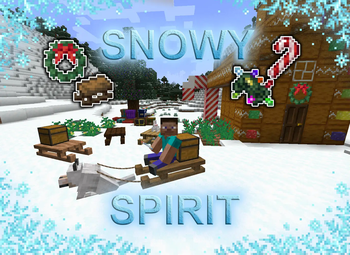

Über dieses Modpack
Festus Winter Horror is a 1.20.1 Fabric-based modpack that throws you into a harsh, snow-covered post-apocalyptic world teeming with horrors, hostile environments, and immersive survival mechanics. Stranded in an eternal winter, you must scavenge, survive, and uncover the secrets buried beneath the ice — while avoiding the many things lurking in the cold, dark wilderness.
🧟♂️ Core Features
❄️ Endless Winter: The world is locked in a permanent blizzard. Snowstorms, freezing temperatures, and whiteout conditions shape your every decision.
🧛 Horrific Encounters: Cursed mobs, paranormal threats, and unknown creatures stalk the snowy biomes. Mods like The Man in the Fog, Graveyard, and Cave Dweller create a constant sense of dread.
🧬 Origins & Abilities: Choose a supernatural origin that gives you unique abilities—and weaknesses—to help or hinder your journey through the apocalypse.
🏚️ Abandoned World: Explore haunting ruins, decaying villages, overrun cities, and frozen wastelands. Mods like Abandoned & Ruined Structures, Hostile Worlds, and Haunted Buildings provide an immersive world full of environmental storytelling.
🔥 Survival Over Comfort: You’ll face harsh hunger mechanics, limited resources, frozen rivers, darkness, and cold exposure. Every campfire, shelter, and decision matters.
🎮 Performance-Optimized: Packed with FPS-boosting mods like Sodium, Starlight, LazyDFU, and EntityCulling for smooth gameplay, even with visual enhancements.
🧊 Immersive Visuals: Snowy shaders, creepy soundscapes, and thematic resource packs create a chilling, cinematic feel.
🛠️ Multiplayer-Ready: Designed for singleplayer survival or server play. Team up or turn on each other in a frozen fight for survival.
🌨️ Why Play Frozen Descent?
If you’ve ever wanted a true survival horror experience in Minecraft, this is it. This modpack blends the challenge of winter survival, the intensity of hostile horror mobs, and exploration into a deeply immersive experience. Every minute you stay alive feels earned. Whether you're hiding from things that move in the snow or scavenging abandoned towns in silence—this is survival, not comfort.
🔧 Recommended Settings
Fabric Loader 1.20.1
6–8GB RAM minimum
Use the included resource pack and shader profile for full immersion
Optional: Play with dynamic lighting off for a more terrifying night
Verfügbare Versionen
Festus Winter Horror Server einrichten
Server bestellen
Wähle mindestens 6 GB RAM (8 GB empfohlen für Festus Winter Horror). Je nach Spieleranzahl: +1 GB pro 5 Spieler.
Modpack im Dashboard installieren
Öffne den Modpack-Browser im Dashboard, suche nach "Festus Winter Horror" und klicke "Installieren". Der fabric-Loader und Minecraft 1.20.1 werden automatisch konfiguriert.
Server starten & spielen
Starte den Server – alle Mods werden automatisch geladen. Teile die Server-IP mit Freunden und spielt zusammen!
Häufige Fragen
Festus Winter Horror Server crasht oder startet nicht – was tun?
Häufigste Ursachen: zu wenig RAM oder falscher fabric-Loader. Prüfe latest.log auf "OutOfMemoryError" → erhöhe RAM auf mindestens 8 GB. Bei "Mixin" oder "ClassNotFoundException": Modpack-Version und Loader stimmen nicht überein. Bei Mado Hosting werden Loader und Minecraft-Version beim Modpack-Install automatisch konfiguriert – das verhindert die meisten Startprobleme.
Wie viel RAM braucht ein Festus Winter Horror Server wirklich?
Minimum 6 GB, empfohlen 8 GB für stabile Performance. +1 GB pro 5 Spieler. Wichtig: Minecraft-Modpacks brauchen mehr RAM als Vanilla – plane pro zusätzlichem Spieler extra ein. Bei Mado Hosting kannst du den RAM jederzeit live hochskalieren, ohne Datenverlust (ab €7.800000000000001/Monat).
Kann ich eigene Mods zu Festus Winter Horror hinzufügen, ohne Konflikte?
Ja, aber achte auf die Kompatibilität: Nutze nur Mods für den gleichen Loader (fabric) und die gleiche Minecraft-Version (1.20.1). Häufige Probleme: ID-Konflikte bei Rezept-Mods und inkompatible Coremod-Versionen. Im Mado Dashboard zeigt der Mod-Browser nur kompatible Mods an und warnt bei bekannten Konflikten.
Festus Winter Horror Server laggt – Performance-Tipps
1) RAM auf 8 GB+ erhöhen. 2) Server-View-Distance auf 8 reduzieren (server.properties). 3) Pre-Generiere Chunks mit dem "Chunky" Plugin. 4) Prüfe mit /spark profiler welche Mods die meiste Tick-Time verbrauchen. Bei Mado Hosting laufen alle Server auf NVMe-SSDs mit dedizierten CPU-Kernen – das eliminiert Hardware als Engpass.
Ähnliche Modpacks
![Cobblemon Official Modpack [Fabric]](https://cdn.modrinth.com/data/5FFgwNNP/e7f9ee2e9d361623847853fe2ddce42f519ee64f.png)
![COBBLEVERSE - Pokemon Adventure [Cobblemon]](https://cdn.modrinth.com/data/Jkb29YJU/581ecf54530972afb18a04660afd820f2f24f6c7.png)
![Better MC [FABRIC] - BMC2](https://cdn.modrinth.com/data/shFhR8Vx/a19c2bcb51d38f32f138d3607e91cb2b7b8e387f_96.webp)


![Better MC [FORGE] - BMC4](https://cdn.modrinth.com/data/4BV47HRn/7f5ef7cc61b2593609aabef3ed07a866a4f11b73_96.webp)
Festus Winter Horror Server mieten
Starte deinen eigenen Server mit automatischer Modpack-Installation.
Details
- Lizenz
- LicenseRef-All-Rights-Reserved
- Server-seitig
- Nicht unterstützt
- Client-seitig
- Nicht unterstützt
Unterstützte Versionen
Starte deinen Festus Winter Horror Server jetzt
Ab €7.80/Monat; für die beste Performance werden 8 GB RAM empfohlen.
Server konfigurieren →