
b8ches SMP 2 - Hexes and Hoodoo
A fantasy adventure modpack with RPG elements!
Screenshots

Über dieses Modpack
Hexes and Hoodoo
A fantasy adventure modpack originally produced for Twitch streamer B8stal to run her 2nd community SMP. This pack, however, is envisioned as a fully-fledged modpack playable solo or on a server!
Installation
Simply install this pack via the Modrinth launcher to get started.
Helpful Hints
- If you are on lower-end hardware, I would highly recommend disabling Distant Horizons, the distant LOD generating mod that gives you a greater render distance than Minecraft would be default, as it will likely cause you performance issues due to the increased load it will put your hardware under. I'd recommend disabling the mod outright, but if your server is enforcing a specific mod list, then the following guide may be useful to you.
A Short Guide to disabling Distant Horizons In-Game
Open the Distant Horizons Menu in Options.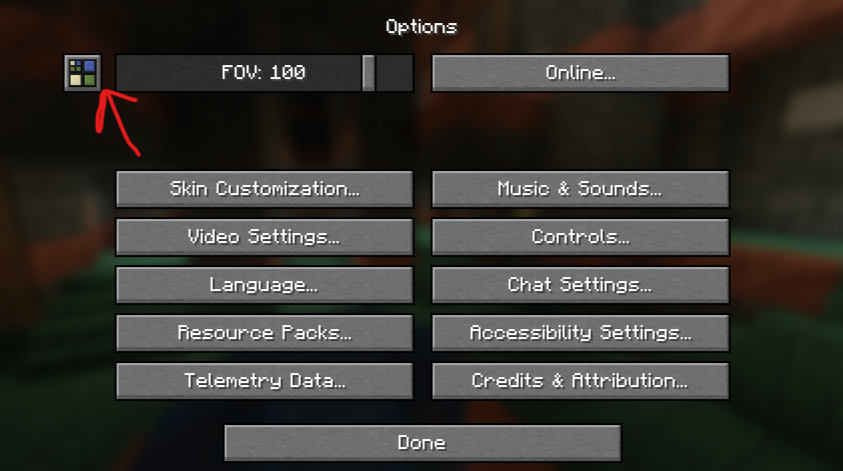
Disable "Enable Rendering" and hit "Done".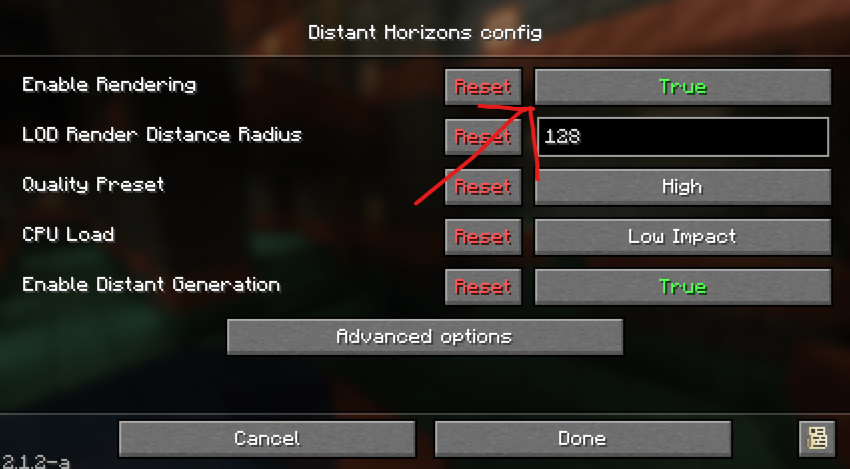
Thank you Joschino for the screenshots!
I would recommend allocating at least 6GB (6144MB) of RAM to this modpack profile without Distant Horizons, and at least 8GB (8192MB) if you are running Distant Horizons. For a guide on how to change your RAM allocation on the Modrinth launcher, see .
As we have many new blocks added by mods to enhance your designs and builds, we have EMI installed to allow you to explore the full range of blocks on offer! Click on a block to see its crafting recipe, as well as any other functions the block may have! EMI's documentation largely revolves around mod integration for developers, but you can see examples of the EMI UI in action here.
The modpack features proximity voice chat via Simple Voice Chat! You will be prompted to set up your audio devices when you join, but you can press V to set it up at any time! It also integrates with Sound Physics Remastered, so you'll be able to hear other people's voices (and your own, if enabled in the SPR config) echo in caves!
The world will be affected by Seasons, which will impact the weather, flora, and crop growth! If you want more info on Serene Seasons, the mod the pack uses to achieve this, you can read about it here.
When you die, your items and 75% of your XP will be stored in a soul that will persist at the place of your death for 3 hours (real-world time) after you died! Once this period expires, the soul will break and your items and XP will be at the mercy of others, and will start their despawn countdown!
Attributions
All content in this pack was sourced from Modrinth. However, as Paxi moves data and resource packs out of their default directories, and Colorwheel patches some shader packs to create custom ZIPs, these may not automatically be accredited in the modpack dependency list.
Datapacks
Resource Packs
- 3D Mace!
- Better Leaves
- Fancy Crops
- Fresh Moves
- GUI Revision
- GUI Revision Compats
- Icons
- Icons Compat
- LowOnFire
- Round Trees
- Stellarity Music
- Stellarity RP
- Sun and Moon Circular
Shader Packs
- Bliss Shaders
- Colorwheel Patcher (used to patch Bliss and Complementary for Flywheel compatibility)
- Complementary Unbound
- MakeUp UltraFast
Special Thanks
Thank you to Goldmaker_10 for creating the custom assets resource pack included in the modpack, as well as playtesting the multiplayer server alongside iamcovenant, Joschino, Mr_Majedd, scarlettyeah, TheZelfie, and Zubit!
Verfügbare Versionen
b8ches SMP 2 - Hexes and Hoodoo Server einrichten
Server bestellen
Wähle mindestens 6 GB RAM (8 GB empfohlen für b8ches SMP 2 - Hexes and Hoodoo). Je nach Spieleranzahl: +1 GB pro 5 Spieler.
Modpack im Dashboard installieren
Öffne den Modpack-Browser im Dashboard, suche nach "b8ches SMP 2 - Hexes and Hoodoo" und klicke "Installieren". Der neoforge-Loader und Minecraft 1.21.1 werden automatisch konfiguriert.
Server starten & spielen
Starte den Server – alle Mods werden automatisch geladen. Teile die Server-IP mit Freunden und spielt zusammen!
Häufige Fragen
b8ches SMP 2 - Hexes and Hoodoo Server crasht oder startet nicht – was tun?
Häufigste Ursachen: zu wenig RAM oder falscher neoforge-Loader. Prüfe latest.log auf "OutOfMemoryError" → erhöhe RAM auf mindestens 8 GB. Bei "Mixin" oder "ClassNotFoundException": Modpack-Version und Loader stimmen nicht überein. Bei Mado Hosting werden Loader und Minecraft-Version beim Modpack-Install automatisch konfiguriert – das verhindert die meisten Startprobleme.
Wie viel RAM braucht ein b8ches SMP 2 - Hexes and Hoodoo Server wirklich?
Minimum 6 GB, empfohlen 8 GB für stabile Performance. +1 GB pro 5 Spieler. Wichtig: Minecraft-Modpacks brauchen mehr RAM als Vanilla – plane pro zusätzlichem Spieler extra ein. Bei Mado Hosting kannst du den RAM jederzeit live hochskalieren, ohne Datenverlust (ab €7.800000000000001/Monat).
Kann ich eigene Mods zu b8ches SMP 2 - Hexes and Hoodoo hinzufügen, ohne Konflikte?
Ja, aber achte auf die Kompatibilität: Nutze nur Mods für den gleichen Loader (neoforge) und die gleiche Minecraft-Version (1.21.1). Häufige Probleme: ID-Konflikte bei Rezept-Mods und inkompatible Coremod-Versionen. Im Mado Dashboard zeigt der Mod-Browser nur kompatible Mods an und warnt bei bekannten Konflikten.
b8ches SMP 2 - Hexes and Hoodoo Server laggt – Performance-Tipps
1) RAM auf 8 GB+ erhöhen. 2) Server-View-Distance auf 8 reduzieren (server.properties). 3) Pre-Generiere Chunks mit dem "Chunky" Plugin. 4) Prüfe mit /spark profiler welche Mods die meiste Tick-Time verbrauchen. Bei Mado Hosting laufen alle Server auf NVMe-SSDs mit dedizierten CPU-Kernen – das eliminiert Hardware als Engpass.
Ähnliche Modpacks
![Cobblemon Official Modpack [Fabric]](https://cdn.modrinth.com/data/5FFgwNNP/e7f9ee2e9d361623847853fe2ddce42f519ee64f.png)
![COBBLEVERSE - Pokemon Adventure [Cobblemon]](https://cdn.modrinth.com/data/Jkb29YJU/581ecf54530972afb18a04660afd820f2f24f6c7.png)
![Better MC [FABRIC] - BMC2](https://cdn.modrinth.com/data/shFhR8Vx/a19c2bcb51d38f32f138d3607e91cb2b7b8e387f_96.webp)


![Better MC [FORGE] - BMC4](https://cdn.modrinth.com/data/4BV47HRn/7f5ef7cc61b2593609aabef3ed07a866a4f11b73_96.webp)
b8ches SMP 2 - Hexes and Hoodoo Server mieten
Starte deinen eigenen Server mit automatischer Modpack-Installation.
Unterstützte Versionen
Starte deinen b8ches SMP 2 - Hexes and Hoodoo Server jetzt
Ab €7.80/Monat; für die beste Performance werden 8 GB RAM empfohlen.
Server konfigurieren →