
Norilsk
A forge modpack based on Frostpunk and real-life Norilsk. Can you survive the eternal winter?
Screenshots

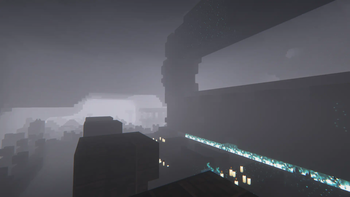
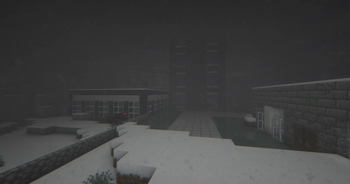
Über dieses Modpack
Norilsk is a modpack made for ones that seek challenge. Eternal winter with "Winter Apocalypse++" datapack, forgotten, post-apocalyptic cities with "Lost Cities", and an incredebly hostile environment with "Sculk Horde", "Fungal Infection" and "From Another World".
Modpack made specifically for multiplayer. Play with your friends and try to cooperate for survival.
FEATURES:
-- Temperature system with Cold Sweat and Serene Seasons.
-- Unique world generation: eternal winter, even in Desert and Savanna biomes + Lost Cities.
-- Ever-evolving, hostile horde of intelligent hivemind -- in fact, three of them! And they battle with each other for the place under this cruel sun.
-- Full set of Farmer's Delight mods -- food&drinks is just as important as temperature!
-- Custom healing system with Herbs&Meds.
-- Immersive weapons, aircrafts and traps to protect your base.
-- Simple tech and magic mods to make your survival more interesting.
IMPORTANT:
-- Use Insanity Shaders, if you can.
-- Before creating a world, place a simple hut with a Hearth inside and some coal -- or you're not gonna survive till the first night.
-- Because of copyright issues, we can't include some important mods on Modrinth. Please download the following mods for the modpack to properly work:
USAGE:
You can freely use this modpack in your videos or to create custom modpacks based on this one.
Verfügbare Versionen
Norilsk Server einrichten
Server bestellen
Wähle mindestens 6 GB RAM (8 GB empfohlen für Norilsk). Je nach Spieleranzahl: +1 GB pro 5 Spieler.
Modpack im Dashboard installieren
Öffne den Modpack-Browser im Dashboard, suche nach "Norilsk" und klicke "Installieren". Der forge-Loader und Minecraft 1.20.1 werden automatisch konfiguriert.
Server starten & spielen
Starte den Server – alle Mods werden automatisch geladen. Teile die Server-IP mit Freunden und spielt zusammen!
Häufige Fragen
Norilsk Server crasht oder startet nicht – was tun?
Häufigste Ursachen: zu wenig RAM oder falscher forge-Loader. Prüfe latest.log auf "OutOfMemoryError" → erhöhe RAM auf mindestens 8 GB. Bei "Mixin" oder "ClassNotFoundException": Modpack-Version und Loader stimmen nicht überein. Bei Mado Hosting werden Loader und Minecraft-Version beim Modpack-Install automatisch konfiguriert – das verhindert die meisten Startprobleme.
Wie viel RAM braucht ein Norilsk Server wirklich?
Minimum 6 GB, empfohlen 8 GB für stabile Performance. +1 GB pro 5 Spieler. Wichtig: Minecraft-Modpacks brauchen mehr RAM als Vanilla – plane pro zusätzlichem Spieler extra ein. Bei Mado Hosting kannst du den RAM jederzeit live hochskalieren, ohne Datenverlust (ab €7.800000000000001/Monat).
Kann ich eigene Mods zu Norilsk hinzufügen, ohne Konflikte?
Ja, aber achte auf die Kompatibilität: Nutze nur Mods für den gleichen Loader (forge) und die gleiche Minecraft-Version (1.20.1). Häufige Probleme: ID-Konflikte bei Rezept-Mods und inkompatible Coremod-Versionen. Im Mado Dashboard zeigt der Mod-Browser nur kompatible Mods an und warnt bei bekannten Konflikten.
Norilsk Server laggt – Performance-Tipps
1) RAM auf 8 GB+ erhöhen. 2) Server-View-Distance auf 8 reduzieren (server.properties). 3) Pre-Generiere Chunks mit dem "Chunky" Plugin. 4) Prüfe mit /spark profiler welche Mods die meiste Tick-Time verbrauchen. Bei Mado Hosting laufen alle Server auf NVMe-SSDs mit dedizierten CPU-Kernen – das eliminiert Hardware als Engpass.
Ähnliche Modpacks
![Cobblemon Official Modpack [Fabric]](https://cdn.modrinth.com/data/5FFgwNNP/e7f9ee2e9d361623847853fe2ddce42f519ee64f.png)
![COBBLEVERSE - Pokemon Adventure [Cobblemon]](https://cdn.modrinth.com/data/Jkb29YJU/581ecf54530972afb18a04660afd820f2f24f6c7.png)
![Better MC [FABRIC] - BMC2](https://cdn.modrinth.com/data/shFhR8Vx/a19c2bcb51d38f32f138d3607e91cb2b7b8e387f_96.webp)


![Better MC [FORGE] - BMC4](https://cdn.modrinth.com/data/4BV47HRn/7f5ef7cc61b2593609aabef3ed07a866a4f11b73_96.webp)
Norilsk Server mieten
Starte deinen eigenen Server mit automatischer Modpack-Installation.
Unterstützte Versionen
Starte deinen Norilsk Server jetzt
Ab €7.80/Monat; für die beste Performance werden 8 GB RAM empfohlen.
Server konfigurieren →