
Panorama
A create-focused technology and magic pack.
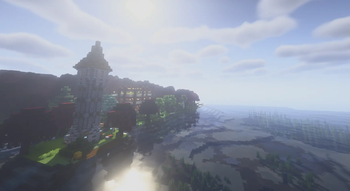
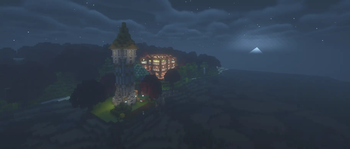
Screenshots
Über dieses Modpack
Panoramic
A create-first modpack with a focus on travel and exploration, with a nod towards the olden days of Minecraft modpacks
Theming
This modpack serves as a reasonable "kitchen sink" type pack; rather than add anything and everything, it takes the traditional approach of utilising big mods to frame a general playthrough, with all the optimization gifted by modern Minecraft
In general, the technological focus is on the Create mod, extending (via New Age) into Ad Astra for additional worlds to explore, as well as the freedom of movement with jetpacks (as well as a few parkour-based mods)
As well as tech, this pack contains several of the major magic mods, in Spectrum and the RPG series, with dungeons and villages to make the world feel more alive
As well as new mods, we also bring back some old favourites in the form of Hephaestus (Tinkers Construct) and Travelers Backpacks (adventures backpacks) for easy access for older mod users, as well as Applied Energistics 2 for storage and Ad Astra (Galacticraft)
Below is a list of mods and what they do, in brief, so that people can dive into them:
- Create - the modern standard for tech mods, with an easy-to-use Ponder UI (hold W on some items)
- Spectrum - a fully featured magic mod, with a book, reminding us of old Thaumcraft
- Valkyrie Skies - moving block ships, the top-end of Archimedes Ships like mods
- Aquamirae - deep sea creatures and ship graveyards
- Simply Skills and the RPG series - a suite of mods in the style of RPG classes, spells are added to items using a spellbinding table, and a skill tree to specialise can also be seen (by default k, will need to be reminded)
- Minecraft Comes Alive - to make villagers more realistic
- Applied Energistics - the classic tech storage mod
- Dungeons Arise - very fancy dungeons
- Ad Astra - a modern version of Galacticraft, with many planets and moons to explore
- Zenith - a port of Apothesis adding various oddities including fancy weapon prefixes and suffixes
- Computer Craft
- Let's Do series, adding tea, coffee, many foods, beer and wine using neat mechanics (as seen in-game)
- Immersive Melodies - instruments that play songs
- Automobility - adds cars/carts with real-ish physics
- Better Archaeology - museum-worthy artifacts
- Nifty Carts - AstikorCarts, horse carts with ploughs and storage and
hopefully that covers most of the content mods, and something for everyone
Verfügbare Versionen
Panorama Server einrichten
Server bestellen
Wähle mindestens 6 GB RAM (8 GB empfohlen für Panorama). Je nach Spieleranzahl: +1 GB pro 5 Spieler.
Modpack im Dashboard installieren
Öffne den Modpack-Browser im Dashboard, suche nach "Panorama" und klicke "Installieren". Der fabric-Loader und Minecraft 1.20.1 werden automatisch konfiguriert.
Server starten & spielen
Starte den Server – alle Mods werden automatisch geladen. Teile die Server-IP mit Freunden und spielt zusammen!
Häufige Fragen
Panorama Server crasht oder startet nicht – was tun?
Häufigste Ursachen: zu wenig RAM oder falscher fabric-Loader. Prüfe latest.log auf "OutOfMemoryError" → erhöhe RAM auf mindestens 8 GB. Bei "Mixin" oder "ClassNotFoundException": Modpack-Version und Loader stimmen nicht überein. Bei Mado Hosting werden Loader und Minecraft-Version beim Modpack-Install automatisch konfiguriert – das verhindert die meisten Startprobleme.
Wie viel RAM braucht ein Panorama Server wirklich?
Minimum 6 GB, empfohlen 8 GB für stabile Performance. +1 GB pro 5 Spieler. Wichtig: Minecraft-Modpacks brauchen mehr RAM als Vanilla – plane pro zusätzlichem Spieler extra ein. Bei Mado Hosting kannst du den RAM jederzeit live hochskalieren, ohne Datenverlust (ab €7.800000000000001/Monat).
Kann ich eigene Mods zu Panorama hinzufügen, ohne Konflikte?
Ja, aber achte auf die Kompatibilität: Nutze nur Mods für den gleichen Loader (fabric) und die gleiche Minecraft-Version (1.20.1). Häufige Probleme: ID-Konflikte bei Rezept-Mods und inkompatible Coremod-Versionen. Im Mado Dashboard zeigt der Mod-Browser nur kompatible Mods an und warnt bei bekannten Konflikten.
Panorama Server laggt – Performance-Tipps
1) RAM auf 8 GB+ erhöhen. 2) Server-View-Distance auf 8 reduzieren (server.properties). 3) Pre-Generiere Chunks mit dem "Chunky" Plugin. 4) Prüfe mit /spark profiler welche Mods die meiste Tick-Time verbrauchen. Bei Mado Hosting laufen alle Server auf NVMe-SSDs mit dedizierten CPU-Kernen – das eliminiert Hardware als Engpass.
Ähnliche Modpacks
![Cobblemon Official Modpack [Fabric]](https://cdn.modrinth.com/data/5FFgwNNP/e7f9ee2e9d361623847853fe2ddce42f519ee64f.png)
![COBBLEVERSE - Pokemon Adventure [Cobblemon]](https://cdn.modrinth.com/data/Jkb29YJU/581ecf54530972afb18a04660afd820f2f24f6c7.png)
![Better MC [FABRIC] - BMC2](https://cdn.modrinth.com/data/shFhR8Vx/a19c2bcb51d38f32f138d3607e91cb2b7b8e387f_96.webp)


![Better MC [FORGE] - BMC4](https://cdn.modrinth.com/data/4BV47HRn/7f5ef7cc61b2593609aabef3ed07a866a4f11b73_96.webp)
Panorama Server mieten
Starte deinen eigenen Server mit automatischer Modpack-Installation.
Unterstützte Versionen
Starte deinen Panorama Server jetzt
Ab €7.80/Monat; für die beste Performance werden 8 GB RAM empfohlen.
Server konfigurieren →