
PataLand3
The ModPack of The server PataLand3. Made by Shynux
Screenshots
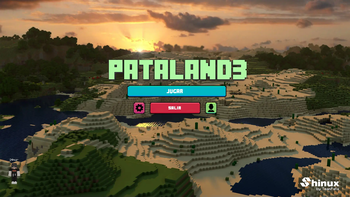
Über dieses Modpack
PataLand3
If you have any questions or suggestions, do not hesitate to contact us in our Discord.What's PataLand3
PataLand3 is a Modpack for the PataLand3 server. As its name suggests, it is the third edition. This Modpack is made to work on the server side and on the client side. It is a perfect adventure pack for multiplayer. This ModPack is made with requests from server participants. It is a very complete ModPack and includes all kinds of things. With this ModPack you will have a lot of fun for a long time.
This ModPack has a lot of animals thanks to "Alex's mobs" and thanks to "Beyond Earth" you can travel to planets with very good mechanics. And with its own mod, it's the perfect ModPack for the server PataLand3.
Why play PataLand3
PataLand ModPack has lots of different types of mods to do your experience more fun, it has lots of mechanics and you can do lots of things with it. In one player or multiplayer mode, it's the best option.
List of resources used
Mods
- 3D Skin Layers
- Alex's Mobs
- Ambient Sounds 5
- Another Furniture
- AppleSkin
- Artifacts
- Beyond Earth
- Chat Heads
- Citadel
- Comforts
- Configured
- Corpse
- CosmeticArmorReworked
- Create
- CreativeCore
- Creatures and Beasts
- Creeper Overhaul
- Curios API
- Diagonal Fences
- Drippy Loading Screen
- Dynamic Lights
- Open Blocks Elevator
- Emojiful
- Emotecraft
- ExpandAbility
- FallingTree
- FancyMenu
- Flash's NPCs
- Geckolib
- Immersive Paintings
- Inventory HUD+
- Jade
- Just Enough Items
- Just Enough Professions (JEP)
- Just Enough Resources
- Koncrete
- MineTraps
- More Crafting Tables Mod
- More Player Models
- MrCrayfish's Furniture Mod
- Oculus
- Oh The Biomes You'll Go
- Pam's Harvestcraft 2 - Crops
- Pam's Harvestcraft 2 - Food Core
- Pam's Harvestcraft 2 - Food Extended
- Pam's Harvestcraft 2 - Trees
- PataLand3
- Player Animator
- PlayerRevive
- Pretty Fluid Pipes
- Pretty Pipes
- Puzzles Lib
- Rechiseled
- Rubidum
- Security Craft
- Selene
- Simple Voice Chat
- Sit
- Sophisticated Backpacks
- Sophisticated Core
- SuperMartijn642's Config Lib
- SuperMartijn642's Core Lib
- Suplementaries
- TerraBlender
- The Graveyard
- TorchMaster
- Tortillas Españolas Mod
- Towns and Towers
- Unusual End
- Wall-Jump!
- When Dungeons Arise
- Xaero's Minimap
- Xaero's World Map

Verfügbare Versionen
PataLand3 Server einrichten
Server bestellen
Wähle mindestens 6 GB RAM (8 GB empfohlen für PataLand3). Je nach Spieleranzahl: +1 GB pro 5 Spieler.
Modpack im Dashboard installieren
Öffne den Modpack-Browser im Dashboard, suche nach "PataLand3" und klicke "Installieren". Der forge-Loader und Minecraft 1.18.2 werden automatisch konfiguriert.
Server starten & spielen
Starte den Server – alle Mods werden automatisch geladen. Teile die Server-IP mit Freunden und spielt zusammen!
Häufige Fragen
PataLand3 Server crasht oder startet nicht – was tun?
Häufigste Ursachen: zu wenig RAM oder falscher forge-Loader. Prüfe latest.log auf "OutOfMemoryError" → erhöhe RAM auf mindestens 8 GB. Bei "Mixin" oder "ClassNotFoundException": Modpack-Version und Loader stimmen nicht überein. Bei Mado Hosting werden Loader und Minecraft-Version beim Modpack-Install automatisch konfiguriert – das verhindert die meisten Startprobleme.
Wie viel RAM braucht ein PataLand3 Server wirklich?
Minimum 6 GB, empfohlen 8 GB für stabile Performance. +1 GB pro 5 Spieler. Wichtig: Minecraft-Modpacks brauchen mehr RAM als Vanilla – plane pro zusätzlichem Spieler extra ein. Bei Mado Hosting kannst du den RAM jederzeit live hochskalieren, ohne Datenverlust (ab €7.800000000000001/Monat).
Kann ich eigene Mods zu PataLand3 hinzufügen, ohne Konflikte?
Ja, aber achte auf die Kompatibilität: Nutze nur Mods für den gleichen Loader (forge) und die gleiche Minecraft-Version (1.18.2). Häufige Probleme: ID-Konflikte bei Rezept-Mods und inkompatible Coremod-Versionen. Im Mado Dashboard zeigt der Mod-Browser nur kompatible Mods an und warnt bei bekannten Konflikten.
PataLand3 Server laggt – Performance-Tipps
1) RAM auf 8 GB+ erhöhen. 2) Server-View-Distance auf 8 reduzieren (server.properties). 3) Pre-Generiere Chunks mit dem "Chunky" Plugin. 4) Prüfe mit /spark profiler welche Mods die meiste Tick-Time verbrauchen. Bei Mado Hosting laufen alle Server auf NVMe-SSDs mit dedizierten CPU-Kernen – das eliminiert Hardware als Engpass.
Ähnliche Modpacks
![Cobblemon Official Modpack [Fabric]](https://cdn.modrinth.com/data/5FFgwNNP/e7f9ee2e9d361623847853fe2ddce42f519ee64f.png)
![COBBLEVERSE - Pokemon Adventure [Cobblemon]](https://cdn.modrinth.com/data/Jkb29YJU/581ecf54530972afb18a04660afd820f2f24f6c7.png)
![Better MC [FABRIC] - BMC2](https://cdn.modrinth.com/data/shFhR8Vx/a19c2bcb51d38f32f138d3607e91cb2b7b8e387f_96.webp)


![Better MC [FORGE] - BMC4](https://cdn.modrinth.com/data/4BV47HRn/7f5ef7cc61b2593609aabef3ed07a866a4f11b73_96.webp)
PataLand3 Server mieten
Starte deinen eigenen Server mit automatischer Modpack-Installation.
Details
- Lizenz
- LicenseRef-All-Rights-Reserved
- Server-seitig
- Erforderlich
- Client-seitig
- Erforderlich
Unterstützte Versionen
Starte deinen PataLand3 Server jetzt
Ab €7.80/Monat; für die beste Performance werden 8 GB RAM empfohlen.
Server konfigurieren →