
Perfect Vanilla
Perfect Vanilla — pure Minecraft, perfectly optimized for performance and stability.
Screenshots
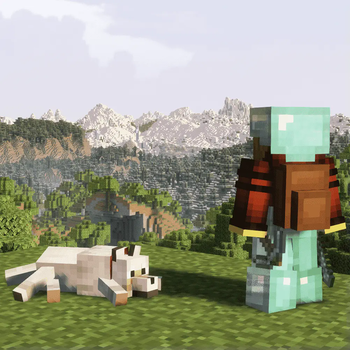
Über dieses Modpack

Perfect Vanilla — The Refined Minecraft Experience
 |
 |
 |
|---|---|---|
| High-performance gameplay with custom tuning | Quality-of-life enhancements that keep it vanilla | Polished visuals & sound designed for immersion |
🧭 About This Modpack
Perfect Vanilla redefines how Minecraft should feel — smooth, stable, and immersive, while staying completely faithful to the original game.
It focuses on technical performance, aesthetic refinement, and user comfort, without changing the game’s core identity.
Every improvement is subtle but meaningful: faster chunk loading, optimized memory handling, enhanced lighting, more natural audio, and intelligent interface tweaks — all built on top of the pure vanilla foundation.
This modpack doesn’t add new blocks, tools, or biomes.
Instead, it enhances Minecraft’s core systems, visual fidelity, and responsiveness, ensuring that everything looks, sounds, and performs better — just as it should.
⚙️ Key Features
- ⚡ Optimized performance — faster world generation, smoother frame pacing
- 🧠 Smart QoL tools — improved inventory, crafting, and interface usability
- 🎨 Enhanced visuals & sound — handcrafted shaders, subtle ambient effects
- 🧩 Full mod compatibility — no conflicts or game-breaking dependencies
- 🔧 Lightweight structure — easy to maintain, quick to update
- 🛠️ Stable foundation — designed for long-term worlds and continuous play
🖥️ System Requirements
| Component | Minimum | Recommended |
|---|---|---|
| RAM | 8 GiB | 12 GiB + |
| VRAM | 4 GiB | 8 GiB + |
| GPU | GTX 1060 / RX 580 | RX 7900 XT / RTX 4070 + |
| Storage | SSD | NVMe SSD |
⚠️ Usage Notes
- Singleplayer Focus: Perfect Vanilla is primarily designed for single-player gameplay.
Some client-side mods may conflict with multiplayer anti-cheat systems. - Performance Impact: System stability depends on CPU frequency, temperature, and driver configuration.
- Launchers: Use a third-party launcher such as Prism or ATLauncher for easy installation and management.
- RAM Allocation: At least 8 GiB is required; 12 GiB is recommended for maximum performance.
🧩 Philosophy & Maintenance
Perfect Vanilla is maintained as a personal, long-term project dedicated to refining the vanilla experience —
not to reinvent it. Updates focus on optimization, compatibility, and technical excellence.
The philosophy is simple:
“Enhance everything — change nothing.”
By avoiding unnecessary complexity and respecting the vanilla core, Perfect Vanilla delivers a stable, elegant, and timeless Minecraft experience for purists and performance enthusiasts alike.
✨ Perfect Vanilla — Where the original game meets modern optimization. ✨
Description version 3.0
Verfügbare Versionen
Perfect Vanilla Server einrichten
Server bestellen
Wähle mindestens 6 GB RAM (8 GB empfohlen für Perfect Vanilla). Je nach Spieleranzahl: +1 GB pro 5 Spieler.
Modpack im Dashboard installieren
Öffne den Modpack-Browser im Dashboard, suche nach "Perfect Vanilla" und klicke "Installieren". Der fabric-Loader und Minecraft 1.21.1 werden automatisch konfiguriert.
Server starten & spielen
Starte den Server – alle Mods werden automatisch geladen. Teile die Server-IP mit Freunden und spielt zusammen!
Häufige Fragen
Perfect Vanilla Server crasht oder startet nicht – was tun?
Häufigste Ursachen: zu wenig RAM oder falscher fabric-Loader. Prüfe latest.log auf "OutOfMemoryError" → erhöhe RAM auf mindestens 8 GB. Bei "Mixin" oder "ClassNotFoundException": Modpack-Version und Loader stimmen nicht überein. Bei Mado Hosting werden Loader und Minecraft-Version beim Modpack-Install automatisch konfiguriert – das verhindert die meisten Startprobleme.
Wie viel RAM braucht ein Perfect Vanilla Server wirklich?
Minimum 6 GB, empfohlen 8 GB für stabile Performance. +1 GB pro 5 Spieler. Wichtig: Minecraft-Modpacks brauchen mehr RAM als Vanilla – plane pro zusätzlichem Spieler extra ein. Bei Mado Hosting kannst du den RAM jederzeit live hochskalieren, ohne Datenverlust (ab €7.800000000000001/Monat).
Kann ich eigene Mods zu Perfect Vanilla hinzufügen, ohne Konflikte?
Ja, aber achte auf die Kompatibilität: Nutze nur Mods für den gleichen Loader (fabric) und die gleiche Minecraft-Version (1.21.1). Häufige Probleme: ID-Konflikte bei Rezept-Mods und inkompatible Coremod-Versionen. Im Mado Dashboard zeigt der Mod-Browser nur kompatible Mods an und warnt bei bekannten Konflikten.
Perfect Vanilla Server laggt – Performance-Tipps
1) RAM auf 8 GB+ erhöhen. 2) Server-View-Distance auf 8 reduzieren (server.properties). 3) Pre-Generiere Chunks mit dem "Chunky" Plugin. 4) Prüfe mit /spark profiler welche Mods die meiste Tick-Time verbrauchen. Bei Mado Hosting laufen alle Server auf NVMe-SSDs mit dedizierten CPU-Kernen – das eliminiert Hardware als Engpass.
Ähnliche Modpacks
![Cobblemon Official Modpack [Fabric]](https://cdn.modrinth.com/data/5FFgwNNP/e7f9ee2e9d361623847853fe2ddce42f519ee64f.png)
![COBBLEVERSE - Pokemon Adventure [Cobblemon]](https://cdn.modrinth.com/data/Jkb29YJU/581ecf54530972afb18a04660afd820f2f24f6c7.png)
![Better MC [FABRIC] - BMC2](https://cdn.modrinth.com/data/shFhR8Vx/a19c2bcb51d38f32f138d3607e91cb2b7b8e387f_96.webp)


![Better MC [FORGE] - BMC4](https://cdn.modrinth.com/data/4BV47HRn/7f5ef7cc61b2593609aabef3ed07a866a4f11b73_96.webp)
Perfect Vanilla Server mieten
Starte deinen eigenen Server mit automatischer Modpack-Installation.
Unterstützte Versionen
Starte deinen Perfect Vanilla Server jetzt
Ab €7.80/Monat; für die beste Performance werden 8 GB RAM empfohlen.
Server konfigurieren →