
Power & Precision: Back In Time
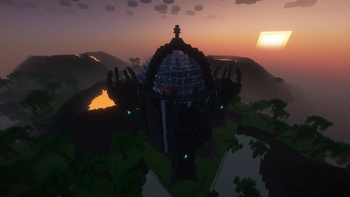
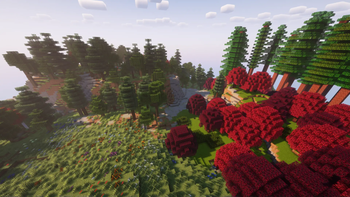
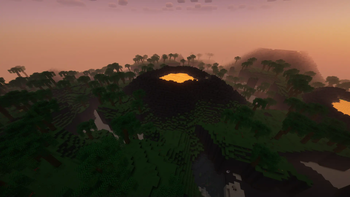
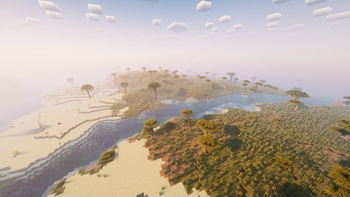
Discover medieval magic and technology in the eagerly awaited "Power & Precision: Back In Time." Experience unique adventures with custom origins, master innovative machinery using the Create mod, and confront enhanced endermen and creepers.
Screenshots
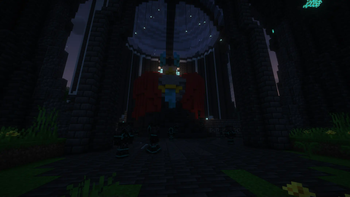
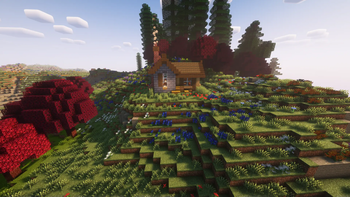
Über dieses Modpack
"Power & Precision Modpack: Back In Time" is the highly anticipated fourth installment in the renowned modpack series. This immersive Minecraft experience takes players on a journey through time, embracing a loosely medieval theme with a wealth of extraordinary features.
The pack boasts the Origins mod, enhanced with custom origins tailored specifically for "Back In Time," allowing players to embark on unique adventures with diverse abilities. The Create mod, coupled with carefully selected addons, provides an intricate and innovative machinery system for players to explore and master.
To expand the realms of exploration, "Back In Time" incorporates the Better End and Better Nether mods, introducing a plethora of new biomes and terrains in both dimensions. Brace yourself for encounters with revamped endermen and creepers, thanks to the Overhauled Creepers and Overhauled Endermen mods, adding an extra layer of challenge and excitement.
Delving further into the medieval theme, vanilla Minecraft structures receive an overhaul, immersing players in a world reminiscent of times past. The Regions Unexplored mod enhances exploration with an impressive array of 70+ new biomes, each with its own unique environment to uncover. Brace yourself for epic battles against incredibly powerful bosses scattered across the diverse landscapes.
Embracing the magical essence of medieval times, the modpack introduces the Wizards mod alongside Paladins & Priests, providing players with mystical powers and divine abilities. Unleash your magical prowess as you traverse the enchanted landscapes.
For community engagement, "Back In Time" offers a dedicated public server accessible through the Succ's Chilly Cave Discord community. Join the server to connect with fellow adventurers, share experiences, and conquer the challenges presented by this intricately crafted modpack. Immerse yourself in the medieval magic and technological wonders of "Power & Precision Modpack: Back In Time."
Be aware that the FTB mods are not included in the pack itself, as they aren’t hosted on Modrinth. So, when you join the Minecraft server, it will ask you if you want to update your mods. All that does is download FTB Chunks, FTB Teams, FTB Essentials, FTB Library, FTB Quests, FTB Ultimine, and FTB XMod Compat.
Verfügbare Versionen
Power & Precision: Back In Time Server einrichten
Server bestellen
Wähle mindestens 6 GB RAM (8 GB empfohlen für Power & Precision: Back In Time). Je nach Spieleranzahl: +1 GB pro 5 Spieler.
Modpack im Dashboard installieren
Öffne den Modpack-Browser im Dashboard, suche nach "Power & Precision: Back In Time" und klicke "Installieren". Der fabric-Loader und Minecraft 1.20.1 werden automatisch konfiguriert.
Server starten & spielen
Starte den Server – alle Mods werden automatisch geladen. Teile die Server-IP mit Freunden und spielt zusammen!
Häufige Fragen
Power & Precision: Back In Time Server crasht oder startet nicht – was tun?
Häufigste Ursachen: zu wenig RAM oder falscher fabric-Loader. Prüfe latest.log auf "OutOfMemoryError" → erhöhe RAM auf mindestens 8 GB. Bei "Mixin" oder "ClassNotFoundException": Modpack-Version und Loader stimmen nicht überein. Bei Mado Hosting werden Loader und Minecraft-Version beim Modpack-Install automatisch konfiguriert – das verhindert die meisten Startprobleme.
Wie viel RAM braucht ein Power & Precision: Back In Time Server wirklich?
Minimum 6 GB, empfohlen 8 GB für stabile Performance. +1 GB pro 5 Spieler. Wichtig: Minecraft-Modpacks brauchen mehr RAM als Vanilla – plane pro zusätzlichem Spieler extra ein. Bei Mado Hosting kannst du den RAM jederzeit live hochskalieren, ohne Datenverlust (ab €7.800000000000001/Monat).
Kann ich eigene Mods zu Power & Precision: Back In Time hinzufügen, ohne Konflikte?
Ja, aber achte auf die Kompatibilität: Nutze nur Mods für den gleichen Loader (fabric) und die gleiche Minecraft-Version (1.20.1). Häufige Probleme: ID-Konflikte bei Rezept-Mods und inkompatible Coremod-Versionen. Im Mado Dashboard zeigt der Mod-Browser nur kompatible Mods an und warnt bei bekannten Konflikten.
Power & Precision: Back In Time Server laggt – Performance-Tipps
1) RAM auf 8 GB+ erhöhen. 2) Server-View-Distance auf 8 reduzieren (server.properties). 3) Pre-Generiere Chunks mit dem "Chunky" Plugin. 4) Prüfe mit /spark profiler welche Mods die meiste Tick-Time verbrauchen. Bei Mado Hosting laufen alle Server auf NVMe-SSDs mit dedizierten CPU-Kernen – das eliminiert Hardware als Engpass.
Ähnliche Modpacks
![Cobblemon Official Modpack [Fabric]](https://cdn.modrinth.com/data/5FFgwNNP/e7f9ee2e9d361623847853fe2ddce42f519ee64f.png)
![COBBLEVERSE - Pokemon Adventure [Cobblemon]](https://cdn.modrinth.com/data/Jkb29YJU/581ecf54530972afb18a04660afd820f2f24f6c7.png)
![Better MC [FABRIC] - BMC2](https://cdn.modrinth.com/data/shFhR8Vx/a19c2bcb51d38f32f138d3607e91cb2b7b8e387f_96.webp)


![Better MC [FORGE] - BMC4](https://cdn.modrinth.com/data/4BV47HRn/7f5ef7cc61b2593609aabef3ed07a866a4f11b73_96.webp)
Power & Precision: Back In Time Server mieten
Starte deinen eigenen Server mit automatischer Modpack-Installation.
Details
- Lizenz
- LicenseRef-All-Rights-Reserved
- Server-seitig
- Erforderlich
- Client-seitig
- Erforderlich
Unterstützte Versionen
Starte deinen Power & Precision: Back In Time Server jetzt
Ab €7.80/Monat; für die beste Performance werden 8 GB RAM empfohlen.
Server konfigurieren →