Provi's Monumenta Modpack
Another modpack designed for the CTM-MMO Minecraft server Monumenta.
Screenshots
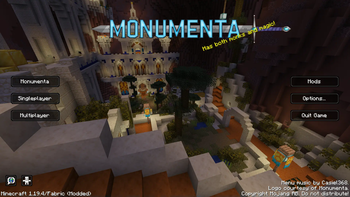
Über dieses Modpack
Provi's Monumenta Modpack
Inspired by Noelle's modpack, this is a feature-complete plug-and-play modpack that is designed for the CTM-MMO Minecraft server Monumenta.
License
This modpack (custom menu layouts, configuration files, etc) is licensed as MIT, feel free to disect and reuse parts of it.
The contents of this modpack (mods, resourcepacks, music, logos, etc) are not covered by the modpack's license and instead have separate licenses to respect.
Contents
- Performance improvement mods.
- Monumenta Official Resource Pack
- Monumenta General Music Pack v2.6.0 (check the official discord for the latest release).
- Contains open world, dungeon, boss, and town music.
- Monumenta Custom Music Pack v1.2.0 (check the official discord for the latest release).
- Allows you to set custom music to play in Monumenta.
- General gameplay enhancement mods.
- Tooltip Scroll
- Shulkerbox Tooltips
- Xaero's Minimap/Worldmap (Fair-Play)
- Provi's Health Bars
- Monumenta specific gameplay enhancement mods.
- Unofficial Monumenta Mod
- Dynamic Fullbright (disabled by default)
Installation
Vanilla Launcher
- Modrinth Modpack Installer (zero setup required)
- I made this one, so just tell me if it breaks somehow.
- It will set up a folder with all the mods and configs from the
.mrpackfile, then you can just tell Minecraft to launch an installation from that folder.
- There are also several command line tools you can try that have the ability to set up the modpack for you.
- Manual Installation (lots of setup required)
- The
.mrpackfile is just a zip folder with a fancy extension. Rename the file to change the filetype to.zip. - Unzip the folder.
- If you have 7zip, you can use that to open the
.mrpackdirectly and skip step 1.
- If you have 7zip, you can use that to open the
- The "overrides" folder contains configs, resourcepacks, etc in the exact format they need to be for a standard Minecraft profile.
- Either use this folder as the profile/installation folder or copy its contents into your chosen folder.
modrinth.index.jsonis a json file containing URLs to every mod to download.- These URLs are direct download links, so just click all of them and let your web browser do the rest.
- Move all the downloaded mods into your mods folder.
- Create a Minecraft profile pointing at the location of the folder you set up (the same folder you dumped the contents of override into).
- Play, let Minecraft and the mods generate all remaining files.
- The
3rd Party Launchers
The instructions will be different per 3rd party launcher, but any launcher that supports Modrinth modpacks should be able to set everything up:
- Modrinth Launcher
- Prism Launcher
- ATLauncher
- MultiMC
Verfügbare Versionen
Provi's Monumenta Modpack Server einrichten
Server bestellen
Wähle mindestens 4 GB RAM (6 GB empfohlen für Provi's Monumenta Modpack). Je nach Spieleranzahl: +1 GB pro 8 Spieler.
Modpack im Dashboard installieren
Öffne den Modpack-Browser im Dashboard, suche nach "Provi's Monumenta Modpack" und klicke "Installieren". Der fabric-Loader und Minecraft 1.20.4 werden automatisch konfiguriert.
Server starten & spielen
Starte den Server – alle Mods werden automatisch geladen. Teile die Server-IP mit Freunden und spielt zusammen!
Häufige Fragen
Provi's Monumenta Modpack Server crasht oder startet nicht – was tun?
Häufigste Ursachen: zu wenig RAM oder falscher fabric-Loader. Prüfe latest.log auf "OutOfMemoryError" → erhöhe RAM auf mindestens 6 GB. Bei "Mixin" oder "ClassNotFoundException": Modpack-Version und Loader stimmen nicht überein. Bei Mado Hosting werden Loader und Minecraft-Version beim Modpack-Install automatisch konfiguriert – das verhindert die meisten Startprobleme.
Wie viel RAM braucht ein Provi's Monumenta Modpack Server wirklich?
Minimum 4 GB, empfohlen 6 GB für stabile Performance. +1 GB pro 8 Spieler. Wichtig: Minecraft-Modpacks brauchen mehr RAM als Vanilla – plane pro zusätzlichem Spieler extra ein. Bei Mado Hosting kannst du den RAM jederzeit live hochskalieren, ohne Datenverlust (ab €5.2/Monat).
Kann ich eigene Mods zu Provi's Monumenta Modpack hinzufügen, ohne Konflikte?
Ja, aber achte auf die Kompatibilität: Nutze nur Mods für den gleichen Loader (fabric) und die gleiche Minecraft-Version (1.20.4). Häufige Probleme: ID-Konflikte bei Rezept-Mods und inkompatible Coremod-Versionen. Im Mado Dashboard zeigt der Mod-Browser nur kompatible Mods an und warnt bei bekannten Konflikten.
Provi's Monumenta Modpack Server laggt – Performance-Tipps
1) RAM auf 6 GB+ erhöhen. 2) Server-View-Distance auf 8 reduzieren (server.properties). 3) Pre-Generiere Chunks mit dem "Chunky" Plugin. 4) Prüfe mit /spark profiler welche Mods die meiste Tick-Time verbrauchen. Bei Mado Hosting laufen alle Server auf NVMe-SSDs mit dedizierten CPU-Kernen – das eliminiert Hardware als Engpass.
Ähnliche Modpacks

![COBBLEVERSE - Pokemon Adventure [Cobblemon]](https://cdn.modrinth.com/data/Jkb29YJU/581ecf54530972afb18a04660afd820f2f24f6c7.png)




Provi's Monumenta Modpack Server mieten
Starte deinen eigenen Server mit automatischer Modpack-Installation.
Unterstützte Versionen
Starte deinen Provi's Monumenta Modpack Server jetzt
Ab €5.20/Monat; für die beste Performance werden 6 GB RAM empfohlen.
Server konfigurieren →