
Survival Recrafted
Minecraft Vanilla is way too simple, Survival Recrafted modpack changes that.
Screenshots
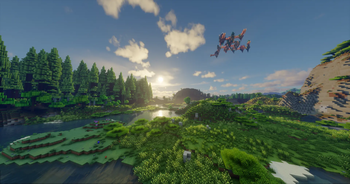
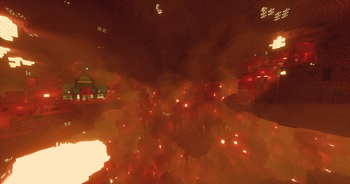
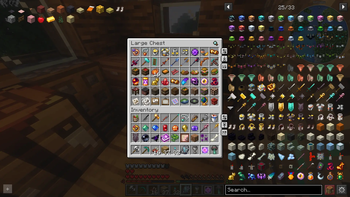
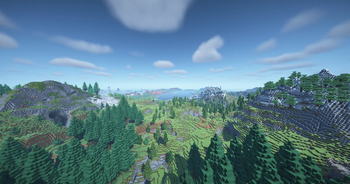
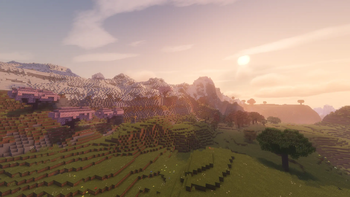
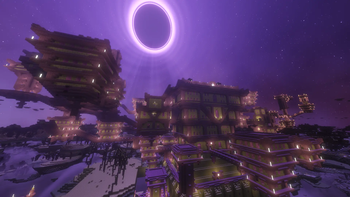
Über dieses Modpack
Survival Recrafted - A complete, immersive survival overhaul
Survival Recrafted is a carefully curated Minecraft modpack designed to take the core survival experience and polish it to absolute perfection. Survival Recrafted completely overhauls the game with thirst mechanics, deadly temperatures, new mobs and an unforgiving early game.
Even just surviving the first night is an actual achievement.
✨ Key Features
- High Performance: Optimized with the best Fabric performance mods to ensure high FPS
- Overhauled Early Game: Forget punching trees. You will need to scavenge rocks, sticks and craft primitive flint tools just to get your first piece of wood.
- Dynamic Difficulty: As you get stronger, so does the world. Mobs will scale in difficulty the further you travel and the longer you survive.
- Visual Enhancements: Shaders for cinematic lighting and 3D Textures.
- Vanilla Style: No complex tech or magic mods, just pure Minecraft survival, recrafted.
🌎 How to Survive & Objectives
- How to get started: You can't chop down a tree with your bare fists anymore. You have to collect rocks, sticks and flint from the ground. Make a Crafting Rock, put it down and place the sticks and flint like in a crafting table, and then hit the Crafting Rock a few times with a rock to craft the tools. You can cut down trees only by using a Flint Axe. Many crafting recipes have been changed. Open your inventory, in the top left you will see a list of items that you have to craft, click on the item to see the crafting recipe.
- Thirst & Temperature: Hunger is no longer your only concern. You have to drink fresh water from a river, or purify it. Craft warm clothes to survive the snowy biomes, and stay cool in the scorching desert.
- Scaling Difficulty: As you progress, survive longer, and travel further, the world actively scales in difficulty. Mobs become stronger, deal more damage and spawn more.
- Objectives: Your main objective is to defeat the overhauled Ender Dragon. Open the Advancements tab, on the right side you will see some pinned advancements that you have to unlock in order to progress through the modpack.
⚙️ Technical Recommendations
- RAM Allocation: You should allocate 8 GB of RAM for the smoothest experience.
- Mods: You can see all the mods installed in this modpack by checking the versions tab, select a version and all the mods installed are under the Dependencies list.
- Mod Settings: You can easily tweak this modpack in Mod Menu, almost every mod can be customized. If you don't like something from a mod you can turn that feature off or just remove the mod.
- Shaders: You can enable shaders in video settings!
💬 Feedback & Bug Reports
If you have suggestions, questions or need help feel free to tell me.
Spoiler
Contact me via Email: [email protected]
The foundation of this modpack has been thoroughly balanced and finalized.
I plan to keep updating the modpack and adding mods or other assets in the future.
Verfügbare Versionen
Survival Recrafted Server einrichten
Server bestellen
Wähle mindestens 6 GB RAM (8 GB empfohlen für Survival Recrafted). Je nach Spieleranzahl: +1 GB pro 5 Spieler.
Modpack im Dashboard installieren
Öffne den Modpack-Browser im Dashboard, suche nach "Survival Recrafted" und klicke "Installieren". Der fabric-Loader und Minecraft 1.21.1 werden automatisch konfiguriert.
Server starten & spielen
Starte den Server – alle Mods werden automatisch geladen. Teile die Server-IP mit Freunden und spielt zusammen!
Häufige Fragen
Survival Recrafted Server crasht oder startet nicht – was tun?
Häufigste Ursachen: zu wenig RAM oder falscher fabric-Loader. Prüfe latest.log auf "OutOfMemoryError" → erhöhe RAM auf mindestens 8 GB. Bei "Mixin" oder "ClassNotFoundException": Modpack-Version und Loader stimmen nicht überein. Bei Mado Hosting werden Loader und Minecraft-Version beim Modpack-Install automatisch konfiguriert – das verhindert die meisten Startprobleme.
Wie viel RAM braucht ein Survival Recrafted Server wirklich?
Minimum 6 GB, empfohlen 8 GB für stabile Performance. +1 GB pro 5 Spieler. Wichtig: Minecraft-Modpacks brauchen mehr RAM als Vanilla – plane pro zusätzlichem Spieler extra ein. Bei Mado Hosting kannst du den RAM jederzeit live hochskalieren, ohne Datenverlust (ab €7.800000000000001/Monat).
Kann ich eigene Mods zu Survival Recrafted hinzufügen, ohne Konflikte?
Ja, aber achte auf die Kompatibilität: Nutze nur Mods für den gleichen Loader (fabric) und die gleiche Minecraft-Version (1.21.1). Häufige Probleme: ID-Konflikte bei Rezept-Mods und inkompatible Coremod-Versionen. Im Mado Dashboard zeigt der Mod-Browser nur kompatible Mods an und warnt bei bekannten Konflikten.
Survival Recrafted Server laggt – Performance-Tipps
1) RAM auf 8 GB+ erhöhen. 2) Server-View-Distance auf 8 reduzieren (server.properties). 3) Pre-Generiere Chunks mit dem "Chunky" Plugin. 4) Prüfe mit /spark profiler welche Mods die meiste Tick-Time verbrauchen. Bei Mado Hosting laufen alle Server auf NVMe-SSDs mit dedizierten CPU-Kernen – das eliminiert Hardware als Engpass.
Ähnliche Modpacks
![Cobblemon Official Modpack [Fabric]](https://cdn.modrinth.com/data/5FFgwNNP/e7f9ee2e9d361623847853fe2ddce42f519ee64f.png)
![COBBLEVERSE - Pokemon Adventure [Cobblemon]](https://cdn.modrinth.com/data/Jkb29YJU/581ecf54530972afb18a04660afd820f2f24f6c7.png)
![Better MC [FABRIC] - BMC2](https://cdn.modrinth.com/data/shFhR8Vx/a19c2bcb51d38f32f138d3607e91cb2b7b8e387f_96.webp)


![Better MC [FORGE] - BMC4](https://cdn.modrinth.com/data/4BV47HRn/7f5ef7cc61b2593609aabef3ed07a866a4f11b73_96.webp)
Survival Recrafted Server mieten
Starte deinen eigenen Server mit automatischer Modpack-Installation.
Details
- Lizenz
- LicenseRef-All-Rights-Reserved
- Server-seitig
- Erforderlich
- Client-seitig
- Erforderlich
Unterstützte Versionen
Starte deinen Survival Recrafted Server jetzt
Ab €7.80/Monat; für die beste Performance werden 8 GB RAM empfohlen.
Server konfigurieren →