
THF Industrial
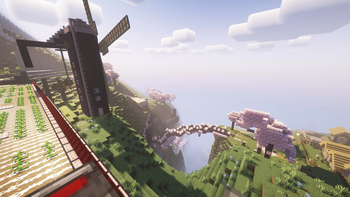
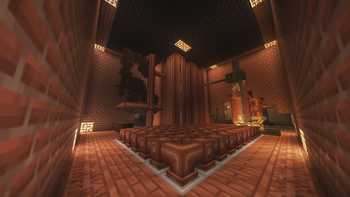
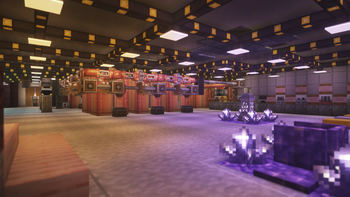
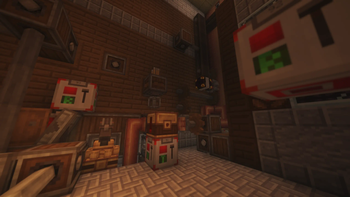
Welcome to THF Industrial, a cutting-edge Minecraft modpack tailored for version 1.20.1, inspired in classic Tekkit where industrial innovation meets the limitless creativity of Minecraft, from steam engines to computers!
Screenshots
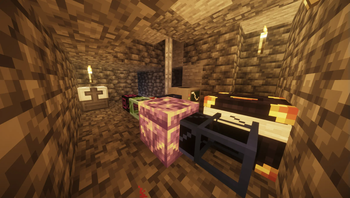
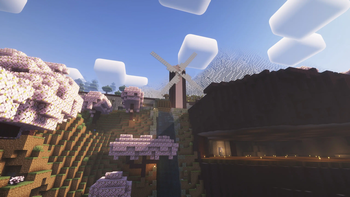
Über dieses Modpack
Welcome to THF Industrial, a Minecraft modpack tailored for version 1.20.1, where industrial innovation meets the limitless creativity of Minecraft. Explore a world enriched with technological wonders, from advanced machinery to intricate automation systems, all set within a thematic blend of steampunk and modern industrial aesthetics.
Key Features:
Tech Reborn:
Delve into the next generation of industrialization with Tech Reborn, offering a comprehensive suite of advanced machinery and tools. From ore processing to energy generation, Tech Reborn empowers players to master the art of industrial crafting.
ComputerCraft (CC) / CC: Tweaked:
Unleash your programming skills with ComputerCraft, allowing you to automate tasks and control devices using Lua programming. With CC: Tweaked, enhance your scripting capabilities and expand the scope of automation across your industrial empire.
Create Fabric:
Transform your world with Create Fabric, a revolutionary mod introducing mechanical engineering at its finest. Build intricate contraptions, automate processes, and construct awe-inspiring structures using gears, belts, and mechanical blocks.
Applied Energistics 2 (AE2):
Experience unparalleled storage and automation capabilities with Applied Energistics 2. Manage vast inventories seamlessly, craft with precision, and optimize resource processing to fuel your industrial ambitions.
Lamps (Additional Lanterns, Distant Horizons):
Illuminate your creations with style using Additional Lanterns and Distant Horizons. These mods offer a wide array of lighting solutions, from decorative lanterns to futuristic light sources, enhancing both functionality and ambiance.
Tectonic:
Embark on geological adventures with Tectonic, where the earth itself becomes your playground. Explore dynamic landscapes, harness natural resources, and uncover geological marvels in your quest for industrial dominance.
Embrace the Industrial Revolution:
THF Industrial invites you to redefine the boundaries of industrialization within Minecraft. Whether you're constructing massive factories powered by Tech Reborn, programming intricate systems with ComputerCraft, or engineering complex machinery using Create Fabric, every aspect of this modpack is crafted to ignite your creativity and challenge your engineering prowess.
Forge alliances with fellow engineers, embark on ambitious projects, and carve your legacy in the annals of industrial history. From towering steam-powered structures to sleek, automated facilities, THF Industrial is your gateway to a world where innovation and imagination converge. Are you ready to build the future?
Verfügbare Versionen
THF Industrial Server einrichten
Server bestellen
Wähle mindestens 6 GB RAM (8 GB empfohlen für THF Industrial). Je nach Spieleranzahl: +1 GB pro 5 Spieler.
Modpack im Dashboard installieren
Öffne den Modpack-Browser im Dashboard, suche nach "THF Industrial" und klicke "Installieren". Der fabric-Loader und Minecraft 1.20.1 werden automatisch konfiguriert.
Server starten & spielen
Starte den Server – alle Mods werden automatisch geladen. Teile die Server-IP mit Freunden und spielt zusammen!
Häufige Fragen
THF Industrial Server crasht oder startet nicht – was tun?
Häufigste Ursachen: zu wenig RAM oder falscher fabric-Loader. Prüfe latest.log auf "OutOfMemoryError" → erhöhe RAM auf mindestens 8 GB. Bei "Mixin" oder "ClassNotFoundException": Modpack-Version und Loader stimmen nicht überein. Bei Mado Hosting werden Loader und Minecraft-Version beim Modpack-Install automatisch konfiguriert – das verhindert die meisten Startprobleme.
Wie viel RAM braucht ein THF Industrial Server wirklich?
Minimum 6 GB, empfohlen 8 GB für stabile Performance. +1 GB pro 5 Spieler. Wichtig: Minecraft-Modpacks brauchen mehr RAM als Vanilla – plane pro zusätzlichem Spieler extra ein. Bei Mado Hosting kannst du den RAM jederzeit live hochskalieren, ohne Datenverlust (ab €7.800000000000001/Monat).
Kann ich eigene Mods zu THF Industrial hinzufügen, ohne Konflikte?
Ja, aber achte auf die Kompatibilität: Nutze nur Mods für den gleichen Loader (fabric) und die gleiche Minecraft-Version (1.20.1). Häufige Probleme: ID-Konflikte bei Rezept-Mods und inkompatible Coremod-Versionen. Im Mado Dashboard zeigt der Mod-Browser nur kompatible Mods an und warnt bei bekannten Konflikten.
THF Industrial Server laggt – Performance-Tipps
1) RAM auf 8 GB+ erhöhen. 2) Server-View-Distance auf 8 reduzieren (server.properties). 3) Pre-Generiere Chunks mit dem "Chunky" Plugin. 4) Prüfe mit /spark profiler welche Mods die meiste Tick-Time verbrauchen. Bei Mado Hosting laufen alle Server auf NVMe-SSDs mit dedizierten CPU-Kernen – das eliminiert Hardware als Engpass.
Ähnliche Modpacks
![Cobblemon Official Modpack [Fabric]](https://cdn.modrinth.com/data/5FFgwNNP/e7f9ee2e9d361623847853fe2ddce42f519ee64f.png)
![COBBLEVERSE - Pokemon Adventure [Cobblemon]](https://cdn.modrinth.com/data/Jkb29YJU/581ecf54530972afb18a04660afd820f2f24f6c7.png)
![Better MC [FABRIC] - BMC2](https://cdn.modrinth.com/data/shFhR8Vx/a19c2bcb51d38f32f138d3607e91cb2b7b8e387f_96.webp)


![Better MC [FORGE] - BMC4](https://cdn.modrinth.com/data/4BV47HRn/7f5ef7cc61b2593609aabef3ed07a866a4f11b73_96.webp)
THF Industrial Server mieten
Starte deinen eigenen Server mit automatischer Modpack-Installation.
Unterstützte Versionen
Starte deinen THF Industrial Server jetzt
Ab €7.80/Monat; für die beste Performance werden 8 GB RAM empfohlen.
Server konfigurieren →