![[DISCONTINUED] Subjectively Correct](https://cdn.modrinth.com/data/5mooS7A7/a215eb0552dddf63c1aee6174d6f17f3ef574ad2_96.webp)
[DISCONTINUED] Subjectively Correct
The correct way to play modded Minecraft, in my subjective opinion.
Screenshots

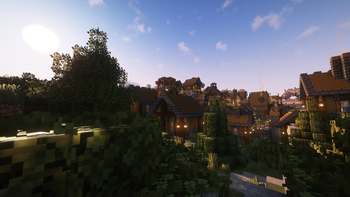
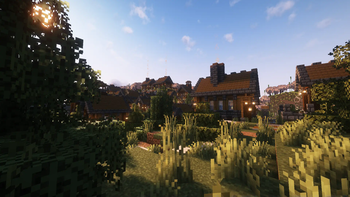
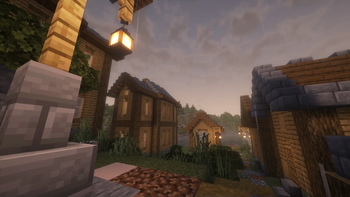
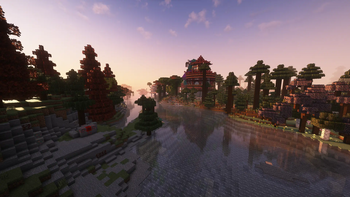
Über dieses Modpack
Working on a new modpack
I was planning on releasing what I had planned for 3.0, but something seems to have gone wrong when updating and most of my mods seem to be incompatible with each other :(
It's out btw: https://modrinth.com/modpack/iatj

This modpack aims to make Minecraft feel better, no matter how you prefer to play! Whether you're a builder, a survivor, or someone looking for a fun hour with friends, you're sure to have a great time!
It is recommended to run this pack with at least 4GB of RAM on an at least mid-range laptop.
If you can run GMod with a hundred addons, you can run this pack with little to no issues. Tinker with the settings and find what works best for your computer.
If you enjoy this pack and would like to help me out finacially, consider donating to either my CashApp or you could buy me a coffee!
This pack features mods like Progression Reborn, Better Combat, Marium's Soulslike Weaponry, SimplySkills, Dungeon Difficulty, Teralith, Nullscape, almost all of YUNG's worldgen mods, Another Furniture, Blockus, and a ton more!
There's also some resource packs to help tie everything together, like:
3 custom panoramas to show off the pack in all it's beauty!
- Dark Oak and Spruce Wood options backgrounds ripped from Vanilla Tweaks
Vanilla+ Collections by bebebea_loste (Slightly Modified)
A Vanilla Tweaks preset
A few more that make the game feel much more comfortable, even while in the heat of battle!
This pack also adds an easy-to-use way to play with friends thanks to WAN Party and OfflineSkins!
This modpack also includes Complimentary Shaders, pre-configured with Euphoria Patches!
Verfügbare Versionen
[DISCONTINUED] Subjectively Correct Server einrichten
Server bestellen
Wähle mindestens 6 GB RAM (8 GB empfohlen für [DISCONTINUED] Subjectively Correct). Je nach Spieleranzahl: +1 GB pro 5 Spieler.
Modpack im Dashboard installieren
Öffne den Modpack-Browser im Dashboard, suche nach "[DISCONTINUED] Subjectively Correct" und klicke "Installieren". Der fabric-Loader und Minecraft 1.20.1 werden automatisch konfiguriert.
Server starten & spielen
Starte den Server – alle Mods werden automatisch geladen. Teile die Server-IP mit Freunden und spielt zusammen!
Häufige Fragen
[DISCONTINUED] Subjectively Correct Server crasht oder startet nicht – was tun?
Häufigste Ursachen: zu wenig RAM oder falscher fabric-Loader. Prüfe latest.log auf "OutOfMemoryError" → erhöhe RAM auf mindestens 8 GB. Bei "Mixin" oder "ClassNotFoundException": Modpack-Version und Loader stimmen nicht überein. Bei Mado Hosting werden Loader und Minecraft-Version beim Modpack-Install automatisch konfiguriert – das verhindert die meisten Startprobleme.
Wie viel RAM braucht ein [DISCONTINUED] Subjectively Correct Server wirklich?
Minimum 6 GB, empfohlen 8 GB für stabile Performance. +1 GB pro 5 Spieler. Wichtig: Minecraft-Modpacks brauchen mehr RAM als Vanilla – plane pro zusätzlichem Spieler extra ein. Bei Mado Hosting kannst du den RAM jederzeit live hochskalieren, ohne Datenverlust (ab €7.800000000000001/Monat).
Kann ich eigene Mods zu [DISCONTINUED] Subjectively Correct hinzufügen, ohne Konflikte?
Ja, aber achte auf die Kompatibilität: Nutze nur Mods für den gleichen Loader (fabric) und die gleiche Minecraft-Version (1.20.1). Häufige Probleme: ID-Konflikte bei Rezept-Mods und inkompatible Coremod-Versionen. Im Mado Dashboard zeigt der Mod-Browser nur kompatible Mods an und warnt bei bekannten Konflikten.
[DISCONTINUED] Subjectively Correct Server laggt – Performance-Tipps
1) RAM auf 8 GB+ erhöhen. 2) Server-View-Distance auf 8 reduzieren (server.properties). 3) Pre-Generiere Chunks mit dem "Chunky" Plugin. 4) Prüfe mit /spark profiler welche Mods die meiste Tick-Time verbrauchen. Bei Mado Hosting laufen alle Server auf NVMe-SSDs mit dedizierten CPU-Kernen – das eliminiert Hardware als Engpass.
Ähnliche Modpacks
![Cobblemon Official Modpack [Fabric]](https://cdn.modrinth.com/data/5FFgwNNP/e7f9ee2e9d361623847853fe2ddce42f519ee64f.png)
![COBBLEVERSE - Pokemon Adventure [Cobblemon]](https://cdn.modrinth.com/data/Jkb29YJU/581ecf54530972afb18a04660afd820f2f24f6c7.png)
![Better MC [FABRIC] - BMC2](https://cdn.modrinth.com/data/shFhR8Vx/a19c2bcb51d38f32f138d3607e91cb2b7b8e387f_96.webp)


![Better MC [FORGE] - BMC4](https://cdn.modrinth.com/data/4BV47HRn/7f5ef7cc61b2593609aabef3ed07a866a4f11b73_96.webp)
[DISCONTINUED] Subjectively Correct Server mieten
Starte deinen eigenen Server mit automatischer Modpack-Installation.
Details
- Lizenz
- Creative Commons Attribution Non Commercial 4.0 International
- Server-seitig
- Erforderlich
- Client-seitig
- Erforderlich
Unterstützte Versionen
Starte deinen [DISCONTINUED] Subjectively Correct Server jetzt
Ab €7.80/Monat; für die beste Performance werden 8 GB RAM empfohlen.
Server konfigurieren →