
WoKPack
World Of Keralis mod pack with recommended mods
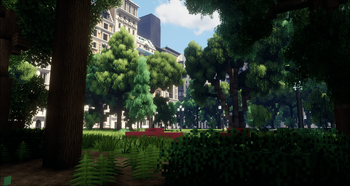
Screenshots
Über dieses Modpack
WoKPack
WoKPack is a performance-oriented Minecraft mod pack designed to enhance gameplay while keeping the experience smooth and efficient. Each mod has been carefully selected to deliver optimized performance, immersive features, and practical quality-of-life improvements. This mod pack is specifically designed for World of Keralis Creative.
Focus Areas and Key Dependencies
1. Performance optimizations:
- Sodium: (including Reeses Sodium Options): A powerful rendering engine for better FPS.
- Lithium: Optimizes game logic for smoother gameplay.
- FerriteCore: Reduces memory usage to improve stability.
- C2ME: Improves chunk performance, especially for larger worlds.
- Krypton: Enhances networking performance and reduces latency.
- EntityCulling: Reduces rendering load by skipping unseen entities.
- ImmediatelyFast: Optimizes block rendering.
- ModernFix: Addresses common compatibility and optimization issues.
- Noisium: Provides sound feedback for in-game events.
- **Dynamic FPS: Enables framerate cap when game window is not selected
- Better Biome Reblend: Replaces vanilla's biome blend algorithm with a more efficient one
- ScalableLux: Rewrites lighting engine to be more efficient
2. Additional Optifine parody features:
- Iris: Adds shader support for a visually stunning experience.
- Polytone: Enhances the overall aesthetic of your builds.
- Continuity: Adds seamless connected textures for a polished look.
- Capes: Adds customization options for player visuals.
- JustZoom: Offers enhanced zoom functionality.
- Entity Model Features: Adds Optifinelike entity model features
- Entity Texture Features: Adds Optifinelike entity texture features
- LambDynamicLights: Adds Optifinelike dynamic lights
3. Quality of life features:
- WorldEdit: Provides powerful tools for building and editing large structures.
- Axiom: Turns minecraft into 3d modeling software
- Itemswapper: Speeds up inventory management by swapping tools automatically.
- Jade: Displays helpful block and entity information.
- Bobby: Allows for higher render distances than server maximum
- Cubes Without borders: add windowed borderless as a display option
- Resourcify: allows you to install and update resourcepacks (including wokflows) and shaderpacks from in game
- 3D-Skin-Layers: Displays avatar skins layers as 3d
- BetterF3: Cleans up the f3 menu and makes it more readable
- Bigshot: Allows for higher resolution screenshots
- Language Reload: Allows for languages to load faster
- Model Gap Fix: Fixes gaps in models
- More Chat History: Allows you to scroll further up in chat
- Remove Loading Screen: Removes the loading screen, allowing you to get back into game faster
- No Telemetry: Removes telemetry
- Smooth Skies: removes line in the skybox
Verfügbare Versionen
WoKPack Server einrichten
Server bestellen
Wähle mindestens 6 GB RAM (8 GB empfohlen für WoKPack). Je nach Spieleranzahl: +1 GB pro 5 Spieler.
Modpack im Dashboard installieren
Öffne den Modpack-Browser im Dashboard, suche nach "WoKPack" und klicke "Installieren". Der fabric-Loader und Minecraft 1.21.11 werden automatisch konfiguriert.
Server starten & spielen
Starte den Server – alle Mods werden automatisch geladen. Teile die Server-IP mit Freunden und spielt zusammen!
Häufige Fragen
WoKPack Server crasht oder startet nicht – was tun?
Häufigste Ursachen: zu wenig RAM oder falscher fabric-Loader. Prüfe latest.log auf "OutOfMemoryError" → erhöhe RAM auf mindestens 8 GB. Bei "Mixin" oder "ClassNotFoundException": Modpack-Version und Loader stimmen nicht überein. Bei Mado Hosting werden Loader und Minecraft-Version beim Modpack-Install automatisch konfiguriert – das verhindert die meisten Startprobleme.
Wie viel RAM braucht ein WoKPack Server wirklich?
Minimum 6 GB, empfohlen 8 GB für stabile Performance. +1 GB pro 5 Spieler. Wichtig: Minecraft-Modpacks brauchen mehr RAM als Vanilla – plane pro zusätzlichem Spieler extra ein. Bei Mado Hosting kannst du den RAM jederzeit live hochskalieren, ohne Datenverlust (ab €7.800000000000001/Monat).
Kann ich eigene Mods zu WoKPack hinzufügen, ohne Konflikte?
Ja, aber achte auf die Kompatibilität: Nutze nur Mods für den gleichen Loader (fabric) und die gleiche Minecraft-Version (1.21.11). Häufige Probleme: ID-Konflikte bei Rezept-Mods und inkompatible Coremod-Versionen. Im Mado Dashboard zeigt der Mod-Browser nur kompatible Mods an und warnt bei bekannten Konflikten.
WoKPack Server laggt – Performance-Tipps
1) RAM auf 8 GB+ erhöhen. 2) Server-View-Distance auf 8 reduzieren (server.properties). 3) Pre-Generiere Chunks mit dem "Chunky" Plugin. 4) Prüfe mit /spark profiler welche Mods die meiste Tick-Time verbrauchen. Bei Mado Hosting laufen alle Server auf NVMe-SSDs mit dedizierten CPU-Kernen – das eliminiert Hardware als Engpass.
Ähnliche Modpacks


WoKPack Server mieten
Starte deinen eigenen Server mit automatischer Modpack-Installation.
Details
- Lizenz
- Creative Commons Attribution Non Commercial No Derivatives 4.0 International
- Server-seitig
- Optional
- Client-seitig
- Optional
Unterstützte Versionen
Starte deinen WoKPack Server jetzt
Ab €7.80/Monat; für die beste Performance werden 8 GB RAM empfohlen.
Server konfigurieren →