
Alchemist's Garden
🌱 Explore a magical world full of new plants and creatures!
Screenshots

Über diese Mod
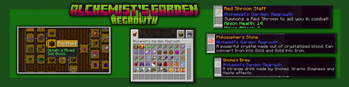
Alchemist's Garden is a mod that focuses on populating your world with magical creatures & plants! While exploring the Overworld with this mod installed, you'll stumble across: new creatures, plants, blocks, structures and more! Become a magical gardener who uses the power of magical plants! This mod tries to stick to Vanilla Minecraft while adding new mechanics!
📖 Check out the wiki! https://github.com/VortzPlays/AlchemistsGarden/wiki
Introducing Alchemist's Garden: Regrowth, a TON of content and issues have been fixed, go check it out!
📚 Compatibility with other mods:
The Bumblezone (Forge) - https://modrinth.com/mod/the-bumblezone
While exploring the Bumblezone, you may find flowers from this mod spawning around in the Bumblezone.
Pollen Puffs will now have an effect on Shrooms. Throw some Pollen Puff at Shrooms to grow some mushrooms around them! The Bezoar Stone can also be handy when exploring the dimension for the first time, as it removes poison when used.
Thanks to TelepathicGrunt, for adding compatibility with Bumblezone!
If your mod adds compatibility with Alchemist's Garden contact me, so I can update this list!
Yes, you can use this mod in any modpacks (a link to this mod somewhere would be strongly appreciated).
Make sure to download the latest version and only report bugs from last versions.
Please backup your world before adding this mod.
Suggestions are appreciated!
Do not upload this mod to any third-party websites.
Verfügbare Versionen
Alchemist's Garden auf dem Server installieren
Server bestellen
Bestelle einen Minecraft Java Server mit mindestens 3 GB RAM (4 GB empfohlen).
forge Loader setzen
Wähle im Panel unter "Egg" den forge-Loader und die passende Minecraft-Version (1.20.1).
Mod installieren
Öffne den Mod-Browser im Dashboard und suche nach "Alchemist's Garden". Klicke "Installieren" – fertig! Alternativ: Lade die .jar via SFTP in den /mods Ordner.
Kompatibilität
Mod-Loader
Minecraft-Versionen
1.20.1, 1.19.4, 1.19.2
Server-seitig
✓ ErforderlichEmpfohlener RAM
4 GB(min. 3 GB)Häufige Fragen
Alchemist's Garden Server crasht beim Start – was tun?
Häufigste Ursache: falsche forge-Version oder zu wenig RAM. Prüfe im Server-Log (latest.log), ob ein "OutOfMemoryError" oder "Mixin"-Fehler auftritt. Bei Mado Hosting: Stelle sicher, dass mindestens 3 GB RAM zugewiesen sind und der Loader zur Mod-Version passt (1.20.1). Über das Panel kannst du den Loader mit einem Klick wechseln.
Ist Alchemist's Garden mit forge kompatibel?
Alchemist's Garden unterstützt offiziell forge für Minecraft 1.20.1, 1.19.4, 1.19.2. Im Mado Dashboard werden inkompatible Loader-Kombinationen automatisch erkannt.
Server laggt mit Alchemist's Garden – wie optimiere ich die Performance?
Empfohlener RAM: 4 GB (+1 GB pro 8 Spieler). Prüfe mit /spark profiler, ob Alchemist's Garden den meisten Tick-Time verbraucht. Häufige Fixes: Server-View-Distance auf 8-10 reduzieren, bei Forge "performant" oder "starlight" als Zusatz-Mod installieren. Bei Mado Hosting läuft dein Server auf NVMe-SSDs mit dedizierten CPU-Kernen für minimale Latenz.
Ähnliche Mods




Modded Server mieten
Installiere Alchemist's Garden mit nur einem Klick auf deinem Server.