Animation vs Player
Adds Alan Becker's Animation vs Minecraft into the game! Currently in BETA phase so only limited features!
Screenshots

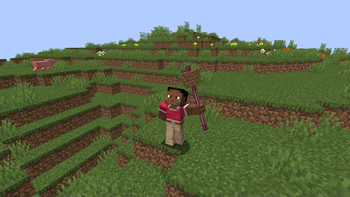
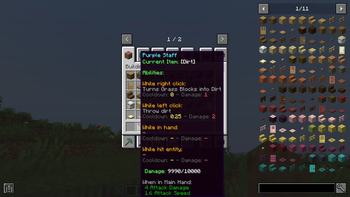
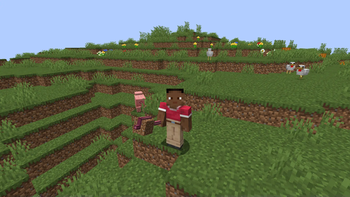
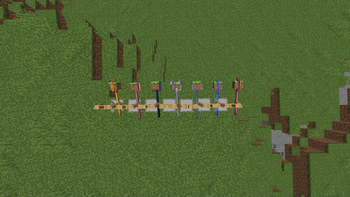

Über diese Mod
This mod is a brand new take on Alan Becker's 'Animation vs Minecraft' series!
This mod is currently in BETA phase, so most features aren't yet implemented. More features and survival gameplay coming soon!
FAQ:
- How do I put a block in the staff?: Hold the staff in your off hand with the block in your main hand and then right click.
OTHER MODS (0.1.0 - 0.2.0):
Required:
- Geckolib
- Player Animator
Recommended:
- JEI
CURRENT FEATURES:
Music Discs:
Spoiler
- Jazzy Note Blocks
- Green's Jam
- Note Block Battle
- Rhapsody in Blue
- Flight of the Bumblebee
- Rush E
Staffs:
Spoiler
- Purple Staff
- Blue Staff
- Light Blue Staff
- Grey Staff
- Black Staff
- Pink Staff
- Lucky Staff
Staff Blocks:
Spoiler
- Grass Block
- Stone
- Dirt
- Cobblestone
- Sand
- Oak Log
- Oak Planks
- Iron Block
- Cake
- Crafting Table (WIP)
- Diamond Block (WIP
- Dispenser (WIP)
- Egg
- Gold Block
- Grindstone (WIP)
- Lighting Rod
- Magma Block
- Netherite Block (WIP)
- Redstone Block (Very WIP, but essentially works)
- White Wool
- Campfire (Kinda WIP)
- TNT
Currently useless stuff:
Spoiler
- Different Minecraft App Icons
- Document
- File Folder
- Image
- Black Hole
- PC blocks
- Alan's PC dimension (empty)
Gamerules:
Spoiler
- Cooldown Percentage: Multiplies Staff Cooldowns by the given percentage.
- Unregistered Staff Items: Allows putting items that don't function in the staff into the staff.
THIS MOD IS NOT AFFILIATED OR APPROVED BY ALAN BECKER
Original Videos (CHECK THEM OUT IF YOU HAVEN'T ALREADY): https://www.youtube.com/@alanbecker
Verfügbare Versionen
Animation vs Player auf dem Server installieren
Server bestellen
Bestelle einen Minecraft Java Server mit mindestens 3 GB RAM (4 GB empfohlen).
forge Loader setzen
Wähle im Panel unter "Egg" den forge-Loader und die passende Minecraft-Version (1.20.1).
Mod installieren
Öffne den Mod-Browser im Dashboard und suche nach "Animation vs Player". Klicke "Installieren" – fertig! Alternativ: Lade die .jar via SFTP in den /mods Ordner.
Kompatibilität
Mod-Loader
Minecraft-Versionen
1.20.1
Server-seitig
✓ ErforderlichEmpfohlener RAM
4 GB(min. 3 GB)Häufige Fragen
Animation vs Player Server crasht beim Start – was tun?
Häufigste Ursache: falsche forge-Version oder zu wenig RAM. Prüfe im Server-Log (latest.log), ob ein "OutOfMemoryError" oder "Mixin"-Fehler auftritt. Bei Mado Hosting: Stelle sicher, dass mindestens 3 GB RAM zugewiesen sind und der Loader zur Mod-Version passt (1.20.1). Über das Panel kannst du den Loader mit einem Klick wechseln.
Ist Animation vs Player mit forge kompatibel?
Animation vs Player unterstützt offiziell forge für Minecraft 1.20.1. Im Mado Dashboard werden inkompatible Loader-Kombinationen automatisch erkannt.
Server laggt mit Animation vs Player – wie optimiere ich die Performance?
Empfohlener RAM: 4 GB (+1 GB pro 8 Spieler). Prüfe mit /spark profiler, ob Animation vs Player den meisten Tick-Time verbraucht. Häufige Fixes: Server-View-Distance auf 8-10 reduzieren, bei Forge "performant" oder "starlight" als Zusatz-Mod installieren. Bei Mado Hosting läuft dein Server auf NVMe-SSDs mit dedizierten CPU-Kernen für minimale Latenz.
Ähnliche Mods




Modded Server mieten
Installiere Animation vs Player mit nur einem Klick auf deinem Server.
Details
- Lizenz
- Creative Commons Attribution Share Alike 4.0 International
- Server-seitig
- Erforderlich