
Arcana Novum
Minecraft's Biggest Server-Only Magic Mod!
Screenshots


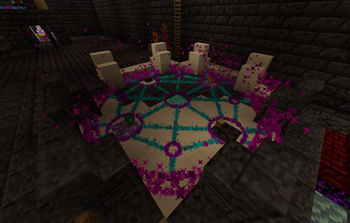

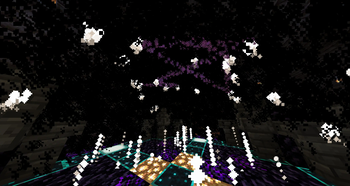

Über diese Mod

Minecraft's Biggest Server-Side Magic Mod
Powerful magic items, multiblock structures, custom bosses, and deep lore.
All Server-Sided; Players don't need any mods.






Features
- 80+ Arcana Items across five rarities, from Mundane to Divine: charms, runic arrows, weapons, armor, tools and utility blocks.
- The Starlight Forge, a multiblock crafting station that grows with you through five Forge Additions.
- Altars and multiblocks, such as the Starpath Altar that teleports you across the world, and the Transmutation Altar with over 100 transmutations.
- Research and progression. Complete research tasks to unlock recipes, earn Arcana XP by using your items, and level up to wield more of them at once.
- 190+ Augmentations. Spend skill points to unlock augments that strengthen an item or change how it works.
- 160+ Achievements that reward XP and skill points.
- Boss fights and Divine items. Custom boss encounters and rare events are the only way to obtain Divine items.
- Built for servers. No client mods, in-game GUIs for everything, a resource pack served by the server, 400+ config options and a permission node for every command.
| Forging at the Starlight Forge | The Starpath Altar | Late-game gear |
|---|---|---|
|
|
|
More screenshots are in the gallery.
Getting Started
Everything in the mod is explained by the Tome of Arcana Novum, your in-game guide book. To make one:
- Craft Mundane Arcane Paper. Put any Enchanted Book in the middle of a crafting table with 4 Paper around it, one on each side. This gives you 4 Mundane Arcane Paper.
- Bind the Tome. Throw all 4 Mundane Arcane Paper and an Eye of Ender onto an Enchanting Table. After a moment they combine into the Tome of Arcana Novum.
- Open the Tome by right clicking with it. It shows your profile and the Compendium, which lists every Arcana Item with its recipe and research tasks.
- Research and build the Starlight Forge. This is your first big goal, since it is where Arcana Items are crafted.
/arcana guide opens a short introduction book at any time, even without a Tome.
Wiki
The Arcana Novum Wiki documents every item, multiblock and mechanic in the mod, along with its recipes, transmutations, config options and lore.
Videos
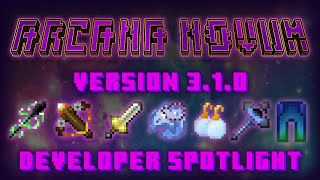
| 3.0 Spotlight / Tutorial | Arcana 3.1 Spotlight |
|---|---|
 |
 |
Server Setup
- Install Fabric Loader and Fabric API on your server, then put the Arcana Novum jar in the
modsfolder. Every other library is bundled, and players do not need to install anything. - Launch the server once to generate the configs.
- Open
config/polymer/auto-host.jsonand change"enabled": falsetotrue. The server now generates the mod's resource pack and sends it to players when they connect. - (Optional) In the same file you can make the resource pack required, or set the
"message"that players see when they are asked to download it.
Commands
/arcana guideOpens the Arcana Guide Book (/arcana helpdoes the same)./arcana itemsShows your Arcane Concentration usage and the items taking concentration./arcana showShows off the Arcana Item in your main hand to all players on the server./arcana blocksLists all of your placed Arcana Blocks, including their location and dimension./arcana versionShows the current Arcana Novum mod version.
Admins have commands for creating items, managing XP, skill points, research, achievements and augments, and running boss fights. Every config value can be viewed and changed in game with /arcana config <setting> [value], and every command has a Fabric Permissions API node with a vanilla permission level fallback.
The full reference is on GitHub: commands, configuration and permission nodes.
Try My Other Mods!
All server-side Fabric mods — no client installation required.
| Mod | Description | Links | |
|---|---|---|---|
 |
Ancestral Archetypes | A highly configurable, Origins-style mod that lets players pick a mob to gain unique abilities! |    |
 |
Ender Nexus | Highly configurable /home, /spawn, /warp, /tpa and /rtp commands all in one, and individually disablable. | |
 |
Fabric Mail | An in-game virtual mailbox system for sending packages and messages between online and offline players. | |
 |
Fabric Trade | Adds /trade, a secure player-to-player trading interface. | |
 |
Limited AFK | AFK detection and management with configurable kick thresholds for servers. | |
 |
Links in Chat | Makes URLs posted in chat clickable. | |
Support
Questions go to the Discord, and bug reports and suggestions go to GitHub Issues.
License Notice
By using this project in any form, you hereby give your "express assent" for the terms of the license of this project, and acknowledge that I, BorisShoes, have fulfilled my obligation under the license to "make a reasonable effort under the circumstances to obtain the express assent of recipients to the terms of this License."
Verfügbare Versionen
Arcana Novum auf dem Server installieren
Server bestellen
Bestelle einen Minecraft Java Server mit mindestens 3 GB RAM (4 GB empfohlen).
fabric Loader setzen
Wähle im Panel unter "Egg" den fabric-Loader und die passende Minecraft-Version (26.3).
Mod installieren
Öffne den Mod-Browser im Dashboard und suche nach "Arcana Novum". Klicke "Installieren" – fertig! Alternativ: Lade die .jar via SFTP in den /mods Ordner.
Kompatibilität
Mod-Loader
Minecraft-Versionen
26.3, 26.2, 26.1.2 (+8 weitere)
Server-seitig
✓ ErforderlichEmpfohlener RAM
4 GB(min. 3 GB)Häufige Fragen
Arcana Novum Server crasht beim Start – was tun?
Häufigste Ursache: falsche fabric-Version oder zu wenig RAM. Prüfe im Server-Log (latest.log), ob ein "OutOfMemoryError" oder "Mixin"-Fehler auftritt. Bei Mado Hosting: Stelle sicher, dass mindestens 3 GB RAM zugewiesen sind und der Loader zur Mod-Version passt (26.3). Über das Panel kannst du den Loader mit einem Klick wechseln.
Ist Arcana Novum mit fabric kompatibel?
Arcana Novum unterstützt offiziell fabric für Minecraft 26.3, 26.2, 26.1.2. Im Mado Dashboard werden inkompatible Loader-Kombinationen automatisch erkannt.
Server laggt mit Arcana Novum – wie optimiere ich die Performance?
Empfohlener RAM: 4 GB (+1 GB pro 8 Spieler). Prüfe mit /spark profiler, ob Arcana Novum den meisten Tick-Time verbraucht. Häufige Fixes: Server-View-Distance auf 8-10 reduzieren, bei Forge "performant" oder "starlight" als Zusatz-Mod installieren. Bei Mado Hosting läuft dein Server auf NVMe-SSDs mit dedizierten CPU-Kernen für minimale Latenz.
Ähnliche Mods



![[TaCZ] Timeless and Classics Zero](https://cdn.modrinth.com/data/SzzJttH8/fd27766d2bb8390d284696b1dbd358f87e081439_96.webp)


Modded Server mieten
Installiere Arcana Novum mit nur einem Klick auf deinem Server.