
Armour Durablity Hud
Display the durability of all wearable equipment directly on the HUD with customizable positioning and scaling
Screenshots
Über diese Mod
Armour Durability HUD
Tired of your armour breaking mid-fight without warning? The Armour Durability HUD mod is here to save the day!
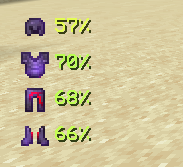
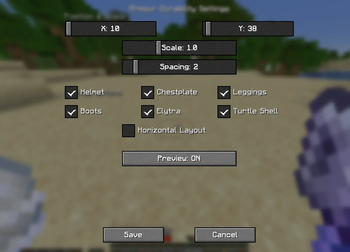
This lightweight and powerful mod adds a customizable HUD on your screen that shows the durability of every piece of armour you’re wearing – including helmets, chestplates, leggings, boots, elytra, turtle shells, and more.
Features Overview
On-Screen Armour HUD
Always know the condition of your armour without opening the inventory.Durability in Percentage
The HUD displays exact percentages, making it easy to decide when to repair or swap gear.Colour-Coded Alerts
- 🟢 Green = High durability
- 🟡 Yellow = Mid durability
- 🟠 Orange = Between Mid and Low durability
- 🔴 Red = Low durability (time to repair or replace!)
Supports All Wearables
Works with every vanilla wearable item, from diamond armour to elytra.Customizable Placement
Adjust the HUD position by clicking "O" on keyboard to match your screen layout and preferences.
Verfügbare Versionen
Armour Durablity Hud auf deinem Client installieren
Mod-Loader lokal installieren
Installiere fabric für deine lokale Minecraft-Version.
Passende Datei herunterladen
Wähle die Armour Durablity Hud-Datei für fabric und Minecraft 26.3.
Mod installieren
Lege die .jar-Datei in deinem lokalen .minecraft/mods-Ordner ab und starte Minecraft neu. Eine Installation auf dem Server ist nicht nötig.
Kompatibilität
Mod-Loader
Minecraft-Versionen
26.3, 26.2, 26.1.2 (+14 weitere)
Server-seitig
✗ Nicht unterstütztEmpfohlener RAM
4 GB(min. 3 GB)Häufige Fragen
Muss Armour Durablity Hud auf dem Minecraft Server installiert werden?
Nein. Modrinth kennzeichnet Armour Durablity Hud serverseitig als nicht unterstützt. Installiere die Mod nur im lokalen Minecraft-Mods-Ordner. Dein Server kann unverändert bleiben, sofern die Mod-Seite keine zusätzliche Abhängigkeit nennt.
Welche Version und welchen Loader braucht Armour Durablity Hud?
Nutze eine Datei für fabric und exakt deine Minecraft-Version. Unterstützte Versionen sind unter anderem 26.3, 26.2, 26.1.2. Loader-Dateien sind nicht untereinander austauschbar.
Armour Durablity Hud funktioniert nicht – was kann ich prüfen?
Prüfe zuerst Minecraft-Version, Loader-Version und erforderliche Abhängigkeiten. Lege die .jar-Datei im lokalen .minecraft/mods-Ordner ab und entferne ältere Duplikate. Da die Mod clientseitig ist, löst mehr Server-RAM dieses Problem nicht.
Ähnliche Mods



![[TaCZ] Timeless and Classics Zero](https://cdn.modrinth.com/data/SzzJttH8/fd27766d2bb8390d284696b1dbd358f87e081439_96.webp)


Minecraft Server für deine Gruppe
Armour Durablity Hud bleibt auf deinem Client. Hoste dazu eine kompatible Welt für deine Mitspieler.