
ASM Robots
A Minecraft mod around coding robots in assembly
Screenshots
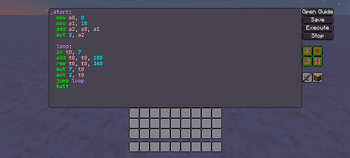
Über diese Mod
ASM Robots
Table of Contents
About
A Minecraft mod around coding robots in assembly.
This mod is similar to mods such as Computer Craft and OpenComputers, except with 2 main differences:
- You program an entity instead of a block
- You program in assembly instead of in lua
Why I made this
- I like coding in assembly and wanted to make something with assembly myself (and because doing this with assembly is easier than writing a compiler)
- I was inspired by Mnemonimov releasing (great game btw, if you also like assembly you should try it)
- I wanted to make something like Computer Craft for a while
- I chose to use entities to distinguish it from Computer Craft and because I haven't seen much in the way of programmable entities in Minecraft
Documentation
Documentation can be accessed from the code editor in the robot's UI.
I will probably make it available out of the game at some point.
Installation
Install the mod by putting the file into minecraft/mods/ alongside a version of LDLib2, Kotlin for Forge and GuideME on a neoforge install for 26.1.2.
If you do not know how to install NeoForge, see their user guide.
Building
To build the mod, clone this repo and run gradle neoforge:build
Demo

Verfügbare Versionen
ASM Robots auf dem Server installieren
Server bestellen
Bestelle einen Minecraft Java Server mit mindestens 3 GB RAM (4 GB empfohlen).
neoforge Loader setzen
Wähle im Panel unter "Egg" den neoforge-Loader und die passende Minecraft-Version (26.1.2).
Mod installieren
Öffne den Mod-Browser im Dashboard und suche nach "ASM Robots". Klicke "Installieren" – fertig! Alternativ: Lade die .jar via SFTP in den /mods Ordner.
Kompatibilität
Mod-Loader
Minecraft-Versionen
26.1.2
Server-seitig
✓ ErforderlichEmpfohlener RAM
4 GB(min. 3 GB)Häufige Fragen
ASM Robots Server crasht beim Start – was tun?
Häufigste Ursache: falsche neoforge-Version oder zu wenig RAM. Prüfe im Server-Log (latest.log), ob ein "OutOfMemoryError" oder "Mixin"-Fehler auftritt. Bei Mado Hosting: Stelle sicher, dass mindestens 3 GB RAM zugewiesen sind und der Loader zur Mod-Version passt (26.1.2). Über das Panel kannst du den Loader mit einem Klick wechseln.
Ist ASM Robots mit neoforge kompatibel?
ASM Robots unterstützt offiziell neoforge für Minecraft 26.1.2. Im Mado Dashboard werden inkompatible Loader-Kombinationen automatisch erkannt.
Server laggt mit ASM Robots – wie optimiere ich die Performance?
Empfohlener RAM: 4 GB (+1 GB pro 8 Spieler). Prüfe mit /spark profiler, ob ASM Robots den meisten Tick-Time verbraucht. Häufige Fixes: Server-View-Distance auf 8-10 reduzieren, bei Forge "performant" oder "starlight" als Zusatz-Mod installieren. Bei Mado Hosting läuft dein Server auf NVMe-SSDs mit dedizierten CPU-Kernen für minimale Latenz.
Ähnliche Mods





Modded Server mieten
Installiere ASM Robots mit nur einem Klick auf deinem Server.