
Auto Eater
This is a simple client mod to stop worrying about eating all the time, that selects the food and eats it. It detects whenever the foodbar falls a certain threshold, selects food in your hotbar, and starts eating it.
Screenshots


Über diese Mod
Auto Eater Mod
This is a simple client mod to stop worrying about eating all the time, selecting the food and eating. It detects whenever the foodbar falls below a certain threshold, selects food in your hotbar, and starts eating, and selects back the slot you had. You can add items to a blacklist to prevent eating unwanted items.
Features
Killswitch with hotkey:
Lets you turn Auto Eater on or off instantly by pressing
,without opening the config screen. Useful when you want full manual control for combat, building, or other precise actions.Customizable Food Blacklist:
Prevents specific foods from being eaten automatically. This is useful for rare, valuable, or dangerous foods like golden apples or suspicious stew.
Auto hunger threshold:
The threshold can automatically adapt to your food supply instead of using one fixed hunger value. In
Auto (min)it prefers the least nutritious available food, and inAuto (max)it prefers the most nutritious food.Return to previous selected slot when done:
After auto-eating, the mod switches you back to the hotbar slot you were using before it started.
Auto Eating cancelation with cooldown:
Auto-eating can be canceled by scrolling away or by pressing left click, and the mod then stays inactive for a configurable amount of time. Getting hit also cancels the mod for safety.
Include Inventory:
If no food is available in the hotbar, auto-eater will search through your inventory and pull out food to your last hotbar slot, and auto-eat it.
Want to see a feature implemented? Please make a feaure request.
Config
Configurations are available through the mod menu.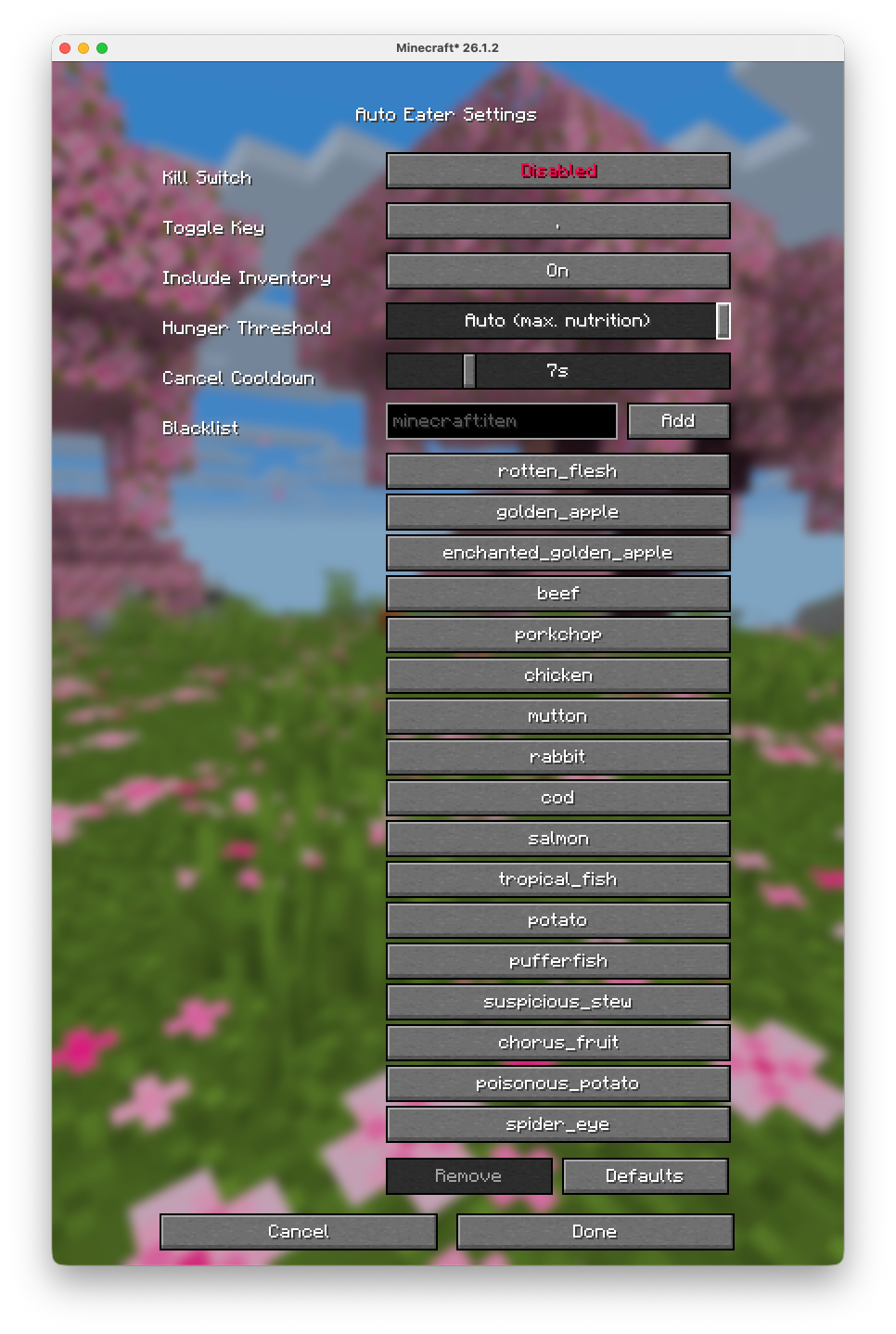
Server Warning
Some servers use plugins that turn your inventory into a UI (for example shops, menus, or other item-based interfaces). In those cases, Auto-Eater can mistakenly try to eat UI items or interfere with menu interactions. On large servers that use that tipe of interfaces (e.g. Hypixel), it is recommended to turn Auto-Eaeter off while using those plugin/UIs.GitHub Source
Verfügbare Versionen
Auto Eater auf deinem Client installieren
Mod-Loader lokal installieren
Installiere fabric für deine lokale Minecraft-Version.
Passende Datei herunterladen
Wähle die Auto Eater-Datei für fabric und Minecraft 26.3.
Mod installieren
Lege die .jar-Datei in deinem lokalen .minecraft/mods-Ordner ab und starte Minecraft neu. Eine Installation auf dem Server ist nicht nötig.
Kompatibilität
Mod-Loader
Minecraft-Versionen
26.3, 26.2, 26.1.2 (+7 weitere)
Server-seitig
✗ Nicht unterstütztEmpfohlener RAM
4 GB(min. 3 GB)Häufige Fragen
Muss Auto Eater auf dem Minecraft Server installiert werden?
Nein. Modrinth kennzeichnet Auto Eater serverseitig als nicht unterstützt. Installiere die Mod nur im lokalen Minecraft-Mods-Ordner. Dein Server kann unverändert bleiben, sofern die Mod-Seite keine zusätzliche Abhängigkeit nennt.
Welche Version und welchen Loader braucht Auto Eater?
Nutze eine Datei für fabric und exakt deine Minecraft-Version. Unterstützte Versionen sind unter anderem 26.3, 26.2, 26.1.2. Loader-Dateien sind nicht untereinander austauschbar.
Auto Eater funktioniert nicht – was kann ich prüfen?
Prüfe zuerst Minecraft-Version, Loader-Version und erforderliche Abhängigkeiten. Lege die .jar-Datei im lokalen .minecraft/mods-Ordner ab und entferne ältere Duplikate. Da die Mod clientseitig ist, löst mehr Server-RAM dieses Problem nicht.
Ähnliche Mods



Minecraft Server für deine Gruppe
Auto Eater bleibt auf deinem Client. Hoste dazu eine kompatible Welt für deine Mitspieler.