
Avaritia at Home
This mod has many of the same items as Avaritia including the sword of the cosmos which can kill anything instantly. Mod now supports extreme crafting and REI for viewing the recipes.
Screenshots
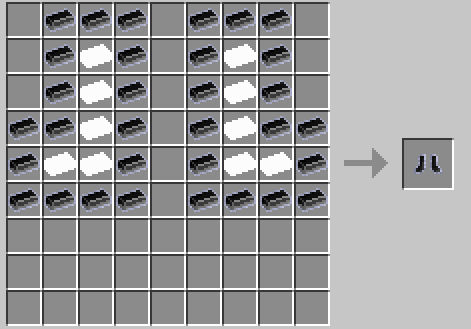
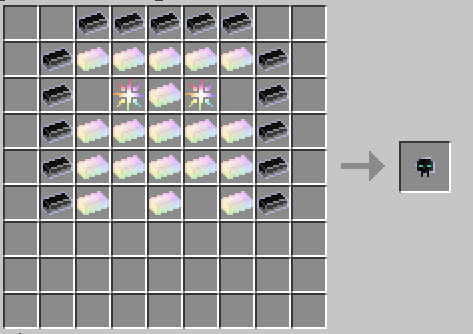
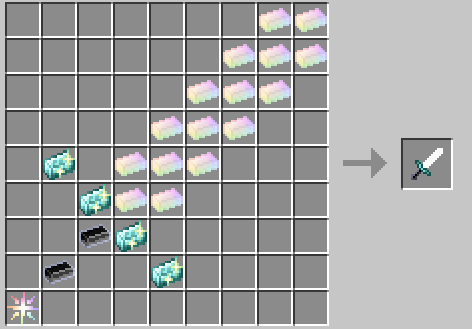
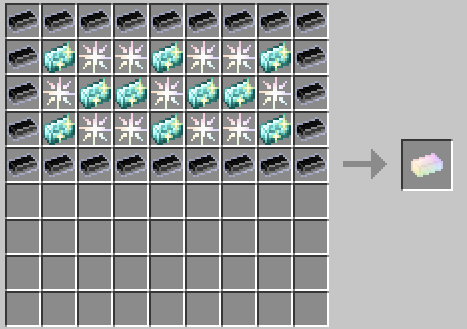
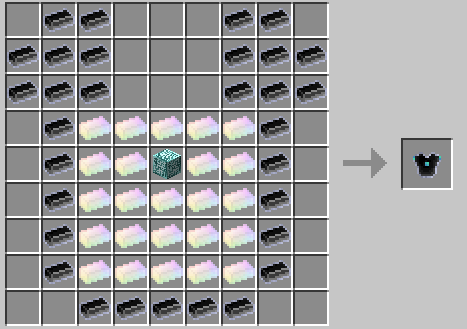
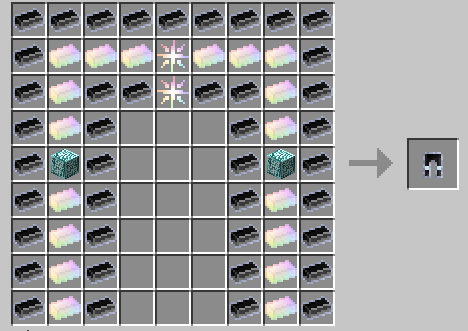
Über diese Mod
Mod Features (Beta)
This mod is currently in beta and introduces the following features:
Crafting
This mod now supports 9x9 crafting recipes using Bigger Crafting Table.
As a result, it is now required to download Bigger Crafting Table.
All items now have crafting recipes.
Crafting Materials
- Star Dust
- Compressed Star Dust
- Double Compressed Star Dust
- Triple Compressed Star Dust
- Neutron Star Dust
- Crystal Matrix Ingot
- Crystal Matrix Block
- Infinity Catalyst
- Neutronium Ingot
- Neutron Nugget
- Neutron Pile
- Neutron Singularity
- Diamond Lattice
- Endest Pearl
- Infinity Ingot
- Cosmic Meatballs
- Ultimate Stew
- Star Fuel
- Perfected Star
- Perfected Star Fragment
Weapons
- Sword of the Cosmos: Instantly kills anything you hit, regardless of health, effects, or armor.
- Infinity Bow: Shoots super-fast arrows that one-shot anything they hit.
Tools
- Infinity Axe
- Infinity Hoe
- Infinity Shovel
- Infinity Pickaxe
Armor
- Infinity Helmet: Grants Night Vision and Saturation
- Infinity Chestplate: Grants Flight, Flight Speed, Haste, and Strength
- Infinity Leggings: Grants Dolphin’s Grace and removes fall damage
- Infinity Boots: Grants increased Speed
Each piece of armor worn increases your Resistance level by 1. Wearing the full set makes you immortal.
Integration with REI (Roughly Enough Items)
This mod also integrates with REI (Roughly Enough Items), making it easy to view larger crafting recipes such as those used in the 9x9 crafting grid. REI allows you to:
- View larger recipes that wouldn't fit in a standard 3x3 grid
- Quickly search for crafting recipes using all included materials and items
- Easily navigate between various custom recipes added by this mod
With REI, understanding the complex crafting recipes for powerful items like the Infinity Armor and Sword of the Cosmos becomes effortless!
Verfügbare Versionen
Avaritia at Home auf dem Server installieren
Server bestellen
Bestelle einen Minecraft Java Server mit mindestens 3 GB RAM (4 GB empfohlen).
fabric Loader setzen
Wähle im Panel unter "Egg" den fabric-Loader und die passende Minecraft-Version (1.20.1).
Mod installieren
Öffne den Mod-Browser im Dashboard und suche nach "Avaritia at Home". Klicke "Installieren" – fertig! Alternativ: Lade die .jar via SFTP in den /mods Ordner.
Kompatibilität
Mod-Loader
Minecraft-Versionen
1.20.1
Server-seitig
✓ ErforderlichEmpfohlener RAM
4 GB(min. 3 GB)Häufige Fragen
Avaritia at Home Server crasht beim Start – was tun?
Häufigste Ursache: falsche fabric-Version oder zu wenig RAM. Prüfe im Server-Log (latest.log), ob ein "OutOfMemoryError" oder "Mixin"-Fehler auftritt. Bei Mado Hosting: Stelle sicher, dass mindestens 3 GB RAM zugewiesen sind und der Loader zur Mod-Version passt (1.20.1). Über das Panel kannst du den Loader mit einem Klick wechseln.
Ist Avaritia at Home mit fabric kompatibel?
Avaritia at Home unterstützt offiziell fabric für Minecraft 1.20.1. Im Mado Dashboard werden inkompatible Loader-Kombinationen automatisch erkannt.
Server laggt mit Avaritia at Home – wie optimiere ich die Performance?
Empfohlener RAM: 4 GB (+1 GB pro 8 Spieler). Prüfe mit /spark profiler, ob Avaritia at Home den meisten Tick-Time verbraucht. Häufige Fixes: Server-View-Distance auf 8-10 reduzieren, bei Forge "performant" oder "starlight" als Zusatz-Mod installieren. Bei Mado Hosting läuft dein Server auf NVMe-SSDs mit dedizierten CPU-Kernen für minimale Latenz.
Ähnliche Mods



![[TaCZ] Timeless and Classics Zero](https://cdn.modrinth.com/data/SzzJttH8/fd27766d2bb8390d284696b1dbd358f87e081439_96.webp)


Modded Server mieten
Installiere Avaritia at Home mit nur einem Klick auf deinem Server.