
Bedrock Hotbar
Makes hotbar the same as in Bedrock Edition
Screenshots
Über diese Mod

Description
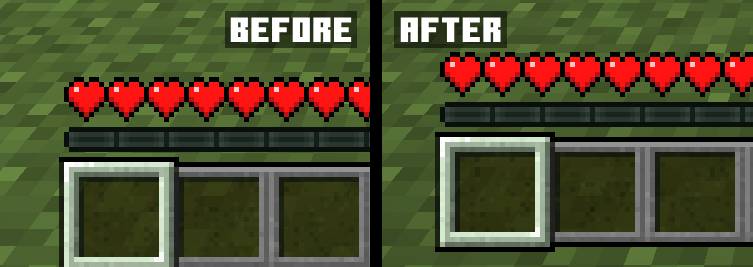
The mod makes the hotbar offset in Java Edition the same as in Bedrock Edition with the ability to customize its offset
Usage
The mod currently has a settings menu that can be used if you install Cloth Config and ModMenu for Fabric. In the settings window, you can change the hotbar offset, and this can also be done by changing the value in the config file. Since version 1.1, the mod renders the bottom of the texture of the selected item (missing since Minecraft version 1.20.2), which allows it to be used with resource packs that change the hotbar
Compatibility
AppleSkin: Health and saturation HUD linked to the hotbar
Verfügbare Versionen
Bedrock Hotbar auf deinem Client installieren
Mod-Loader lokal installieren
Installiere fabric für deine lokale Minecraft-Version.
Passende Datei herunterladen
Wähle die Bedrock Hotbar-Datei für fabric und Minecraft 26.3.
Mod installieren
Lege die .jar-Datei in deinem lokalen .minecraft/mods-Ordner ab und starte Minecraft neu. Eine Installation auf dem Server ist nicht nötig.
Kompatibilität
Mod-Loader
Minecraft-Versionen
26.3, 26.2, 26.1.2 (+224 weitere)
Server-seitig
✗ Nicht unterstütztEmpfohlener RAM
4 GB(min. 3 GB)Häufige Fragen
Muss Bedrock Hotbar auf dem Minecraft Server installiert werden?
Nein. Modrinth kennzeichnet Bedrock Hotbar serverseitig als nicht unterstützt. Installiere die Mod nur im lokalen Minecraft-Mods-Ordner. Dein Server kann unverändert bleiben, sofern die Mod-Seite keine zusätzliche Abhängigkeit nennt.
Welche Version und welchen Loader braucht Bedrock Hotbar?
Nutze eine Datei für fabric, forge, neoforge, quilt und exakt deine Minecraft-Version. Unterstützte Versionen sind unter anderem 26.3, 26.2, 26.1.2. Loader-Dateien sind nicht untereinander austauschbar.
Bedrock Hotbar funktioniert nicht – was kann ich prüfen?
Prüfe zuerst Minecraft-Version, Loader-Version und erforderliche Abhängigkeiten. Lege die .jar-Datei im lokalen .minecraft/mods-Ordner ab und entferne ältere Duplikate. Da die Mod clientseitig ist, löst mehr Server-RAM dieses Problem nicht.
Ähnliche Mods




Minecraft Server für deine Gruppe
Bedrock Hotbar bleibt auf deinem Client. Hoste dazu eine kompatible Welt für deine Mitspieler.