
blockbench import library
This library simplifies model import, generates item models & textures, and leverages polymer for resource pack creation. Supports animations, Molang expressions, and various Blockbench features.
Screenshots
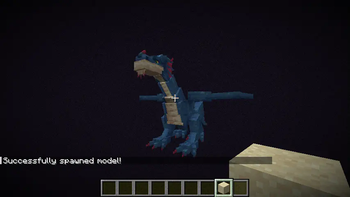
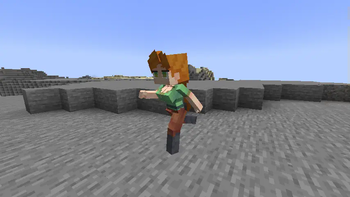

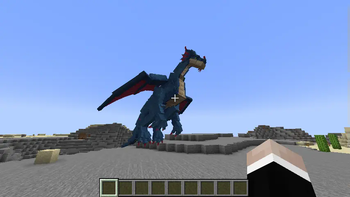
Über diese Mod
blockbench import library
This library streamlines the process of integrating Blockbench models (generic and from the AnimatedJava Blockbench Plugin) into your Fabric mods.
It automates item model and texture creation and leverages resource packs in combination with item display entities for client-side integration, eliminating the need for players to install additional mods.
The library offers comprehensive support for animations, including Molang expressions for keyframes, along with a variety of Blockbench features and additionally support for one of its plugins, AnimatedJava.

Features:
- Animation Support: Import models with pre-rendered animations and utilize Molang expressions (currently only q.anim_time and q.life_time) for dynamic animation control.
- CustomModelData & Item Displays: Employs CustomModelData and Item Displays to represent the model with minimal server impact through "virtual" item display entities. - Item Display transformations are asynchronously updated for smooth performance.
- Large Bone Support: Breaks free from vanilla's limitations, allowing for bones exceeding the standard 3x3x3 size restriction.
- Blockbench Feature Support: Offers compatibility with various Blockbench features, including effect keyframes (commands & sound effects), animation loop modes, interpolations, and more.
- AnimatedJava Extensions: Provides additional functionality for AnimatedJava, including variant support, bone blacklisting, conditional effects, and locator support
- Vanilla Mob Feature Integration: Out-of-the-box support for many vanilla mob features like accurate hitboxes (visible in F3+B), ridability, name tags, invisibility, glowing, fire animations, particle effects, leashes, death animations, smooth collisions, dynamic hitboxes/scale, and entity-specific ticking for optimized performance.
Checkout the Github README and the documentation for more infos!
Setup
repositories {
    maven { url "https://maven.tomalbrc.de" }
}

dependencies {
    modImplementation include("de.tomalbrc:blockbench-import-library:[TAG]")
}
Usage
Documentation is available here
Commands
/bil model create id<.ajmodel>|filepath <model>Spawns a model ingame based on mob identifier or a file path (from server root folder) to the model json file. These models are not saved and are mostly intended for testing. If you want load an .ajmodel file, make sure to append
.ajmodelto either the id or file path./bil model <targets> animation|variant|scale <args>Modifies the model of any entity selected in
that has a custom model. Allows you to temporarily change the scale of the model, update the variant and play / pause / stop animations. This is also mostly intended for testing and playing with the models.
Roadmap
1.x
- Bone modifier for more dynamic animations
- Handle pre/post values for keyframes
- mcmeta generation for animated textures
- Bezier support for keyframes
2.x
- Dynamic Animations for dynamic animation speed, right now all animations are pre-rendered during import
- Per-player animations; Show animations to only a single player or a group of players. Right now all animations are played globally, visible for all players
- Multiple rider (for entities), currently only 1 is supported
- Multiple hitboxes (requires the same changes as multiple rider support)
- Particle effects (?)
Test Sever
Join the test server with a 1.20.5-1.21+ client on
mc.tomalbrc.de:25565
to test this mod and my other mods + upcoming, unreleased mods and features!
Verfügbare Versionen
blockbench import library auf dem Server installieren
Server bestellen
Bestelle einen Minecraft Java Server mit mindestens 3 GB RAM (4 GB empfohlen).
fabric Loader setzen
Wähle im Panel unter "Egg" den fabric-Loader und die passende Minecraft-Version (26.3).
Mod installieren
Öffne den Mod-Browser im Dashboard und suche nach "blockbench import library". Klicke "Installieren" – fertig! Alternativ: Lade die .jar via SFTP in den /mods Ordner.
Kompatibilität
Mod-Loader
Minecraft-Versionen
26.3, 26.2, 26.1.2 (+20 weitere)
Server-seitig
✓ ErforderlichEmpfohlener RAM
4 GB(min. 3 GB)Häufige Fragen
blockbench import library Server crasht beim Start – was tun?
Häufigste Ursache: falsche fabric-Version oder zu wenig RAM. Prüfe im Server-Log (latest.log), ob ein "OutOfMemoryError" oder "Mixin"-Fehler auftritt. Bei Mado Hosting: Stelle sicher, dass mindestens 3 GB RAM zugewiesen sind und der Loader zur Mod-Version passt (26.3). Über das Panel kannst du den Loader mit einem Klick wechseln.
Ist blockbench import library mit fabric kompatibel?
blockbench import library unterstützt offiziell fabric für Minecraft 26.3, 26.2, 26.1.2. Im Mado Dashboard werden inkompatible Loader-Kombinationen automatisch erkannt.
Server laggt mit blockbench import library – wie optimiere ich die Performance?
Empfohlener RAM: 4 GB (+1 GB pro 8 Spieler). Prüfe mit /spark profiler, ob blockbench import library den meisten Tick-Time verbraucht. Häufige Fixes: Server-View-Distance auf 8-10 reduzieren, bei Forge "performant" oder "starlight" als Zusatz-Mod installieren. Bei Mado Hosting läuft dein Server auf NVMe-SSDs mit dedizierten CPU-Kernen für minimale Latenz.
Ähnliche Mods



Modded Server mieten
Installiere blockbench import library mit nur einem Klick auf deinem Server.
Details
- Lizenz
- GNU Lesser General Public License v3.0 only
- Server-seitig
- Erforderlich