![BETTER MINECRAFT [ BMC MOD ]](https://cdn.modrinth.com/data/8AM9MxTo/ec25a22873eaf2c7b0e7d2938c2b472078dd4f8b_96.webp)
BETTER MINECRAFT [ BMC MOD ]
Enderite, Emeraude & More: A vanilla mod that adds new goals to Minecraft. You’ll never get bored with this mod, which enhances your experience
Screenshots
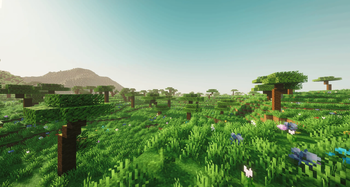
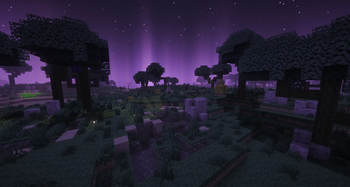

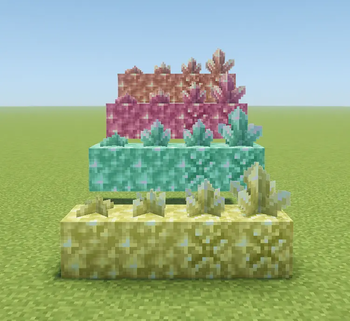
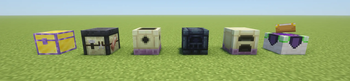
Über diese Mod

- ⭐Thank you to everyone who supports us!
- 🔔If you want to see more, go to SOLEA PIXEL
- ⚒️Check out the wiki here [Under construction]

BETTER MINECRAFT: As the name suggests, “Better” is a mod that offers a wide range of essential additions to Minecraft, improving the game without requiring you to install 30 different mods.
Note that this mod is “vanilla-like”; the goal isn’t to add features such as special machines or overpowered abilities. The mod must adapt to Minecraft and stay within its universe. (Better Minecraft was created to be, in my opinion, one of several Minecraft updates that I think would be cool to add.)
If you’d like to participate in the project by sharing your ideas or concepts, head over to our official Discord.
💎 Additional Information
This mod is compatible with several other mods, such as
- Just Enough Items [JEI]
- Jade
This helps improve the experience for new players.
It’s also easy for you to include it in your modpacks, as this mod blends in well with others and offers a range of features that can enhance your modded survival experience.

Minecraft has often become repetitive; eventually, you end up seeing everything there is to see. That’s why BETTER MINECRAFT stands out as the new 1.22 update that will never be released in Minecraft. You can discover our various additions and more by installing our mod.
🪄 Example of addition in the mods
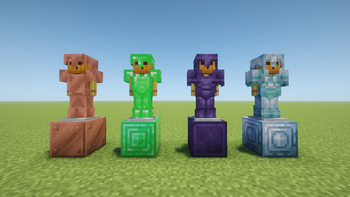
- Enderite Armor & Tools
- Emerald Armor & Tools
- New Infusion Table
- New Biome End / Overworld
- Compatibilities : JEI / JADE
- News Enchant & More
And there is much more to discover in the mods as the updates come, so what are you waiting for?
Would you like to create with BMCMOD?
⚠️Stable : Version 26.1 !
Stable identifiers (com.soleapixel.bmcmod.api.BmcModIds)
Use these ResourceLocation constants in addons to avoid hard-coded strings. They match registry paths for the current version.
| Constant | Path |
|---|---|
BmcModIds.MAYOR_BELL_BLOCK |
bmcmod:mayor_bell (block) |
BmcModIds.MAYOR_BELL_ITEM |
bmcmod:mayor_bell (item) |
BmcModIds.VILLAGE_MAYOR_SPAWN_EGG |
bmcmod:village_mayor_spawn_egg |
BmcModIds.CONSTRUCTION_GUIDE |
bmcmod:construction_guide |
BmcModIds.PROFESSION_MAYOR |
bmcmod:mayor (VillagerProfession) |
BmcModIds.PROFESSION_CURED_WITCH |
bmcmod:cured_witch |
Note: Gameplay still resolves blocks/items through ModBlocks / ModItems in the main mod; BmcModIds is for cross-mod references, recipes, and conditions in your own code or datapacks.
Tag conventions (datapack & cross-mod)
Tags live under data/bmcmod/tags/…. Use #bmcmod:… in JSON where Minecraft expects a tag.
Mayor / village integration (extend in your addon)
| Tag ID | Type | Purpose |
|---|---|---|
#bmcmod:mayor_bells |
block |
All blocks that act as a “Mayor Bell” for filtering, quests, or compatibility in your mod. The base mod still registers its own block in code; add your block id here for ecosystem consistency. |
#bmcmod:mayor_bells |
item |
Same for the item form (block items). |
Example (your addon’s datapack):
{
  "replace": false,
  "values": ["yourmod:golden_mayor_bell"]
}
If you add a custom bell block that must ring and use BellBlockEntity:
- Your block should behave like a bell (e.g. extend
BellBlockor mirror behavior). - Register it on
BlockEntityType.BELLvia NeoForgeBlockEntityTypeAddBlocksEvent(same pattern as this mod forMAYOR_BELL). - Add your block/item to
#bmcmod:mayor_bellsso other mods and datapacks can target all mayor bells at once.
Other useful namespaces in this mod
#c:…(common / convention) — e.g.c:tags/item/tools/scytheis used for compatibility. Add your items to the c / forge / neoforge tags your ecosystem expects.- Item tags under
data/bmcmod/tags/item/(e.g.scythes,foundry_shards,boreal_ingots, enchantability lists) are datapack-driven; addon items can be merged in with"replace": false.
Registries (code entry points)
| Registry | Class (indicative) |
|---|---|
| Blocks / Items | com.soleapixel.bmcmod.registry.ModBlocks, ModItems |
| Villager professions | com.soleapixel.bmcmod.villager.ModProfessions |
| Block entity types | com.soleapixel.bmcmod.registry.ModBlockEntityTypes |
| Entities, sounds, particles, … | ModEntities, ModSounds, ModParticles, etc. |
| Global loot / GLM | com.soleapixel.bmcmod.registry.ModGlobalLoot |
Village saved data (per dimension): BmcVillageSavedData — key = village anchor (long from BlockPos).
Events (NeoForge) — where to hook
These use @EventBusSubscriber(modid = "bmcmod", …) on the game bus unless noted. Add-on mods should subscribe with EventPriority appropriately and not assume load order unless you declare an explicit dependency in mods.toml.
| Area | Example classes / hooks |
|---|---|
| Villager trades | VillagerTradesEvent, TradeWithVillagerEvent — see village.mayor.VillageEconomyEvents |
| Mayor death | LivingDeathEvent — VillageMayorDeathEvents |
| Server tick (elections / lifecycle) | ServerTickEvent.Post — MayorElectionScheduler, VillageLifecycleEvents |
| POI extension | Mod bus: ExtendPoiTypesEvent — vanilla bell POI extended for mayor bell (BmcMod setup) |
| Block entity types | Mod bus: BlockEntityTypeAddBlocksEvent — SunwoodRegistryEvents (same pattern for bells/signs) |
Compatibility tip: prefer listening to NeoForge events or datapacks (tags, loot tables) over mixin targets inside com.soleapixel.bmcmod.mixin, which may change between BMC releases.
Mixins
- Configuration:
resources/bmcmod.mixins.json. - Treat mixin targets as fragile API: they can break on Minecraft or NeoForge updates.
- For addons: avoid shadowing BMC mixins; use NeoForge events, tags, or ASM-free registry hooks when possible.
Datapacks & resource paths
- Recipes:
data/bmcmod/recipe/ - Loot tables:
data/bmcmod/loot_table/ - Loot modifiers:
data/bmcmod/loot_modifiers/ - Structures / worldgen:
data/bmcmod/worldgen/and patched vanilla pools underdata/minecraft/where shipped - Tags:
data/bmcmod/tags/<type>/<path>.json
mods.toml dependency snippet (addon mod)
[[dependencies.yourmod]]
modId = "bmcmod"
type = "required" # or "optional" if soft-compat only
versionRange = "[26.0.3,)" # align with the BMC major you tested against
ordering = "NONE"
side = "BOTH"
Adjust version range to match gradle.properties → mod_version for the BMC build you test against.
API & docs changelog
| Date | Change |
|---|---|
| 2026-05-09 | Initial publication of release/dev.md: #bmcmod:mayor_bells (block + item), com.soleapixel.bmcmod.api.BmcModIds, maintainer checklist for Modrinth bio. |
(Append new rows whenever integration surfaces change.)
License / redistribution
Follow the license declared in the BMC jar / repository (SOLEA PIXEL as shown in user mods.toml). When redistributing this dev guide, keep the changelog section honest with your fork.
Verfügbare Versionen
BETTER MINECRAFT [ BMC MOD ] auf dem Server installieren
Server bestellen
Bestelle einen Minecraft Java Server mit mindestens 3 GB RAM (4 GB empfohlen).
forge Loader setzen
Wähle im Panel unter "Egg" den forge-Loader und die passende Minecraft-Version (1.21.1).
Mod installieren
Öffne den Mod-Browser im Dashboard und suche nach "BETTER MINECRAFT [ BMC MOD ]". Klicke "Installieren" – fertig! Alternativ: Lade die .jar via SFTP in den /mods Ordner.
Kompatibilität
Mod-Loader
Minecraft-Versionen
1.21.1, 1.20.1
Server-seitig
~ OptionalEmpfohlener RAM
4 GB(min. 3 GB)Häufige Fragen
BETTER MINECRAFT [ BMC MOD ] Server crasht beim Start – was tun?
Häufigste Ursache: falsche forge-Version oder zu wenig RAM. Prüfe im Server-Log (latest.log), ob ein "OutOfMemoryError" oder "Mixin"-Fehler auftritt. Bei Mado Hosting: Stelle sicher, dass mindestens 3 GB RAM zugewiesen sind und der Loader zur Mod-Version passt (1.21.1). Über das Panel kannst du den Loader mit einem Klick wechseln.
Ist BETTER MINECRAFT [ BMC MOD ] mit forge und neoforge kompatibel?
BETTER MINECRAFT [ BMC MOD ] unterstützt offiziell forge, neoforge für Minecraft 1.21.1, 1.20.1. Im Mado Dashboard werden inkompatible Loader-Kombinationen automatisch erkannt.
Server laggt mit BETTER MINECRAFT [ BMC MOD ] – wie optimiere ich die Performance?
Empfohlener RAM: 4 GB (+1 GB pro 8 Spieler). Prüfe mit /spark profiler, ob BETTER MINECRAFT [ BMC MOD ] den meisten Tick-Time verbraucht. Häufige Fixes: Server-View-Distance auf 8-10 reduzieren, bei Forge "performant" oder "starlight" als Zusatz-Mod installieren. Bei Mado Hosting läuft dein Server auf NVMe-SSDs mit dedizierten CPU-Kernen für minimale Latenz.
Ähnliche Mods




Modded Server mieten
Installiere BETTER MINECRAFT [ BMC MOD ] mit nur einem Klick auf deinem Server.