
BotMod
This mod allows players to spawn in a bot, so they can farm without being in the chunk.
Screenshots
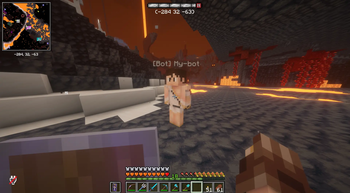
Über diese Mod
BotMod lets you place a stationary bot at any location on your server. The bot wears your exact skin, keeps its chunk force-loaded, and tricks the game's mob spawning engine into thinking a real player is standing there — so your farms keep running while you're away, logged out of the area, or doing something else entirely.
Why this exists
Vanilla Minecraft stops spawning mobs the moment no real player is nearby. The chunk unloads, the spawner has nothing to anchor to, and your farm goes idle. BotMod fixes both problems at once: the chunk stays loaded, and a fake player entry is injected into the spawner's player list so hostile and passive mobs continue to spawn around the bot exactly as they would around you.
Features
Spawn named bots at your current position with a single command
Each bot renders with the spawning player's live skin, downloaded from Mojang's session servers
Bots display a [Bot] nametag with the name you give them, styled in bold blue
Chunk force-loading keeps farms ticking after you leave render distance
Mob spawning works correctly around the bot via fake-player injection
Bots are invulnerable, non-pushable, and have no AI — they are presence anchors, not autonomous agents
Bots survive a server restart: they're restored automatically on startup, so there's no need to respawn your farms after every reboot.
Commands:
- /bot spawn
— spawn a bot at your position - /bot remove
— remove a named bot (supports tab-completion) - /bot list — list all active bots
- /bot killall — remove every bot on the server at once
- /bot help — show a formatted overview of the mod and its commands
Verfügbare Versionen
BotMod auf dem Server installieren
Server bestellen
Bestelle einen Minecraft Java Server mit mindestens 3 GB RAM (4 GB empfohlen).
neoforge Loader setzen
Wähle im Panel unter "Egg" den neoforge-Loader und die passende Minecraft-Version (1.21.11).
Mod installieren
Öffne den Mod-Browser im Dashboard und suche nach "BotMod". Klicke "Installieren" – fertig! Alternativ: Lade die .jar via SFTP in den /mods Ordner.
Kompatibilität
Mod-Loader
Minecraft-Versionen
1.21.11, 1.21.10, 1.21.9 (+8 weitere)
Server-seitig
✓ ErforderlichEmpfohlener RAM
4 GB(min. 3 GB)Häufige Fragen
BotMod Server crasht beim Start – was tun?
Häufigste Ursache: falsche neoforge-Version oder zu wenig RAM. Prüfe im Server-Log (latest.log), ob ein "OutOfMemoryError" oder "Mixin"-Fehler auftritt. Bei Mado Hosting: Stelle sicher, dass mindestens 3 GB RAM zugewiesen sind und der Loader zur Mod-Version passt (1.21.11). Über das Panel kannst du den Loader mit einem Klick wechseln.
Ist BotMod mit neoforge kompatibel?
BotMod unterstützt offiziell neoforge für Minecraft 1.21.11, 1.21.10, 1.21.9. Im Mado Dashboard werden inkompatible Loader-Kombinationen automatisch erkannt.
Server laggt mit BotMod – wie optimiere ich die Performance?
Empfohlener RAM: 4 GB (+1 GB pro 8 Spieler). Prüfe mit /spark profiler, ob BotMod den meisten Tick-Time verbraucht. Häufige Fixes: Server-View-Distance auf 8-10 reduzieren, bei Forge "performant" oder "starlight" als Zusatz-Mod installieren. Bei Mado Hosting läuft dein Server auf NVMe-SSDs mit dedizierten CPU-Kernen für minimale Latenz.
Modded Server mieten
Installiere BotMod mit nur einem Klick auf deinem Server.