
B'Quarry
An upgradeable Forge Quarry mod with fuel, energy, redstone control, Void mining, custom upgrades, recipes and advancements.
Über diese Mod
B'Quarry
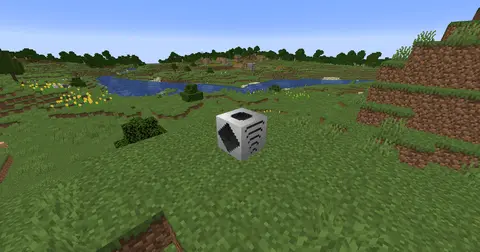
B'Quarry is a Forge mod that adds a fully upgradeable Quarry machine to Minecraft.
Build your Quarry, fuel it with burnable items or Forge Energy, install upgrades, and let it automatically mine blocks in front of it. The mod is designed around progression: the Quarry starts simple, but can become extremely powerful with late-game upgrades.
Features
Adds a functional Quarry block
Supports both fuel and Forge Energy
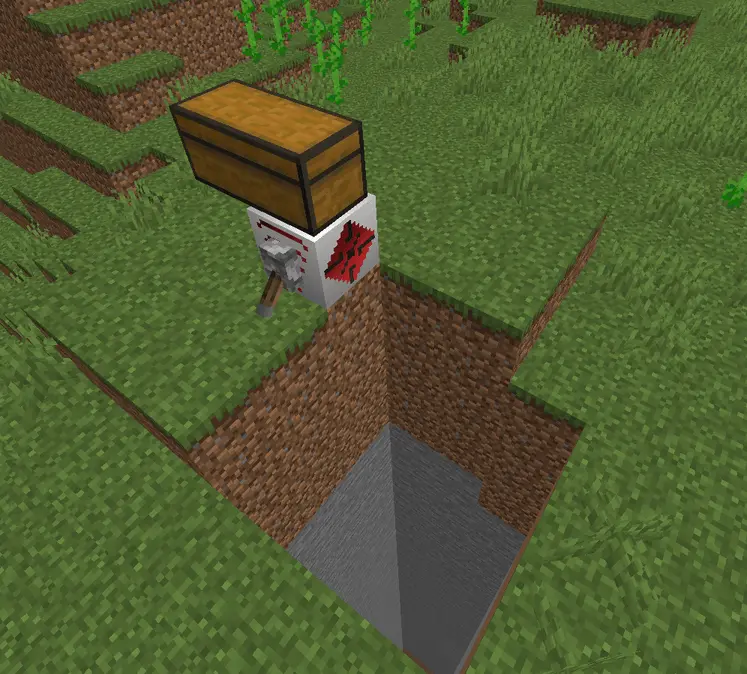
Mines blocks automatically in the direction it is facing
Outputs mined items to an inventory placed above it
Can be paused with redstone
Includes a Quarry Wrench for rotating and resetting the mining area
Includes custom textures, tooltips, recipes, creative tab and advancements
Works with JEI for recipe viewing
Upgrades
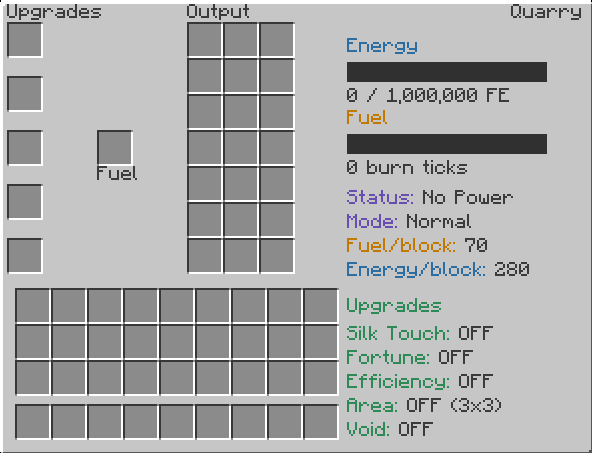
B'Quarry includes several upgrade types:
Efficiency Upgrades
Increase the mining speed of the Quarry.
Levels I to X
Early levels are easier to craft
Higher levels become much more expensive
Efficiency X makes the Quarry extremely fast
Fortune Upgrades
Increase the amount of drops generated by the Quarry.
Levels I to X
Works with normal mining drops
Very powerful when combined with Void Upgrades
Area Upgrades
Increase the mining area of the Quarry.
Level I: 5x5
Level II: 9x9
Level III: 16x16
Level IV: 24x24
Level V: 32x32
Silk Touch Upgrade
Allows the Quarry to mine blocks using Silk Touch.
This is a unique upgrade and requires an enchanted Silk Touch book to craft.
Void Upgrades
Void Upgrades allow the Quarry to generate resources without destroying blocks in the world.
Void Upgrade I: basic void mining
Void Upgrade II: adds Nether-related resources
Void Upgrade III: increases the chance of rarer resources
Void III is an endgame upgrade and is meant to be difficult to obtain.
Quarry Wrench
The Quarry Wrench is used to control the Quarry:
Right-click a Quarry to reset its mining area
Shift + Right-click a Quarry to rotate it
Redstone Control
The Quarry can be paused using redstone.
Redstone signal ON: Quarry pauses
Redstone signal OFF: Quarry continues working
B'Quarry can be played without B'things, but some endgame upgrades require items from the B'things mod.
Without B'things installed, the mod will still work normally, but certain late-game recipes will not be available. For example, some upgrade lines may stop before their maximum level.
Installing B'things unlocks the full endgame progression for B'Quarry.
Progression
B'Quarry is balanced around survival progression.
The early Quarry is useful but limited. As you craft stronger upgrades, it becomes faster, larger and more powerful. A fully upgraded Quarry is extremely strong, but reaching that point requires expensive late-game materials and optional boss-related items.
Advancements
The mod includes custom advancements to guide progression, including challenges for obtaining high-tier upgrades and building the ultimate Quarry setup.
Requirements
Minecraft Forge
Minecraft 1.20.1
Recommended
Verfügbare Versionen
B'Quarry auf dem Server installieren
Server bestellen
Bestelle einen Minecraft Java Server mit mindestens 3 GB RAM (4 GB empfohlen).
forge Loader setzen
Wähle im Panel unter "Egg" den forge-Loader und die passende Minecraft-Version (1.20.1).
Mod installieren
Öffne den Mod-Browser im Dashboard und suche nach "B'Quarry". Klicke "Installieren" – fertig! Alternativ: Lade die .jar via SFTP in den /mods Ordner.
Kompatibilität
Mod-Loader
Minecraft-Versionen
1.20.1
Server-seitig
✓ ErforderlichEmpfohlener RAM
4 GB(min. 3 GB)Häufige Fragen
B'Quarry Server crasht beim Start – was tun?
Häufigste Ursache: falsche forge-Version oder zu wenig RAM. Prüfe im Server-Log (latest.log), ob ein "OutOfMemoryError" oder "Mixin"-Fehler auftritt. Bei Mado Hosting: Stelle sicher, dass mindestens 3 GB RAM zugewiesen sind und der Loader zur Mod-Version passt (1.20.1). Über das Panel kannst du den Loader mit einem Klick wechseln.
Ist B'Quarry mit forge kompatibel?
B'Quarry unterstützt offiziell forge für Minecraft 1.20.1. Im Mado Dashboard werden inkompatible Loader-Kombinationen automatisch erkannt.
Server laggt mit B'Quarry – wie optimiere ich die Performance?
Empfohlener RAM: 4 GB (+1 GB pro 8 Spieler). Prüfe mit /spark profiler, ob B'Quarry den meisten Tick-Time verbraucht. Häufige Fixes: Server-View-Distance auf 8-10 reduzieren, bei Forge "performant" oder "starlight" als Zusatz-Mod installieren. Bei Mado Hosting läuft dein Server auf NVMe-SSDs mit dedizierten CPU-Kernen für minimale Latenz.
Ähnliche Mods


Modded Server mieten
Installiere B'Quarry mit nur einem Klick auf deinem Server.