Bright Out
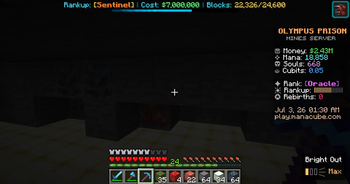
Grinding prison mining servers but the headaches and nausea are brutal? I had the same problem. Lights Out dims your screen in 3 modes—Light, Medium, Max—to rest your eyes mid-grind. Doesn't touch server GUIs. Client-side, and works on any server
Screenshots
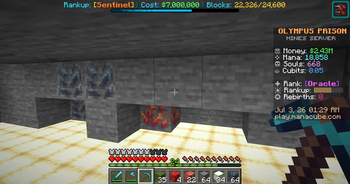
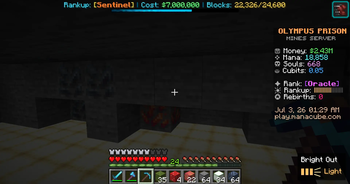
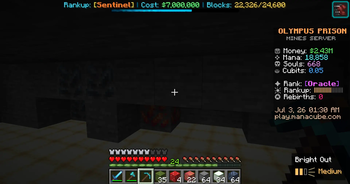
Über diese Mod
I grind prison mining servers too — so if you're reading this, you probably already know the part nobody warns you about. A couple hours into staring at bright blocks and whipping the camera around, my head starts pounding, and my eyes just ache. For the longest time I'd push through it, take a break, come back, and feel the exact same thing all over again. I got tired of choosing between my grind and my head.
So I made Bright Out for myself — and to be honest? It almost completely got rid of my headaches and the nausea. It really does work, and I'm putting it up hoping it does the same for you.
It lets me turn the glare down from the constant particles and light. One key drops a soft dark layer over the world so my eyes have somewhere to rest; tap again to step through three darkness levels, then off.
The part I cared about most: it doesn't hide the HUD. Hotbar, chat, scoreboard, server menus — all still readable through the dim, so I'm never flying blind while I grind.
Fair heads-up: it might feel a little odd for the first bit while your eyes adjust. Give it a session or two — once you're used to it, you genuinely forget it's even on, and you just notice you're not getting that headache anymore.
What it does
Three darkness modes — Light, Medium, Max — so you can put it to whatever feels best for you personally.
HUD stays visible. The dim sits behind the interface; nothing important gets covered.
On-screen mode indicator so you always know which level you're on.
Client-side only. Never touches the server — works anywhere, no server install, won't get you flagged.
Lightweight. It does one thing: gives your eyes and head a break on long sessions.
How to use
Press ' (apostrophe) for the lightest dim.
Press again for Medium, again for Max, again for off.
Rebind it anytime under Options → Controls.
Pro tip
For extra relief, stack Bright Out on top of your in-game settings: turn Brightness in Video Settings to minimal (or all the way down), and set Particles to Minimal. That kills a lot of the glare and flashing at the source, and Bright Out takes care of the rest. It's the combo that worked best for me.
Requirements
Minecraft 26.2 (Java Edition)
Fabric Loader + Fabric API
Works in any launcher — Modrinth apps, CurseForge, Prism, MultiMC, and others. Running it inside a Fabric modpack works fine too.
Verfügbare Versionen
Bright Out auf dem Server installieren
Server bestellen
Bestelle einen Minecraft Java Server mit mindestens 3 GB RAM (4 GB empfohlen).
fabric Loader setzen
Wähle im Panel unter "Egg" den fabric-Loader und die passende Minecraft-Version (26.2).
Mod installieren
Öffne den Mod-Browser im Dashboard und suche nach "Bright Out". Klicke "Installieren" – fertig! Alternativ: Lade die .jar via SFTP in den /mods Ordner.
Kompatibilität
Mod-Loader
Minecraft-Versionen
26.2
Server-seitig
✗ Nicht unterstütztEmpfohlener RAM
4 GB(min. 3 GB)Häufige Fragen
Bright Out Server crasht beim Start – was tun?
Häufigste Ursache: falsche fabric-Version oder zu wenig RAM. Prüfe im Server-Log (latest.log), ob ein "OutOfMemoryError" oder "Mixin"-Fehler auftritt. Bei Mado Hosting: Stelle sicher, dass mindestens 3 GB RAM zugewiesen sind und der Loader zur Mod-Version passt (26.2). Über das Panel kannst du den Loader mit einem Klick wechseln.
Ist Bright Out mit fabric kompatibel?
Bright Out unterstützt offiziell fabric für Minecraft 26.2. Im Mado Dashboard werden inkompatible Loader-Kombinationen automatisch erkannt.
Server laggt mit Bright Out – wie optimiere ich die Performance?
Empfohlener RAM: 4 GB (+1 GB pro 8 Spieler). Prüfe mit /spark profiler, ob Bright Out den meisten Tick-Time verbraucht. Häufige Fixes: Server-View-Distance auf 8-10 reduzieren, bei Forge "performant" oder "starlight" als Zusatz-Mod installieren. Bei Mado Hosting läuft dein Server auf NVMe-SSDs mit dedizierten CPU-Kernen für minimale Latenz.
Modded Server mieten
Installiere Bright Out mit nur einem Klick auf deinem Server.