
Callout
Client-side Fabric chat alerts for mentions, keywords, and regex triggers, with sound notifications and persistent ping history with context.
Screenshots
Über diese Mod
What It Is
Callout is a client-side Fabric mod for Minecraft that helps you never miss important chat messages, nickname mentions, or custom keywords while playing or AFK.
It is useful when:
- you are AFK or focused on another window;
- fast-scrolling server chat makes important messages easy to miss;
- you need immediate audio alerts for staff callouts, personal mentions, or specific server events;
- you want to review recent ping history and see what happened in chat before and after the mention.
What It Adds
Callout extends the standard Minecraft chat with:
- configurable sound alerts for your nickname and custom keywords;
- support for regular expressions for advanced chat matching;
- separate volume and pitch settings for each trigger;
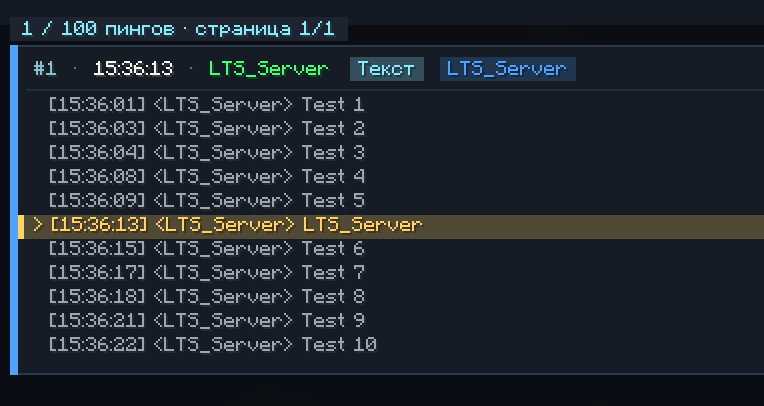
- a dedicated mention history screen with highlighted ping messages;
- saved chat context around every detected mention;
- persistent history that survives world exits and game restarts.
Features
The mod includes:
- nickname-based mention detection;
- up to 5 additional custom triggers;
TextandRegextrigger modes;- case-sensitive or case-insensitive matching;
- optional alerts for your own chat messages;
- automatic cleanup of service artifacts and third-party chat tags;
- filtering for technical sender prefixes in singleplayer and LAN;
- 5 messages of context before and 5 messages after each ping;
- mouse wheel navigation and pagination in the history screen;
- persistent storage in
config/callout_history.json; - Mod Menu integration for easier configuration.
Controls & Settings
Open mention history:
Ctrl + K— open the ping history and chat context screen.
Available settings:
Enabled: main toggle for the mod;Case Sensitive: toggles letter case matching;Ping Own: enables or disables alerts for your own messages;Main Trigger: nickname or primary word trigger with custom sound, volume, and pitch;Additional Triggers: up to 5 extra triggers withTextorRegexmatching.
Installation
Required:
- Fabric Loader
0.19.0+ - Fabric API
Recommended:
- Mod Menu, for configuration through an in-game GUI
Important:
- this is a purely client-side mod;
- it does not need to be installed on the server;
- mention history is saved automatically in
config/callout_history.json.
Verfügbare Versionen
Callout auf dem Server installieren
Server bestellen
Bestelle einen Minecraft Java Server mit mindestens 3 GB RAM (4 GB empfohlen).
fabric Loader setzen
Wähle im Panel unter "Egg" den fabric-Loader und die passende Minecraft-Version (26.2).
Mod installieren
Öffne den Mod-Browser im Dashboard und suche nach "Callout". Klicke "Installieren" – fertig! Alternativ: Lade die .jar via SFTP in den /mods Ordner.
Kompatibilität
Mod-Loader
Minecraft-Versionen
26.2, 26.1.2
Server-seitig
✗ Nicht unterstütztEmpfohlener RAM
4 GB(min. 3 GB)Häufige Fragen
Callout Server crasht beim Start – was tun?
Häufigste Ursache: falsche fabric-Version oder zu wenig RAM. Prüfe im Server-Log (latest.log), ob ein "OutOfMemoryError" oder "Mixin"-Fehler auftritt. Bei Mado Hosting: Stelle sicher, dass mindestens 3 GB RAM zugewiesen sind und der Loader zur Mod-Version passt (26.2). Über das Panel kannst du den Loader mit einem Klick wechseln.
Ist Callout mit fabric kompatibel?
Callout unterstützt offiziell fabric für Minecraft 26.2, 26.1.2. Im Mado Dashboard werden inkompatible Loader-Kombinationen automatisch erkannt.
Server laggt mit Callout – wie optimiere ich die Performance?
Empfohlener RAM: 4 GB (+1 GB pro 8 Spieler). Prüfe mit /spark profiler, ob Callout den meisten Tick-Time verbraucht. Häufige Fixes: Server-View-Distance auf 8-10 reduzieren, bei Forge "performant" oder "starlight" als Zusatz-Mod installieren. Bei Mado Hosting läuft dein Server auf NVMe-SSDs mit dedizierten CPU-Kernen für minimale Latenz.
Ähnliche Mods






Modded Server mieten
Installiere Callout mit nur einem Klick auf deinem Server.