
Cauldron Expansion
Extends the functionality of cauldrons to include bedrock features and more!
Screenshots
Über diese Mod
Features
- All vanilla interactions should be unaffected
- If you find a bug report it on our discord
Custom Interactions
- Adding water to a lava cauldron will create obsidian
- More custom interactions coming soon
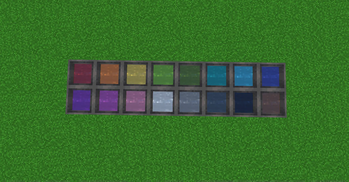
Dyed Water Cauldrons
- Use dye on a cauldron to color the water!
- Dyed cauldrons can be used to dye leather armor, leather horse armor, and wolf armor
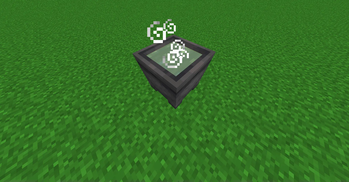
Potion Cauldrons
- Interacting with an empty cauldron while holding a potion to store the potion inside!
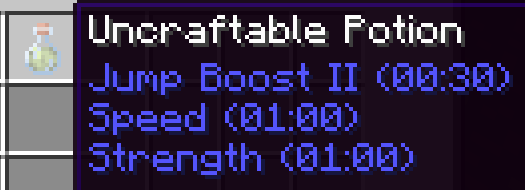
- Multiple potions can be combined in a cauldron reducing their effect durations
- Ex. Combining Strength II (1:30), Speed II (1:30), Jump Boost II (1:30), will create three potions of Strength II (0:30), Speed II (0:30), Jump Boost II (0:30)
- Adding water will also dilute the potions effects
- Strength II (1:30) plus 2 water bottles will provide three Strength II (0:30) potions
- Thick, awkward, and mundane potions behave as water bottles
- Interacting with a potion cauldron while holding arrows will tip them
- Each level of potion can tip up to 16 arrows
Known Issues
You must punch the cauldron before you can mine it
- This works as intended, but useful to know
Interacting with a cauldron less than 5 seconds after punching it will cause it to lose all custom data
Cauldrons pushed by a piston lose all custom data
Custom potions cannot be converted to splash or lingering potions in the brewing stand (MC-270706)
- I have a potential workaround that may be implemented in the future
Verfügbare Versionen
Cauldron Expansion auf dem Server installieren
Server bestellen
Bestelle einen Minecraft Java Server mit mindestens 3 GB RAM (4 GB empfohlen).
datapack Loader setzen
Wähle im Panel unter "Egg" den datapack-Loader und die passende Minecraft-Version (1.21.1).
Mod installieren
Öffne den Mod-Browser im Dashboard und suche nach "Cauldron Expansion". Klicke "Installieren" – fertig! Alternativ: Lade die .jar via SFTP in den /mods Ordner.
Kompatibilität
Mod-Loader
Minecraft-Versionen
1.21.1, 1.21
Server-seitig
✓ ErforderlichEmpfohlener RAM
4 GB(min. 3 GB)Häufige Fragen
Cauldron Expansion Server crasht beim Start – was tun?
Häufigste Ursache: falsche datapack-Version oder zu wenig RAM. Prüfe im Server-Log (latest.log), ob ein "OutOfMemoryError" oder "Mixin"-Fehler auftritt. Bei Mado Hosting: Stelle sicher, dass mindestens 3 GB RAM zugewiesen sind und der Loader zur Mod-Version passt (1.21.1). Über das Panel kannst du den Loader mit einem Klick wechseln.
Ist Cauldron Expansion mit datapack und fabric und forge und neoforge und quilt kompatibel?
Cauldron Expansion unterstützt offiziell datapack, fabric, forge, neoforge, quilt für Minecraft 1.21.1, 1.21. Achtung: Forge- und Fabric-Mods sind NICHT untereinander kompatibel – wähle einen Loader und bleibe dabei. Im Mado Dashboard werden inkompatible Loader-Kombinationen automatisch erkannt.
Server laggt mit Cauldron Expansion – wie optimiere ich die Performance?
Empfohlener RAM: 4 GB (+1 GB pro 8 Spieler). Prüfe mit /spark profiler, ob Cauldron Expansion den meisten Tick-Time verbraucht. Häufige Fixes: Server-View-Distance auf 8-10 reduzieren, bei Forge "performant" oder "starlight" als Zusatz-Mod installieren. Bei Mado Hosting läuft dein Server auf NVMe-SSDs mit dedizierten CPU-Kernen für minimale Latenz.
Ähnliche Mods



![[TaCZ] Timeless and Classics Zero](https://cdn.modrinth.com/data/SzzJttH8/fd27766d2bb8390d284696b1dbd358f87e081439_96.webp)


Modded Server mieten
Installiere Cauldron Expansion mit nur einem Klick auf deinem Server.
Details
- Lizenz
- Creative Commons Attribution Non Commercial Share Alike 4.0 International
- Server-seitig
- Erforderlich