
Caverooms
This project adds the Backrooms to Minecraft rd-132211 and rd-132328.
Screenshots
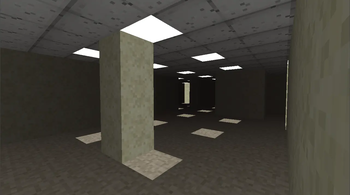
Über diese Mod
The Caverooms
About
This mod adds the Backrooms to ancient Minecraft versions.
You can enter the Backrooms by digging down, at some point, you'll fall right into them.
Compatibility
This mod was originally created for rd-132211, but it also works on rd-132328.
Installion
The mod is distributed as a ZIP file.
To install it using Betacraft:
- Install Betacraft,
- Launch either:
rd-132211 (pc-132011)
rd-132328 (pc-132128) - Open your Betacraft versions folder:
Documents/.betacraft/versions or
AppData/Roaming/.betacraft/versions - Locate the version's .jar file and open it as a ZIP archive (rename it to .zip from .jar if you have file extensions enabled and open via windows file explorer or use WinRar)
- Delete the META-INF folder
- Copy all files from caverooms.zip into the archive and overwrite
- When re-zipping, make sure you don’t zip the folder itself.
Instead, open the extracted folder and select the contents inside it (com/ and terrain.png), then compress those files directly into a ZIP. - Once done, launch the game.
To install it using Prism Launcher:
- Install Prism
- Create a new instance and select the rd-132211 game version,
- Go and edit the instance and under version, click 'Add to minecraft.jar', select the zip file
- And launch the game.
Community
If you want to discuss the mod, report issues, or suggest ideas, you can join my discord.
Verfügbare Versionen
Caverooms auf dem Server installieren
Server bestellen
Bestelle einen Minecraft Java Server mit mindestens 3 GB RAM (4 GB empfohlen).
modloader Loader setzen
Wähle im Panel unter "Egg" den modloader-Loader und die passende Minecraft-Version (rd-132328).
Mod installieren
Öffne den Mod-Browser im Dashboard und suche nach "Caverooms". Klicke "Installieren" – fertig! Alternativ: Lade die .jar via SFTP in den /mods Ordner.
Kompatibilität
Mod-Loader
Minecraft-Versionen
rd-132328, rd-132211
Server-seitig
✗ Nicht unterstütztEmpfohlener RAM
4 GB(min. 3 GB)Häufige Fragen
Caverooms Server crasht beim Start – was tun?
Häufigste Ursache: falsche modloader-Version oder zu wenig RAM. Prüfe im Server-Log (latest.log), ob ein "OutOfMemoryError" oder "Mixin"-Fehler auftritt. Bei Mado Hosting: Stelle sicher, dass mindestens 3 GB RAM zugewiesen sind und der Loader zur Mod-Version passt (rd-132328). Über das Panel kannst du den Loader mit einem Klick wechseln.
Ist Caverooms mit modloader kompatibel?
Caverooms unterstützt offiziell modloader für Minecraft rd-132328, rd-132211. Im Mado Dashboard werden inkompatible Loader-Kombinationen automatisch erkannt.
Server laggt mit Caverooms – wie optimiere ich die Performance?
Empfohlener RAM: 4 GB (+1 GB pro 8 Spieler). Prüfe mit /spark profiler, ob Caverooms den meisten Tick-Time verbraucht. Häufige Fixes: Server-View-Distance auf 8-10 reduzieren, bei Forge "performant" oder "starlight" als Zusatz-Mod installieren. Bei Mado Hosting läuft dein Server auf NVMe-SSDs mit dedizierten CPU-Kernen für minimale Latenz.
Ähnliche Mods




Modded Server mieten
Installiere Caverooms mit nur einem Klick auf deinem Server.
Details
- Lizenz
- Creative Commons Attribution 4.0 International
- Server-seitig
- Nicht unterstützt