
ChaosCraft's Device's
A Mod that adds working Computers into the Game !
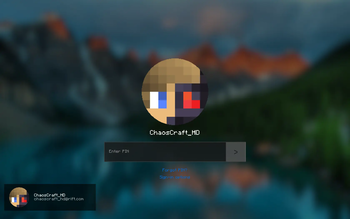
Screenshots
Über diese Mod

🖥️ CHAOSCRAFT'S DEVICE'S 🖥️
A lightweight in-game desktop for Minecraft featuring windowed apps, virtual files, wallpapers, and per-player persistence. Bring a tiny PC into Minecraft!
🔧Required Dependecies
- GeckoLib v.4.7.4+
🚀 Instant In-Game Desktop
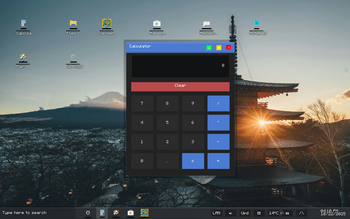
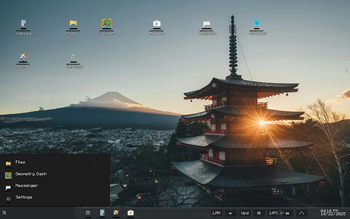
Transform your Minecraft experience with a true desktop environment - drag windows, manage files, customize wallpapers, and run built-in or custom apps, all inside Minecraft - just drop the jar in your mods folder!
🌟 Persistent & Extensible
App and desktop state are saved per-player (JSON + world FS). Modpack authors: easily customize, extend, and persist app state and files. Register custom apps/icons at runtime with simple APIs.
🖼️ Wallpaper & Media Support
Supports solid colors, PNG/JPG/GIF wallpapers, and animated backgrounds. Paint app exports PNGs. Add new wallpapers by dropping images in the runtime folder - no resource pack needed.
⚠️ Compatibility Notice
Supported on Minecraft 1.20.1 with Forge 47.4.0.
⚡ Key Features
- Full desktop UI: draggable windows, icons, taskbar, previews
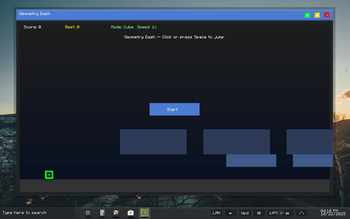
- Built-in apps: Files, Notes, Notepad, Paint, Weather, Settings, Marketplace, Geomtry Dash, etc...
- Per-player JSON persistence and world-level FS (
pc_ui_files.dat) - Wallpaper manager: solid colors, images, GIFs
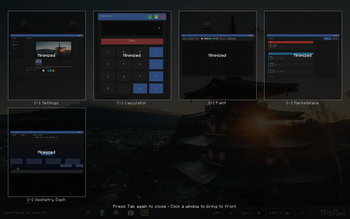
- Tab Feature - If you have any open apps you can press Tab to see them All !
- Searchbar - On the Taskbar so you search for Apps
- Extensible: register custom apps/icons at runtime
- Performance: async IO and smart caching for smooth UX (coming fully for v.2.0.0)
Note: The mod does not change gameplay - it adds a fully functional desktop inside Minecraft!
Also beware ! Some Apps may be incomplete like the Calender, Browser and YouTube app
Apps like the Browser App or YouTube app will be made Functional in a Addon in the future
since having a Real Browser Engine running is Very Performance heavy
🆕 Version 1.0.0 - Initial Release 🎉
What's New:- ✅ Placeable laptops open the in-game desktop
- 🖼️ Wallpaper picker, drag & drop support, window stacking & snapping
- 🧩 Core apps: Files, Notes, Notepad, Paint, Calculator, Calendar, Browser, Marketplace, Messenger, etc...
- 💾 Per-player JSON data and world FS for files
- 🛠️ App registration and icon customization APIs
💬 Frequently Asked Questions
🔄 Can I add this mod to an existing world?
Yes! Desktop and app data are stored per-player in JSON. You can safely add/remove this mod at any time, but always make backups.
💾 How does file persistence work?
Files and app state are saved in config/chaoscrafts_device_mod/players/<player>/ and world FS (pc_ui_files.dat). Wallpapers can be added to run/chaoscrafts_device_mod/wallpapers/ for instant use.
🖼️ Can I use custom wallpapers?
Absolutely! Just drop PNG/JPG/GIF images into the wallpapers folder.
👥 How can I extend with my own apps or icons?
Use AppFactory.registerApp(...) and IconManager.registerCustomIcon(...) in your mod or datapack. ( There will be some Documentation soon so Devs can Create Custom Apps with Ease !
🔧 Vital Fixes & Features
- Full window management: dragging, minimizing, restoring, stacking, snapping
- Taskbar with hover previews and app context menus
- File browser and editor, Paint export to PNG, per-player notes
- Live async stats & diagnostics for troubleshooting (will be fully for v.2.0.0)
- Simple installation: just drop the jar in your mods folder and play!
📊 Real-World Performance
- Desktop loads instantly in-game
- All app and file operations are async for smooth gameplay (will be fully for v.2.0.0)
- Runs fast on both high-end and modest PCs
🎮 Compatibility
- Minecraft 1.20.1 with Forge 47.4.0
- Works with most modpacks
- No resource pack needed for wallpapers - just drop images into the folder
🌐 Community
Need help or want to suggest an app? Join the BlackRift Studios Discord:
BlackRift Studios Discord
👋 About
Created by ChaosCraft - inspired by the idea of having a true desktop OS inside Minecraft, with full extensibility and local persistence for every player.
⚖️ Usage Guidelines
© 2025 ChaosCraft - All Rights Reserved
Modpack & Server Usage:
Free to include in modpacks/servers (attribution appreciated!). For large packs/servers, please reach out for a quick heads-up.
Code Protection: Please respect code copyright. Collaboration and extension are welcome — reach out if you want to contribute or create custom apps.
💬 My Policy Explained
This mod is designed to be open and extensible for the community, but please credit ChaosCraft for major features in large packs or public servers.
ChaosCrafts Device Mod • Version 1.0.0-1.20.1 • Created by ChaosCraft • BlackRift Studios • October 1, 2025
Verfügbare Versionen
ChaosCraft's Device's auf dem Server installieren
Server bestellen
Bestelle einen Minecraft Java Server mit mindestens 3 GB RAM (4 GB empfohlen).
forge Loader setzen
Wähle im Panel unter "Egg" den forge-Loader und die passende Minecraft-Version (1.20.1).
Mod installieren
Öffne den Mod-Browser im Dashboard und suche nach "ChaosCraft's Device's". Klicke "Installieren" – fertig! Alternativ: Lade die .jar via SFTP in den /mods Ordner.
Kompatibilität
Mod-Loader
Minecraft-Versionen
1.20.1
Server-seitig
✓ ErforderlichEmpfohlener RAM
4 GB(min. 3 GB)Häufige Fragen
ChaosCraft's Device's Server crasht beim Start – was tun?
Häufigste Ursache: falsche forge-Version oder zu wenig RAM. Prüfe im Server-Log (latest.log), ob ein "OutOfMemoryError" oder "Mixin"-Fehler auftritt. Bei Mado Hosting: Stelle sicher, dass mindestens 3 GB RAM zugewiesen sind und der Loader zur Mod-Version passt (1.20.1). Über das Panel kannst du den Loader mit einem Klick wechseln.
Ist ChaosCraft's Device's mit forge kompatibel?
ChaosCraft's Device's unterstützt offiziell forge für Minecraft 1.20.1. Im Mado Dashboard werden inkompatible Loader-Kombinationen automatisch erkannt.
Server laggt mit ChaosCraft's Device's – wie optimiere ich die Performance?
Empfohlener RAM: 4 GB (+1 GB pro 8 Spieler). Prüfe mit /spark profiler, ob ChaosCraft's Device's den meisten Tick-Time verbraucht. Häufige Fixes: Server-View-Distance auf 8-10 reduzieren, bei Forge "performant" oder "starlight" als Zusatz-Mod installieren. Bei Mado Hosting läuft dein Server auf NVMe-SSDs mit dedizierten CPU-Kernen für minimale Latenz.
Ähnliche Mods



Modded Server mieten
Installiere ChaosCraft's Device's mit nur einem Klick auf deinem Server.