
Classic Beta Biomes
Brings back the nostalgic feel of old Minecraft with a classic Beta-style biome!
Screenshots
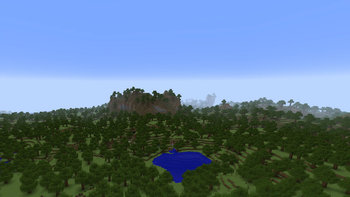
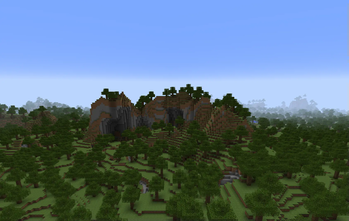
Über diese Mod
Русская версия:
Мод добавляет новый биом, напоминающий старую бета-версию генерации мира Minecraft. Этот биом, названный BetaBiome, воссоздает атмосферу классического мира Minecraft, как он выглядел в версиях до 1.8. В этом биоме можно найти старые текстуры земли и травы, а также характерные особенности генерации, такие как более открытые ландшафты и обрывистые горы.
В BetaBiome растут старые деревья, а сама атмосфера напоминает первые версии Minecraft, возвращая ностальгические ощущения от игры. Здесь нет структур или особого освещения, только простая и чистая природа старых версий игры.
Для наилучшего игрового опыта рекомендуется выбирать в мире только этот биом (BetaBiome), чтобы полностью погрузиться в атмосферу старой версии Minecraft.
Загляните в мой профиль — там вас ждут другие интересные моды! Не забудьте подписаться на обновления, чтобы ничего не пропустить!
English version:
This mod adds a new biome that resembles the old beta generation of Minecraft worlds. This biome, called BetaBiome, recreates the classic Minecraft world atmosphere as it appeared in versions prior to 1.8. In this biome, you’ll find old textures for dirt and grass, as well as typical generation features like more open terrain and steep mountains.
In BetaBiome, old trees grow, and the atmosphere is a throwback to the early versions of Minecraft, evoking nostalgic feelings from the past. There are no structures or special lighting, just the simple, pure nature of the old game versions.
For the best experience, it is recommended to choose only this biome (BetaBiome) in your world to fully immerse yourself in the atmosphere of the old Minecraft version.
Check out my profile for more awesome mods! And don’t forget to subscribe for updates so you don’t miss anything!
Verfügbare Versionen
Classic Beta Biomes auf dem Server installieren
Server bestellen
Bestelle einen Minecraft Java Server mit mindestens 3 GB RAM (4 GB empfohlen).
fabric Loader setzen
Wähle im Panel unter "Egg" den fabric-Loader und die passende Minecraft-Version (1.21.5).
Mod installieren
Öffne den Mod-Browser im Dashboard und suche nach "Classic Beta Biomes". Klicke "Installieren" – fertig! Alternativ: Lade die .jar via SFTP in den /mods Ordner.
Kompatibilität
Mod-Loader
Minecraft-Versionen
1.21.5, 1.21.4, 1.21.3 (+14 weitere)
Server-seitig
~ OptionalEmpfohlener RAM
4 GB(min. 3 GB)Häufige Fragen
Classic Beta Biomes Server crasht beim Start – was tun?
Häufigste Ursache: falsche fabric-Version oder zu wenig RAM. Prüfe im Server-Log (latest.log), ob ein "OutOfMemoryError" oder "Mixin"-Fehler auftritt. Bei Mado Hosting: Stelle sicher, dass mindestens 3 GB RAM zugewiesen sind und der Loader zur Mod-Version passt (1.21.5). Über das Panel kannst du den Loader mit einem Klick wechseln.
Ist Classic Beta Biomes mit fabric und forge und neoforge kompatibel?
Classic Beta Biomes unterstützt offiziell fabric, forge, neoforge für Minecraft 1.21.5, 1.21.4, 1.21.3. Achtung: Forge- und Fabric-Mods sind NICHT untereinander kompatibel – wähle einen Loader und bleibe dabei. Im Mado Dashboard werden inkompatible Loader-Kombinationen automatisch erkannt.
Server laggt mit Classic Beta Biomes – wie optimiere ich die Performance?
Empfohlener RAM: 4 GB (+1 GB pro 8 Spieler). Prüfe mit /spark profiler, ob Classic Beta Biomes den meisten Tick-Time verbraucht. Häufige Fixes: Server-View-Distance auf 8-10 reduzieren, bei Forge "performant" oder "starlight" als Zusatz-Mod installieren. Bei Mado Hosting läuft dein Server auf NVMe-SSDs mit dedizierten CPU-Kernen für minimale Latenz.
Ähnliche Mods




Modded Server mieten
Installiere Classic Beta Biomes mit nur einem Klick auf deinem Server.