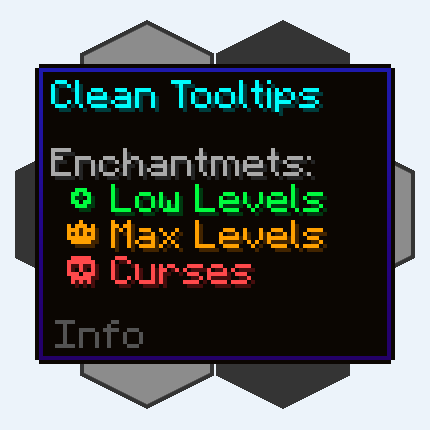
Clean Tooltips
Improving Tooltips by creating a clean and consistent look! Durability Tooltip & more!
Screenshots
Über diese Mod
Clean Tooltips


Ever felt like the default tooltips could be fancied up a bit? Then this is exactly what you're looking for.
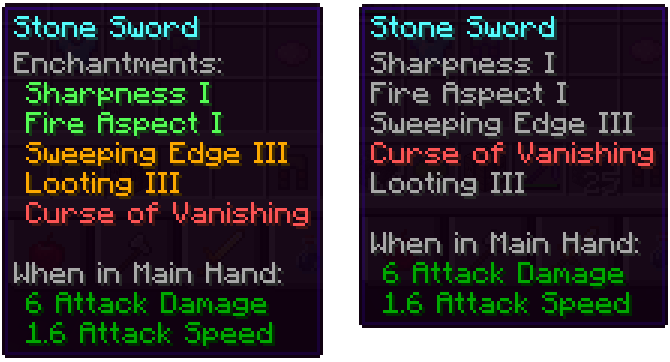
Mainly the mod overhauls the way enchantments get displayed in the tooltip:
- they now have their own "Enchantents:" subcategory
- color coding to easier tell apart good enchantments (green) and curses (red)
- max level enchantments will be displayed in gold
- curses are always ordered at the bottom of the list
With the mod installed: Without the mod installed (Vanila):
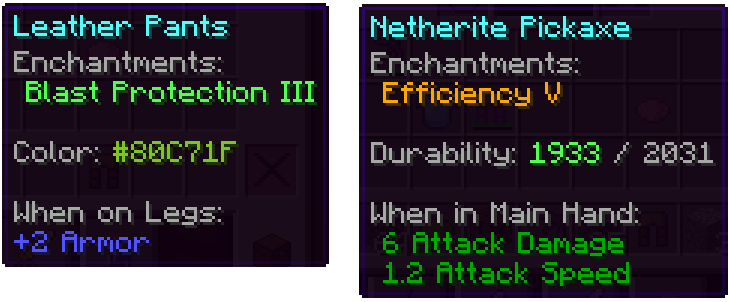
Besides that, other parts got also improved:
- the color line on dyed items now actually shows the used color
- damaged items show their remaining durability in the tooltip
We have many more ideas on how tooltips could be improved for future updates. Besides adding new features, the next updates will also add many configurability options.


Verfügbare Versionen
Clean Tooltips auf deinem Client installieren
Mod-Loader lokal installieren
Installiere fabric für deine lokale Minecraft-Version.
Passende Datei herunterladen
Wähle die Clean Tooltips-Datei für fabric und Minecraft 1.21.10.
Mod installieren
Lege die .jar-Datei in deinem lokalen .minecraft/mods-Ordner ab und starte Minecraft neu. Eine Installation auf dem Server ist nicht nötig.
Kompatibilität
Mod-Loader
Minecraft-Versionen
1.21.10, 1.21.7, 1.21.1 (+7 weitere)
Server-seitig
✗ Nicht unterstütztEmpfohlener RAM
4 GB(min. 3 GB)Häufige Fragen
Muss Clean Tooltips auf dem Minecraft Server installiert werden?
Nein. Modrinth kennzeichnet Clean Tooltips serverseitig als nicht unterstützt. Installiere die Mod nur im lokalen Minecraft-Mods-Ordner. Dein Server kann unverändert bleiben, sofern die Mod-Seite keine zusätzliche Abhängigkeit nennt.
Welche Version und welchen Loader braucht Clean Tooltips?
Nutze eine Datei für fabric, forge, neoforge und exakt deine Minecraft-Version. Unterstützte Versionen sind unter anderem 1.21.10, 1.21.7, 1.21.1. Loader-Dateien sind nicht untereinander austauschbar.
Clean Tooltips funktioniert nicht – was kann ich prüfen?
Prüfe zuerst Minecraft-Version, Loader-Version und erforderliche Abhängigkeiten. Lege die .jar-Datei im lokalen .minecraft/mods-Ordner ab und entferne ältere Duplikate. Da die Mod clientseitig ist, löst mehr Server-RAM dieses Problem nicht.
Ähnliche Mods



![[TaCZ] Timeless and Classics Zero](https://cdn.modrinth.com/data/SzzJttH8/fd27766d2bb8390d284696b1dbd358f87e081439_96.webp)


Minecraft Server für deine Gruppe
Clean Tooltips bleibt auf deinem Client. Hoste dazu eine kompatible Welt für deine Mitspieler.