
Cobblemon Analyzer
Adds an item that can check the stats of a wild Pokemon.
Screenshots


Über diese Mod
Description
Adds an item that allows you to check the IVs of a pokemon before catching it. Fairly straightforward.
Made for Cobblemon 1.6.1-1.7.3

Tutorial
The mod in total adds 4 items and ways to get them.
In order to get started you'll have to find a "Bygone Tablet", it's rarely found in gimmieghoul ruins chests, ancient cities, as well as certain archaeology sites.

Then you'll want to restore the Bygone Tablet into a "Genome Analyzer", by default you'll
get one without any charge.
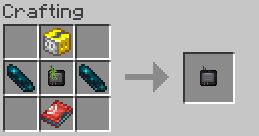
Then lastly you'll want to charge the Genome Analyzer with four thunder stones. As it states
in the item's description, the charge required for each scan scales with the amount of Pokemon caught and registered in the Pokedex. (Specifically CAUGHT not seen/scanned)
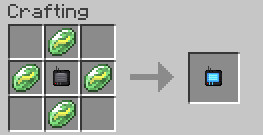
If you want to preview a wild Pokemon's stats before you get your hands on the repaired analyzer then there's always the "Survey Lens". The Genome Analyzer is a direct upgrade from the Survey Lens, however the Survey Lens is far easier to acquire.

Instead of showing you all of the Pokemon's IVs in an easily read format it gives you a brief description of 1-3 of their IVs scaling with the amount of Pokemon caught and registered in the Pokedex, similar to the Genome Analyzer.

| IV Range | Descriptor |
|---|---|
| 0 | Horrible/Not at all |
| 1-15 | Okay/Not Very |
| 16-25 | Decent/Decently |
| 26-29 | Good/Very |
| 30 | Fantastic/Amazingly |
| 31 | Perfect/Exceptionally |
| Stat | Keyword |
|---|---|
| HP | "Vigor" |
| ATK | "Physical Attacks" |
| SPATK | "Mental Acuity" |
| DEF | "Tough Skin" |
| SPDEF | "Mental Fortitude" |
| SPE | "Quick" |
Config
cobbleanalyzerfabric.config.json
dexEntriesForMaxAnalyzerDiscount: Int = 200, // Number of dex entries to get the max discount on the analyzer which is always {chargePerUse} - 1
dexEntriesForMaxSurveyLens: Int = 50, // Number of dex entries needed to get the maximum amount of characteristics shown with the survey lens
maxCharge: Int = 200, // Total charge per recharge
chargePerUse: Int = 20, // Charge expended upon using the analyzer, however this is not the final number, the formula for the final number is such: CHARGE_PER_USE * (1.0 - ((POKEMON_CAUGHT / DEX_ENTRIES_NEEDED_FOR_MAX_DISCOUNT)))
bygoneTabletRarity: Float = 0.07, // the rarity of the bygone tablet in all injected loot tables. (percentage: 7% = 0.07)
surveyLensCooldownTicks: Int = 200, // Cooldown of the survey lens item 0=no cooldown ofc
extraInjectorTargets: List<String> = [], // adds extra tables to inject into
disableLore: Boolean = false, // enable if you don't like my rambling in the item lore :(
disableDexDiscount: Boolean = false, // disables the dex discount given for Pokémon caught
overrideDefaultInjectors: Boolean = false, // usually it's {extraInjectorTargets} + {defaultTargets} but if this is enabled then it's just {extraInjectorTargets} essentially allowing complete configuration of what loot tables the bygone tablet appears in.
disableLootInjection: Boolean = false, // disables injection into loot tables
infiniteCharge: Boolean = false // makes it so the analyzer has infinite charge (you will still need to make a powered analyzer)
Final Notes
I made this mod mostly for a singleplayer play through I wanted to do in the newest version. I found the mod Cobblemon Integrations with Jade was very useful but at a certain point quite OP. I made this mod to try and balance the feature but also not remove it all together. The textures are NOT 100% self-made. I took the screen textures from the Cobblemon PC texture for conformity so please attribute that to the talented people who made the Cobblemon mod. This is my first published mod, I am very open to any criticism or tips.
My discord: the_number_two
My DMs are always open but i might just not see them so i dunno man
Cobblemon Analyzer auf dem Server installieren
Server bestellen
Bestelle einen Minecraft Java Server mit mindestens 3 GB RAM (4 GB empfohlen).
fabric Loader setzen
Wähle im Panel unter "Egg" den fabric-Loader und die passende Minecraft-Version (1.21.1).
Mod installieren
Öffne den Mod-Browser im Dashboard und suche nach "Cobblemon Analyzer". Klicke "Installieren" – fertig! Alternativ: Lade die .jar via SFTP in den /mods Ordner.
Kompatibilität
Mod-Loader
Minecraft-Versionen
1.21.1
Server-seitig
✓ ErforderlichEmpfohlener RAM
4 GB(min. 3 GB)Häufige Fragen
Cobblemon Analyzer Server crasht beim Start – was tun?
Häufigste Ursache: falsche fabric-Version oder zu wenig RAM. Prüfe im Server-Log (latest.log), ob ein "OutOfMemoryError" oder "Mixin"-Fehler auftritt. Bei Mado Hosting: Stelle sicher, dass mindestens 3 GB RAM zugewiesen sind und der Loader zur Mod-Version passt (1.21.1). Über das Panel kannst du den Loader mit einem Klick wechseln.
Ist Cobblemon Analyzer mit fabric kompatibel?
Cobblemon Analyzer unterstützt offiziell fabric für Minecraft 1.21.1. Im Mado Dashboard werden inkompatible Loader-Kombinationen automatisch erkannt.
Server laggt mit Cobblemon Analyzer – wie optimiere ich die Performance?
Empfohlener RAM: 4 GB (+1 GB pro 8 Spieler). Prüfe mit /spark profiler, ob Cobblemon Analyzer den meisten Tick-Time verbraucht. Häufige Fixes: Server-View-Distance auf 8-10 reduzieren, bei Forge "performant" oder "starlight" als Zusatz-Mod installieren. Bei Mado Hosting läuft dein Server auf NVMe-SSDs mit dedizierten CPU-Kernen für minimale Latenz.
Ähnliche Mods



![[TaCZ] Timeless and Classics Zero](https://cdn.modrinth.com/data/SzzJttH8/fd27766d2bb8390d284696b1dbd358f87e081439_96.webp)


Modded Server mieten
Installiere Cobblemon Analyzer mit nur einem Klick auf deinem Server.