
CommandKick
Kicks players who run blocked commands, instead of removing the commands from the tree. Server-side, configurable, Fabric + Kotlin.
Screenshots

Über diese Mod
CommandKick
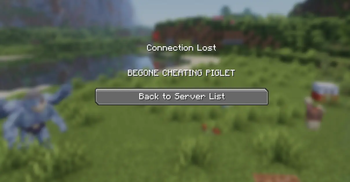
Instead of fiddling with permissions,CommandKick takes a different approach: the commands stay fully visible and tab-completable, but the moment a player runs a blocked one, they're kicked with a custom message. Humorous, no?
Features
- Leaves the command tree intact. Blocked commands still show up and tab-complete; only execution is intercepted.
- Console-safe. Server console, command blocks, datapack functions, and rcon run blocked commands normally. Only player-initiated runs are caught.
- Configurable. Edit a JSON file and restart — no rebuild needed.
- Custom kick message. Set whatever text players see when they get booted.
- Logging. Every kick records which player ran which command, in the server log.
- Lightweight. No LuckPerms or other permission-system dependency required.
Configuration
On first launch, CommandKick writes config/commandkick.json with defaults. Edit it and restart the server to apply — the command list is read once at startup, because Brigadier builds the command tree only at boot. (A /reload is not enough.)
{
  "kickMessage": "command verboten.",
  "blockedCommands": [
    "tick",
    "givepokemon",
    "pokespawn"
  ]
}
Each entry blocks that command and all of its subcommands — listing tick covers /tick freeze, /tick rate, and so on.
Installation
- Install Fabric Loader and Fabric API.
- Install Fabric Language Kotlin.
- Drop CommandKick into your server's
modsfolder. - Start the server once to generate the config, edit it, then restart.
Server-side only — no client installation needed.
Made with the help of Claude
Verfügbare Versionen
CommandKick auf dem Server installieren
Server bestellen
Bestelle einen Minecraft Java Server mit mindestens 3 GB RAM (4 GB empfohlen).
fabric Loader setzen
Wähle im Panel unter "Egg" den fabric-Loader und die passende Minecraft-Version (1.21.11).
Mod installieren
Öffne den Mod-Browser im Dashboard und suche nach "CommandKick". Klicke "Installieren" – fertig! Alternativ: Lade die .jar via SFTP in den /mods Ordner.
Kompatibilität
Mod-Loader
Minecraft-Versionen
1.21.11, 1.21.10, 1.21.9 (+8 weitere)
Server-seitig
✓ ErforderlichEmpfohlener RAM
4 GB(min. 3 GB)Häufige Fragen
CommandKick Server crasht beim Start – was tun?
Häufigste Ursache: falsche fabric-Version oder zu wenig RAM. Prüfe im Server-Log (latest.log), ob ein "OutOfMemoryError" oder "Mixin"-Fehler auftritt. Bei Mado Hosting: Stelle sicher, dass mindestens 3 GB RAM zugewiesen sind und der Loader zur Mod-Version passt (1.21.11). Über das Panel kannst du den Loader mit einem Klick wechseln.
Ist CommandKick mit fabric kompatibel?
CommandKick unterstützt offiziell fabric für Minecraft 1.21.11, 1.21.10, 1.21.9. Im Mado Dashboard werden inkompatible Loader-Kombinationen automatisch erkannt.
Server laggt mit CommandKick – wie optimiere ich die Performance?
Empfohlener RAM: 4 GB (+1 GB pro 8 Spieler). Prüfe mit /spark profiler, ob CommandKick den meisten Tick-Time verbraucht. Häufige Fixes: Server-View-Distance auf 8-10 reduzieren, bei Forge "performant" oder "starlight" als Zusatz-Mod installieren. Bei Mado Hosting läuft dein Server auf NVMe-SSDs mit dedizierten CPU-Kernen für minimale Latenz.
Ähnliche Mods






Modded Server mieten
Installiere CommandKick mit nur einem Klick auf deinem Server.