
Construction Wand (Fabric)
Unofficial Fabric Port of Construction Wand.
Screenshots
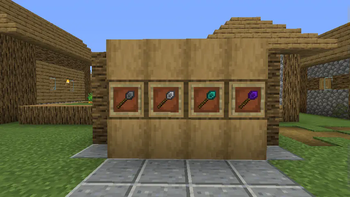
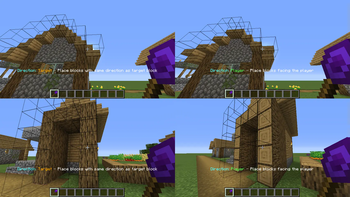
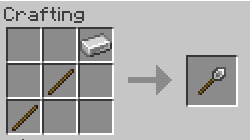
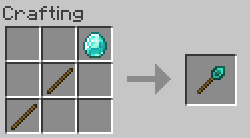
Über diese Mod


Overview
This is an unofficial port of ConstructionWand for the Fabric Mod Loader.
No balance changes have been made, and no new items have been added.
For a full content description refer to the original mod page.
Please report any issues you encounter using the link in the sidebar!
Usage
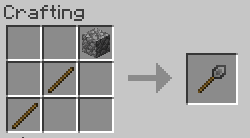
Craft a wand and any desired cores. Apply cores by combining in a crafting grid.
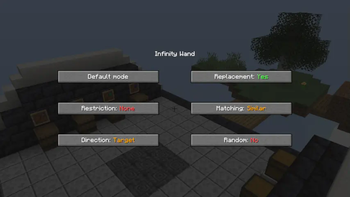
Open the menu with the menu key (V by default) or with Sneak + <OPTION_KEY> while right-clicking air.
To undo, hold Sneak + <OPTION_KEY> while right-clicking any solid block. You will get a preview before.
By default, <OPTION_KEY> is the left control key. This can be changed in the Minecraft settings starting with version 1.1.2! It is also worth noting that this key should not interfere with other keys, such as sprinting, despite it being highlighted in red, though I have observed that this could still happen in combination with certain other mods. In that case simply rebind it.
For older versions you will have to open the config file constructionwand-client.toml and change the keycode manually.
License
Credits go to Theta-Dev for creating the original mod.
This project makes use of the following third-party libraries:
- forge-config-api-port (MPLv2 License), to keep config compatibility between both loaders (for now)
- Botania (Custom License), for its API
- REI (MIT License), for its API
Just like the original release, this mod is licensed under the MIT license!
Verfügbare Versionen
Construction Wand (Fabric) auf dem Server installieren
Server bestellen
Bestelle einen Minecraft Java Server mit mindestens 3 GB RAM (4 GB empfohlen).
fabric Loader setzen
Wähle im Panel unter "Egg" den fabric-Loader und die passende Minecraft-Version (26.3).
Mod installieren
Öffne den Mod-Browser im Dashboard und suche nach "Construction Wand (Fabric)". Klicke "Installieren" – fertig! Alternativ: Lade die .jar via SFTP in den /mods Ordner.
Kompatibilität
Mod-Loader
Minecraft-Versionen
26.3, 26.2, 26.1.2 (+20 weitere)
Server-seitig
✓ ErforderlichEmpfohlener RAM
4 GB(min. 3 GB)Häufige Fragen
Construction Wand (Fabric) Server crasht beim Start – was tun?
Häufigste Ursache: falsche fabric-Version oder zu wenig RAM. Prüfe im Server-Log (latest.log), ob ein "OutOfMemoryError" oder "Mixin"-Fehler auftritt. Bei Mado Hosting: Stelle sicher, dass mindestens 3 GB RAM zugewiesen sind und der Loader zur Mod-Version passt (26.3). Über das Panel kannst du den Loader mit einem Klick wechseln.
Ist Construction Wand (Fabric) mit fabric kompatibel?
Construction Wand (Fabric) unterstützt offiziell fabric für Minecraft 26.3, 26.2, 26.1.2. Im Mado Dashboard werden inkompatible Loader-Kombinationen automatisch erkannt.
Server laggt mit Construction Wand (Fabric) – wie optimiere ich die Performance?
Empfohlener RAM: 4 GB (+1 GB pro 8 Spieler). Prüfe mit /spark profiler, ob Construction Wand (Fabric) den meisten Tick-Time verbraucht. Häufige Fixes: Server-View-Distance auf 8-10 reduzieren, bei Forge "performant" oder "starlight" als Zusatz-Mod installieren. Bei Mado Hosting läuft dein Server auf NVMe-SSDs mit dedizierten CPU-Kernen für minimale Latenz.
Ähnliche Mods



![[TaCZ] Timeless and Classics Zero](https://cdn.modrinth.com/data/SzzJttH8/fd27766d2bb8390d284696b1dbd358f87e081439_96.webp)


Modded Server mieten
Installiere Construction Wand (Fabric) mit nur einem Klick auf deinem Server.