
Convenient Name Tags
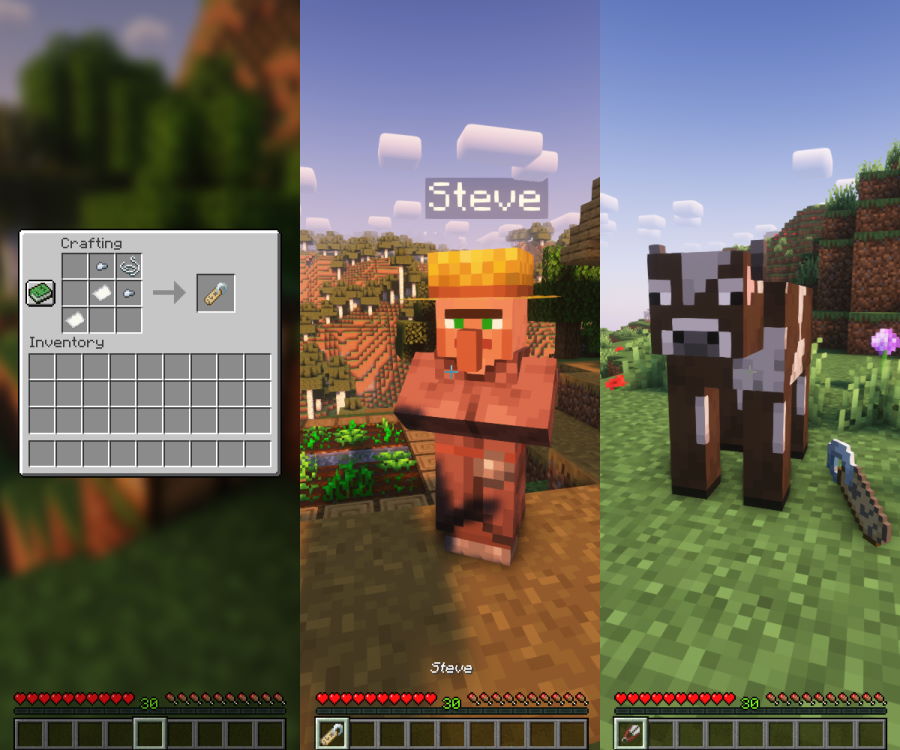
Lets you right click Name Tags in the air to change their name!
Über diese Mod



Have you ever wanted Name Tags to be just a little more Convenient?
Surprise - that's exactly what this mod does! It makes several improvements to the way Name Tags work.
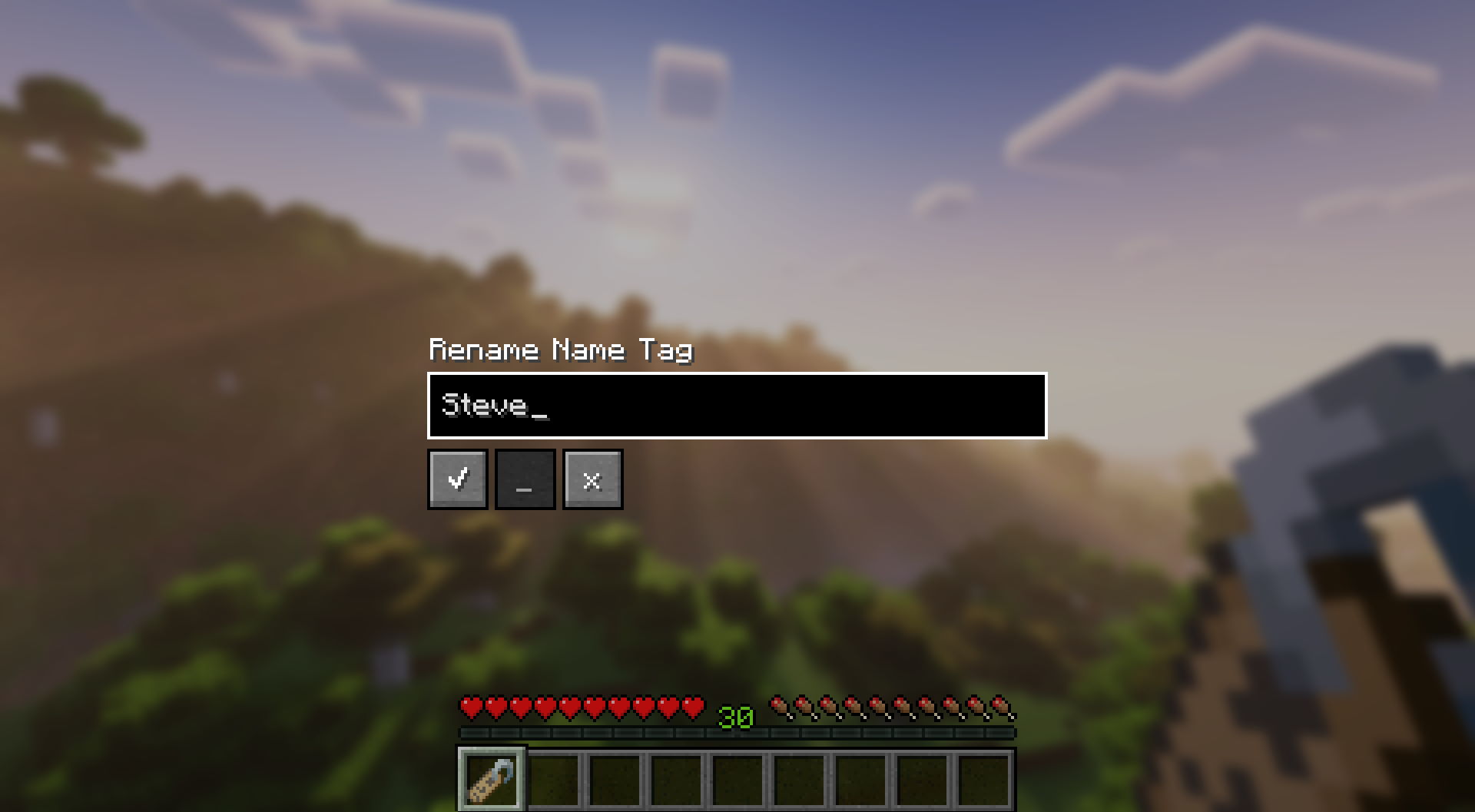
Main Feature: Rename Name Tag Screen
After right clicking with a Name Tag in your main hand, you will be presented with a screen that allows you to rename
the Name Tag without the use of an Anvil.
Other Features
- Added a crafting recipe for Name Tags
- Made renaming Villagers and Wandering Traders possible
- Renamed mobs now drop their Name Tags when you:
- kill them;
- apply another Name Tag to them;
- shift-right-click them with Shears.
Configuration
Configuration of Convenient Name Tags is done a config/convenientnametags.json5 config file.
The following configuration options are available:
| Config Option | Default | Description |
|---|---|---|
renameCost |
0 | Experience levels required to rename a Name Tag |
renameCostPerWholeStack |
true | Should the cost be constant for any stack size (or multiplied by the count) |
dropNameTagsOnDeath |
true | Should a Name Tag drop when a named mod is killed |
dropNameTagsOnNameChange |
true | Should a Name Tag drop from a named mob when another Name Tag is applied |
enableNameTagShearing |
true | Should players be able to use shears to remove Name Tags from mobs |
enableRenameScreen |
true | Should players be able to use the Rename Name Tag screen |
enableCraftingRecipe |
true | Should the Name Tag crafting recipe be enabled |
denyList |
empty | A list of words disallowed when renaming a Name Tag |
Q: Can I use this mod in my modpack?
A: Yes, but please include a link to this mod page and credit me as the author. Asking for permission beforehand is also appreciated!
Q: Can I present this mod in my showcase video?
A: Yes! You can leave a comment with a link to the video, so I can check it out!
Q: Forge / backport?
A: Porting to Forge and older Minecraft versions are not planned at the moment.
Special thanks to:
- gyular for Korean translation
CurseForge | Modrinth | GitHub | Ko-Fi
Verfügbare Versionen
Convenient Name Tags auf dem Server installieren
Server bestellen
Bestelle einen Minecraft Java Server mit mindestens 3 GB RAM (4 GB empfohlen).
fabric Loader setzen
Wähle im Panel unter "Egg" den fabric-Loader und die passende Minecraft-Version (1.20.1).
Mod installieren
Öffne den Mod-Browser im Dashboard und suche nach "Convenient Name Tags". Klicke "Installieren" – fertig! Alternativ: Lade die .jar via SFTP in den /mods Ordner.
Kompatibilität
Mod-Loader
Minecraft-Versionen
1.20.1, 1.20, 1.19.4 (+3 weitere)
Server-seitig
✓ ErforderlichEmpfohlener RAM
4 GB(min. 3 GB)Häufige Fragen
Convenient Name Tags Server crasht beim Start – was tun?
Häufigste Ursache: falsche fabric-Version oder zu wenig RAM. Prüfe im Server-Log (latest.log), ob ein "OutOfMemoryError" oder "Mixin"-Fehler auftritt. Bei Mado Hosting: Stelle sicher, dass mindestens 3 GB RAM zugewiesen sind und der Loader zur Mod-Version passt (1.20.1). Über das Panel kannst du den Loader mit einem Klick wechseln.
Ist Convenient Name Tags mit fabric kompatibel?
Convenient Name Tags unterstützt offiziell fabric für Minecraft 1.20.1, 1.20, 1.19.4. Im Mado Dashboard werden inkompatible Loader-Kombinationen automatisch erkannt.
Server laggt mit Convenient Name Tags – wie optimiere ich die Performance?
Empfohlener RAM: 4 GB (+1 GB pro 8 Spieler). Prüfe mit /spark profiler, ob Convenient Name Tags den meisten Tick-Time verbraucht. Häufige Fixes: Server-View-Distance auf 8-10 reduzieren, bei Forge "performant" oder "starlight" als Zusatz-Mod installieren. Bei Mado Hosting läuft dein Server auf NVMe-SSDs mit dedizierten CPU-Kernen für minimale Latenz.
Ähnliche Mods



![[TaCZ] Timeless and Classics Zero](https://cdn.modrinth.com/data/SzzJttH8/fd27766d2bb8390d284696b1dbd358f87e081439_96.webp)


Modded Server mieten
Installiere Convenient Name Tags mit nur einem Klick auf deinem Server.