Coords HUD
An efficient and customizable action bar HUD for servers!
Screenshots
Über diese Mod
Coords HUD



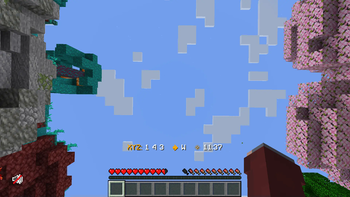
This is a small server-side mod to provide fast and configurable HUD text to players. It's very similar to the "Coordinates HUD" datapack from Vanilla Tweaks!

It aims to provide some small improvements over the datapack:
- Allows custom server or player-specific HUD messages, using the Placeholder API
- Stores data in a config/db file, rather than including it in the world save
- More efficient for large servers, avoiding expensive processing and reducing sent packets
This was primarily built so that Minecraft BINGO players don't need to re-run the /trigger ch_toggle command every time the server restarts with a new world. The customization with placeholders is a nice advantage.
While the performance improvements are good for large servers, the difference should not be noticeable for most players. If you aren't using the extra functionality in this mod, I'd recommend sticking with the datapack for better compatibility.
⌨️ Commands
/coordshudtoggles whether the HUD is enabled/coordshud format <text>changes the text format used for the HUD
📖 Configuration
On the first startup, the mod will create its config files in ./config/coords-hud/... No initial setup is needed to use the mod; it should run out of the box.
"isEnabledByDefault"(default: true) - Whether the HUD is enabled by default for new players."formatDefault"- The default HUD text format, in Raw JSON text format syntax.
Verfügbare Versionen
Coords HUD auf dem Server installieren
Server bestellen
Bestelle einen Minecraft Java Server mit mindestens 3 GB RAM (4 GB empfohlen).
fabric Loader setzen
Wähle im Panel unter "Egg" den fabric-Loader und die passende Minecraft-Version (26.3).
Mod installieren
Öffne den Mod-Browser im Dashboard und suche nach "Coords HUD". Klicke "Installieren" – fertig! Alternativ: Lade die .jar via SFTP in den /mods Ordner.
Kompatibilität
Mod-Loader
Minecraft-Versionen
26.3, 26.2, 26.1.2 (+17 weitere)
Server-seitig
✓ ErforderlichEmpfohlener RAM
4 GB(min. 3 GB)Häufige Fragen
Coords HUD Server crasht beim Start – was tun?
Häufigste Ursache: falsche fabric-Version oder zu wenig RAM. Prüfe im Server-Log (latest.log), ob ein "OutOfMemoryError" oder "Mixin"-Fehler auftritt. Bei Mado Hosting: Stelle sicher, dass mindestens 3 GB RAM zugewiesen sind und der Loader zur Mod-Version passt (26.3). Über das Panel kannst du den Loader mit einem Klick wechseln.
Ist Coords HUD mit fabric und quilt kompatibel?
Coords HUD unterstützt offiziell fabric, quilt für Minecraft 26.3, 26.2, 26.1.2. Im Mado Dashboard werden inkompatible Loader-Kombinationen automatisch erkannt.
Server laggt mit Coords HUD – wie optimiere ich die Performance?
Empfohlener RAM: 4 GB (+1 GB pro 8 Spieler). Prüfe mit /spark profiler, ob Coords HUD den meisten Tick-Time verbraucht. Häufige Fixes: Server-View-Distance auf 8-10 reduzieren, bei Forge "performant" oder "starlight" als Zusatz-Mod installieren. Bei Mado Hosting läuft dein Server auf NVMe-SSDs mit dedizierten CPU-Kernen für minimale Latenz.
Ähnliche Mods




Modded Server mieten
Installiere Coords HUD mit nur einem Klick auf deinem Server.
Details
- Lizenz
- GNU Lesser General Public License v3.0 only
- Server-seitig
- Erforderlich